


Press release
Where To? 10 is Available Including Where To? for iMessage and Emoji Search
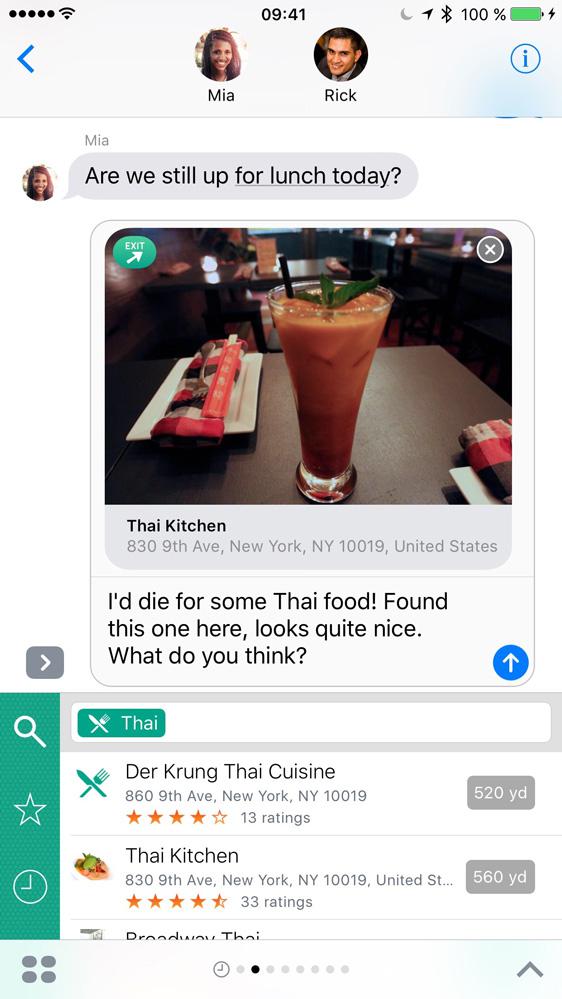
Where To? for iMessage
For several years, Where To? has been the handy travel assistant aware of the user’s surrounding. No matter what the user is looking for, Where To? finds the best nearby restaurant, pharmacy, gas station, shoe store or pediatrician. More than 700 categories are available. Where To? provides detailed information, including business hours, menus, and reviews by users who already visited the place. Even tourist attractions and transit stops are listed in the app.
The data including favorite places can also be accessed from Apple Watch allowing the user to be guided to the destination while on the go. The watch shows a map with the remaining distance and heading to the selected restaurant or other venue.
Where To? for iMessage: More information in the chat conversation
iMessage is used by millions of iPhone owners to chat with friends, family, and colleagues. The new Where To? for iMessage takes advantage of the new iOS 10 capabilities and inserts local search results directly in the conversation without ever leaving the Messages app.
The Where To? extension can access favorite and recently viewed places from the main app. A direct search for nearby locations is also available in the iMessage app. Simply tapping on one of the nearby places inserts the local search result into the conversation.
For instance, users can easily send their friends the name, address, and location information of the restaurant for a lunch meeting. Or when some relatives ask for hotel recommendations prior to a visit, the favorite hotel can be inserted in the chat.
The sent location messages can be opened by tapping and show detailed information within the Where To? app if installed on the recipient’s phone. If not, a download for Where To? is offered.
Where To? for iMessage also can send contacts with privacy in mind. When a contact is searched and selected, only the map area with the name and address is sent. All further contact details such as email, phone numbers, birthday and notes remain private and are not shared.
The main app also learns something new: The new version 10 shows recently viewed places in the history allowing to quickly access the detailed information again.
Consistent with the messaging focus of the release, Where To? now understands emoji. “Searching by emoji is a great new way to quickly find the wanted category,” says Ortwin Gentz, FutureTap CEO. “For instance, typing the popcorn emoji in the search field shows the category with nearby movie theaters. Supporting more than 300 emoji, search by the popular symbols is not only a quick, fun way to surface nearby venues, it also aids the surprisingly large number of illiterate people in finding their way around cities.” Emoji search is available in the main app, in the iMessage app, and in iOS Spotlight.
Where To? doesn’t simply offer searching of local restaurants, banks, health cubs, bars, and other businesses, it also offers reviews from other users, to help iPhone owners make an informed decision as to whether an attraction or business is worth a visit. Once a great place to spend some time at is found, directions to the destination can be requested with the builtin navigation system, Apple Maps, Google Maps, or one of more than 50 supported apps. Even car navigation systems by Audi, BMW and Mercedes-Benz are supported.
“Where To?” has been honored to be selected by Apple as an iPhone App of the Week, and has also been the winner of the “Best App Ever Awards” in the category “Best Travel App” for several years in a row. Apple also selected the app as one of the five best navigation apps in iTunes Rewind 2011.
Device Requirements:
- iPhone, iPad or iPod touch
- Apple Watch and Pebble smartwatch supported
- Requires iOS 8.2 or later
Pricing and Availability:
Where To? 10.0 is $2.99 USD (or equivalent amount in other currencies) and available worldwide exclusively through the App Store in the Navigation category. Where To? for iMessage and Where To? for Apple Watch are included in the iPhone app. Users of the 9.x version get the update free of charge. Users of older versions are eligible for a discount by completing an upgrade bundle.
Important Links:
Where To? product page: http://www.futuretap.com/whereto
Where To? Press Kit with additional screenshots and information: futuretap.com/press/whereto
App Store: http://itunes.apple.com/app/id903955898
App Store for iMessage (on iOS 10): http://itunes.apple.com/app/id903955898?app=messages
Offer to the Press: If you’re interested in reviewing Where To? we’ll gladly provide a promo code on request.
Based in Seefeld, Germany. FutureTap was founded in 2008 by Ortwin Gentz with the mission to create innovative and easy-to-use apps that fully leverage the iPhone user interface concept. FutureTap is known for the local search app "Where To?" for iPhone and the Street View app "Streets" for iPhone and iPad. Both apps have sold more than half a million copies. Copyright (C) 2008-2016 FutureTap GmbH. All Rights Reserved. Apple, the Apple logo, iPhone, iPod and iPad are registered trademarks of Apple Inc. in the U.S. and/or other countries.
FutureTap GmbH
Aubachweg 10
82229 Seefeld
Germany
This release was published on openPR.
Permanent link to this press release:
Copy
Please set a link in the press area of your homepage to this press release on openPR. openPR disclaims liability for any content contained in this release.
You can edit or delete your press release Where To? 10 is Available Including Where To? for iMessage and Emoji Search here
News-ID: 363026 • Views: …
More Releases from FutureTap GmbH
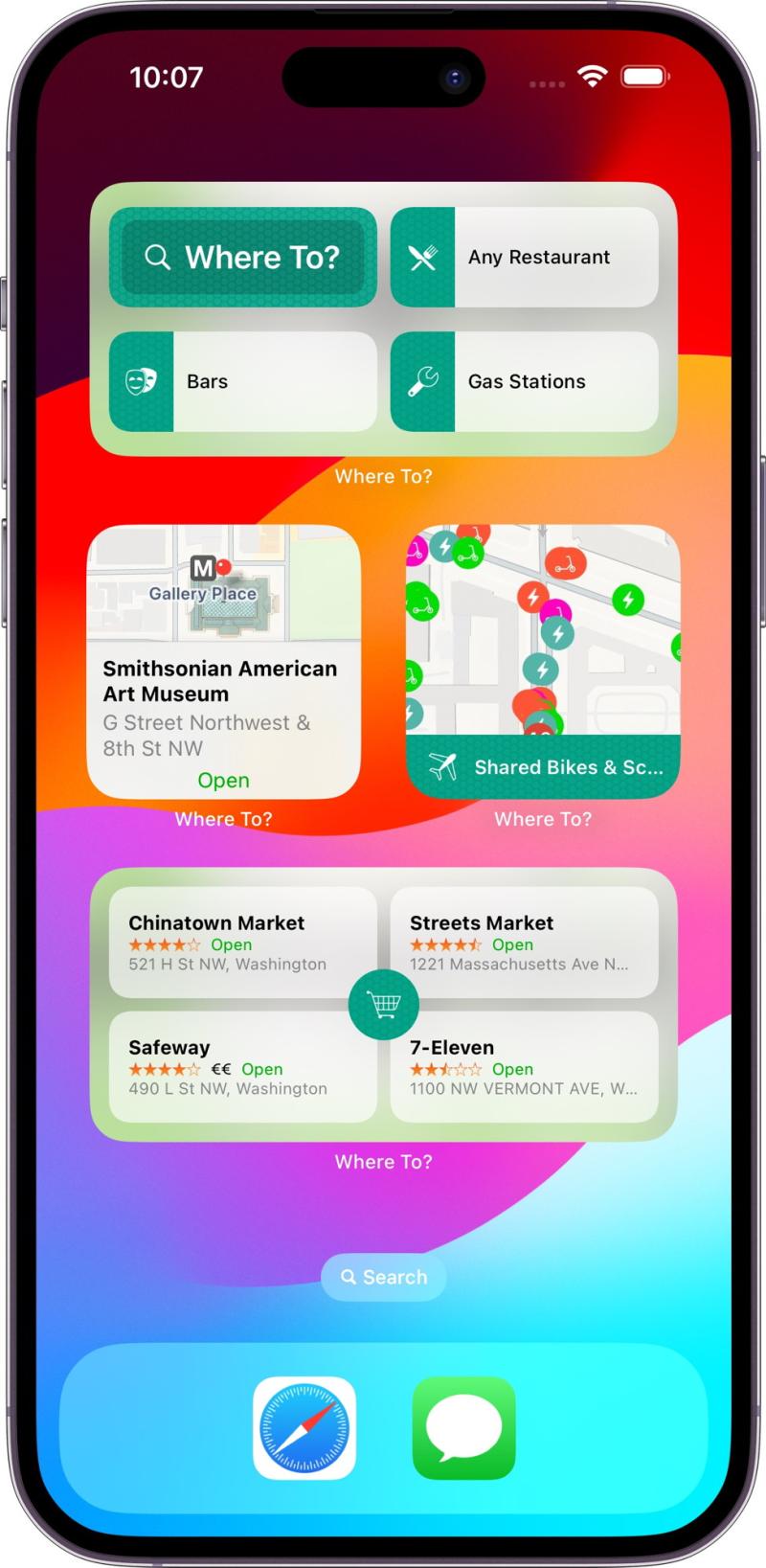
FutureTap Elevates "Where To?" App with New Widgets and Unveils Exclusive Black …
In a significant move, FutureTap, the innovative German app developer, has rolled out a major update for its "Where To?" location finder app, featuring expanded widget options. To add to the excitement, both "Where To?" and the Street View browser app "Streets" are now part of an exclusive Black Week sale.
FutureTap proudly introduces "Where To?" version 13, a milestone marking over 15 years of continuous innovation since the launch of…
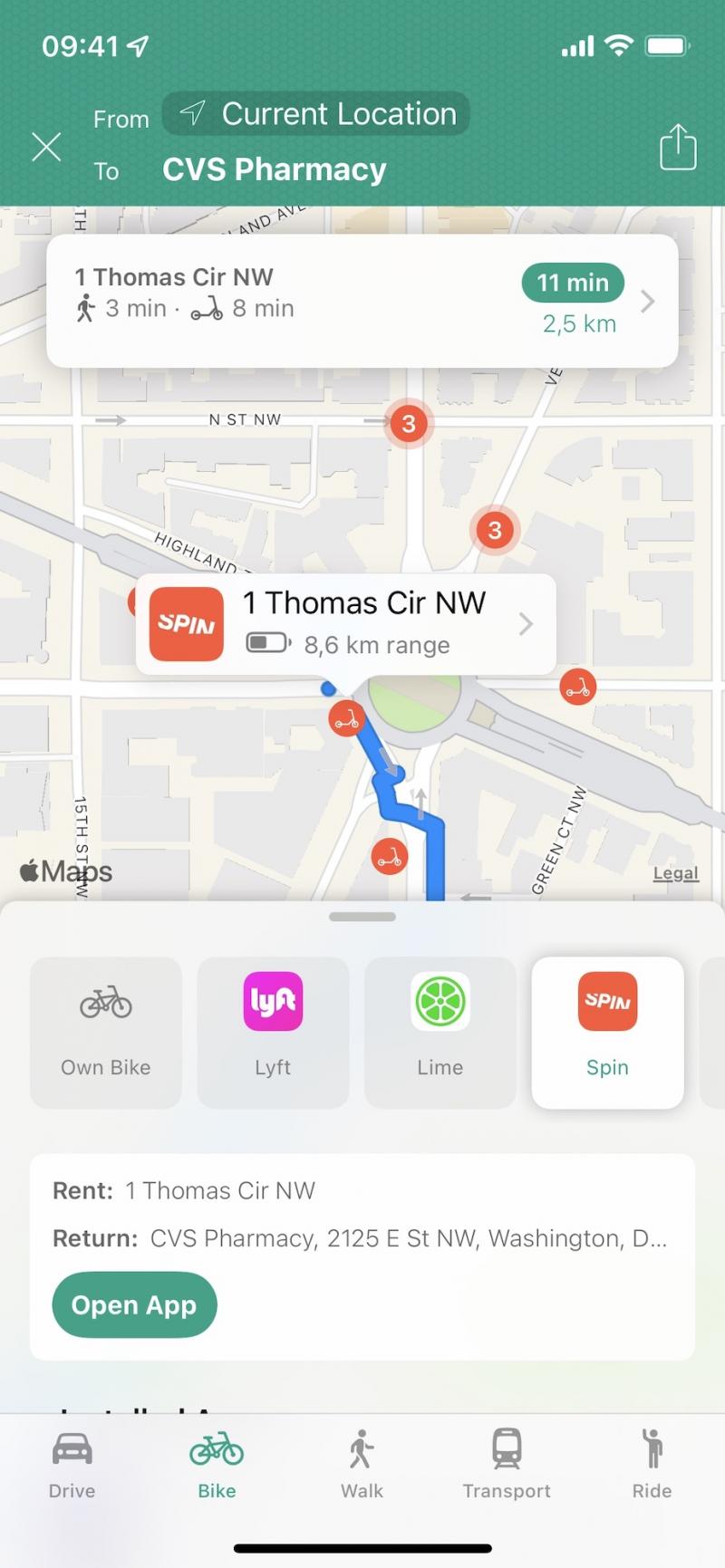
Where To? adds micromobility: integration of shared bike & scooter services
Where To?, the popular iPhone location finder app now supports micromobility services. Users can get to their selected destination using shared bikes, scooters and e-mopeds.
It's spring time in the northern hemisphere - time to leave the car at home and ride to the favorite sushi place or movie theater the green way. With shared bike & scooter services becoming more and more popular, Where To? now integrates many of these…

Where To? 11 adds Augmented Reality, place collections and much more, now free t …
In its biggest update in history, Where To? 11 adds a ton of new features and moves to a freemium business model.
The new Augmented Reality (AR) view visualizes nearby locations in the live camera view, on top of reality. Users can point their iPhone at the street scene and view nearby shops and services without having to read a map or list. AR in Where To? works worldwide and is…

Streets 4.0: Street View App Adds Drag and Drop and Live Panorama Mode
Streets, the popular Street View browser app for iPhone, iPad, and Apple Watch, is now available in version 4. The major update adds drag and drop on iPad and a new Live Panorama mode allowing to look around in a panorama simply by rotating the device.
Streets is focused on delivering the best Street View browsing experience. The user can navigate to any 360° panorama simply by dropping a pin on…
More Releases for To?
Crypto to TransferWise: How to Convert Cryptocurrency to Wise Transfers
Cryptocurrency has changed the way people send and receive money across the world. With blockchain technology, funds can be transferred globally within minutes without relying on traditional banking infrastructure. However, many users eventually need to move their digital assets into traditional financial platforms in order to use them for everyday expenses.
One of the most popular global financial platforms today is Wise, formerly known as TransferWise. Because of its international money…
USDT to Skrill: How to Withdraw Crypto to Skrill
Cryptocurrency has made cross-border payments easier than ever. Stablecoins like USDT are especially popular because they maintain a relatively stable value while allowing fast blockchain transfers. However, many users eventually want to move their funds into online payment platforms.
One of the frequently searched solutions is USDT to Skrill, as Skrill is widely used for online payments, international transfers, and digital wallet services.
For people who regularly use Skrill, converting crypto into…
USDT to PayPal: How to Convert Crypto to PayPal Balance
Stablecoins like USDT have become a common way to store and transfer digital value. Many freelancers, traders, and remote workers receive payments in cryptocurrency and later want to convert those funds into a payment system they use daily. One of the most common searches today is USDT to PayPal, since PayPal remains one of the most widely used online payment platforms in the world.
PayPal allows users to send money, receive…
Ready to Cook Soup Market to Enjoy 'Explosive Growth' to 2032
Global Ready to Cook Soup Market Report from Pro Market Reports highlights deep analysis on market characteristics, sizing, estimates and growth by segmentation, regional breakdowns & country along with competitive landscape, player's market shares, and strategies that are key in the market. The exploration provides a 360° view and insights, highlighting major outcomes of the industry. These insights help the business decision-makers to formulate better business plans and make informed…
How to Market to schools
Every year the education budget in the UK is set to over £85billion and successive governments seem very keen on protecting this portion of their budget. The reasons for this are plenty but that’s not what we want to discuss here, it kind of doesn’t matter. What matters is how you get your business in front of school buyers, how you market to schools and how you make…
Sudocrem to donate up to £25,000 to the NSPCC
Sudocrem, the UK’s leading nappy rash treatment, is delighted to announce a donation of up to £25,000 in total to the NSPCC. Sudocrem is currently supporting ‘All babies count’, an online campaign which will support the NSPCC’s work to prevent the abuse and neglect of babies.
Here’s how you can support All babies count:
Visit www.facebook.com/sudocrem or tweet about the campaign. Sudocrem will donate 50p for each ‘like’ on Sudocrem’s…

