


Press release
Free vs. Paid Video Editors: What Does "Free Download" Really Mean?
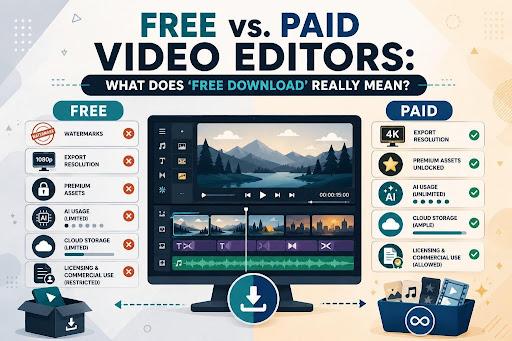
Knowing which one you are installing decides whether the trial is a fair test or a countdown. This article separates the 5 types and lists the restrictions worth checking first. It then sets out how to evaluate a Filmora download Click (https://filmora.wondershare.com/) before any money changes hands.
Part 1. Common Types of Free Video Editing Software
The label on the download button rarely tells you which arrangement you are entering. Five models account for almost everything on the market:
There are some types and What It Actually Means
1.Free Trial: The complete program for a fixed period, after which it locks or reverts.
2.Freemium: A permanent free tier beside paid tiers, with specific features gated.
3.Open-source: Free to use and modify indefinitely, maintained by a community rather than a company.
4.Limited Free Plan: Usable without paying, though output is capped by a watermark or a resolution ceiling.
5.Paid Editor, Free Installer: Installs at no cost, but nothing exports until a license is entered.
Part 2. Restrictions to Check Before Editing
Model type sets the shape, while the detail lives in the restrictions. The following restrictions help decide whether a free version is usable for your work:
●Watermarks: Check whether one appears on every export, how large it is, and whether any route removes it without a subscription.
●Export Resolution: Free tiers often cap output at 1080p, which matters if you deliver in 4K or archive at full quality.
●File Formats: Confirm the formats you deliver in are available, since some codecs sit behind the paid tier.
●Premium Assets: Effects, templates, and stock media frequently belong to a separate library carrying its own subscription.
●AI Usage: Most AI tools draw on a credit balance tied to your plan, so confirm the current allowance before relying on them.
●Cloud Storage: Any included storage varies by tier, and projects saved there may become unreachable once a plan lapses.
●Licensing and Commercial Use: Built-in music and stock are sometimes personal-use only, which matters for client work.
Part 3. What Users Can Evaluate with the Filmora Free Download
Filmora belongs to the 4th category, since the editor installs and runs without payment while exports carry a watermark. That arrangement is unusually generous for evaluation, because the interface is not stripped back. Media import, timeline editing, titles, audio controls, effects, and visual adjustments all behave as they will after purchase.
Preview performance is the other thing worth measuring here, since it depends on your machine rather than your plan. The "Export" window also opens fully, so formats, resolutions, and quality settings can be inspected before committing. What the free Filmora download version withholds is the clean output, along with a handful of tools that unlock on a trial.
Part 4. How to Test Filmora Before Choosing a Plan
A structured hour settles more than a week of reading reviews. Download Filmora, understand the top Filmora video editing features Click (https://filmora.wondershare.com/video-editor/) then work through these 5 stages in order:
Step 1. Edit a Representative Project
Use footage from your own camera and build something close to what you normally publish. A sample made from stock clips will pass a test that your real work would fail.
Step 2. Test the Features You Reach for Most
Work through the operations that appear in every project rather than the ones that sold you on the software. Anything used weekly matters more than anything used once.
Step 3. Open the Export Window Before Rendering
Check the available formats, resolutions, and quality settings while the project is still open. A resolution ceiling shows up here, and it is better found now than at delivery.
Step 4. Review the Current Usage Conditions
Read the terms attached to your own account rather than a review written last year. Trial rewards, watermark rules, and asset licensing all change, and only the official pages carry the current position.
Step 5. Check the Exported File
Play the finished video away from the editor, at full size. Judge the picture, the audio balance, and the watermark placement the way a viewer would.
Part 5. When a Paid Editor May Be Worth the Cost
The result of that test rarely points to one answer, because the cost only makes sense against what you actually produce. Two considerations usually settle the question, and they pull in different directions.
When Time Is the Deciding Factor
How often you publish changes the arithmetic completely, because someone posting weekly recovers a subscription in saved hours long before the year ends. An annual holiday video never reaches that point, and a free version serves it perfectly well. Priority support belongs in the same calculation, since an unanswered question on a deadline costs more than the license.
When the Output Is the Deciding Factor
Anything delivered to a client, a customer, or a platform that pays you has to leave without a watermark. The same applies once a specific feature becomes necessary rather than interesting, or once premium assets stop being optional. Commercial licensing sits underneath all of it, because personal-use terms do not cover paid work.
Part 6. Questions to Answer Before Paying
Those two factors resolve into 6 questions with concrete answers. Work through them, and the decision usually makes itself:
There are some Question and Why It Decides
1.How often will you edit? : Weekly output justifies a subscription that a yearly project cannot
2.What do you need to export? : Resolution, format, and watermark requirements set the minimum tier
3.Which features are essential? : Separate what you use weekly from what impressed you once
4.Will it run on your machine? : A plan is worthless if the hardware cannot handle the footage
5.Is the work commercial? : Personal-use asset licensing does not extend to paid client work
6.What is the total cost? : Compare annual against monthly, and check whether it renews automatically
If you are confused about using Filmora in the first place, go through the Filmora beginner guide Click (https://filmora.wondershare.com/guide/) for a basic understanding of its operations.
Conclusion
A free download is an invitation to test, not a promise that everything stays free. The distinction matters because restrictions rarely appear until the export window, by which point the project already exists. Spend an hour on a real project first, and a Filmora video editor download tells you exactly what you would be paying for.
This release was published on openPR.
Permanent link to this press release:
Copy
Please set a link in the press area of your homepage to this press release on openPR. openPR disclaims liability for any content contained in this release.
You can edit or delete your press release Free vs. Paid Video Editors: What Does "Free Download" Really Mean? here
News-ID: 4605806 • Views: …
More Releases from Publiera
Francophone IPTV Market Is Bigger Than Anyone Realizes
Cable TV Is Collapsing. IPTV Is The Default Now. But Growth Comes With Problems.
PARIS, August 2026
France: EUR 2.1B annual IPTV revenue. Quebec: EUR 890M. Belgium: EUR 480M. Switzerland: EUR 320M.
Add Francophone Africa and you're at EUR 4.2B today. Projected EUR 5.2B by 2028 if current trends hold.
This is real money. This is a real market.
Yet the companies owning this market-Orange, Free, Videotron-are barely talking about growth. They're managing decline.
The Cable…
IPTV on Android TV: Installation Guide and Best Apps Compared
Android TV has emerged as serious alternative to Amazon Fire TV for IPTV streaming. Native Android operating system, Google Play Store access, and hardware flexibility create ecosystem uniquely suited for streaming enthusiasts. Whether you're considering Android TV box or already own one, this guide covers installation, app selection, optimization, and troubleshooting.
Android TV's advantage is architectural. Pure Android means maximum app compatibility, flexibility in playlist formats, and zero restrictions from proprietary…

Adedotun Olaoluwa Invites the World to Abuja as IGA Capital Hunts for $100 Milli …
Adedotun Olaoluwa is inviting the world to Abuja - and, in doing so, making a larger argument about what Africa needs from an investment gathering now.
The founder of Dotmount Communications is positioning the Africa Business and Investment Expo not as another conference built around speeches and ceremony, but as a marketplace for access: a place where investors, ministers, governors, entrepreneurs and project sponsors can meet around the harder question of…
Godex Introduces Operational Readiness Program To Support Future Service Develop …
Summary: Godex has introduced a new operational readiness program focused on strengthening internal processes, technical coordination, and service continuity as the platform prepares for its next stage of development.
Victoria, Bahamas, August 12, 2026 - Godex today announced the launch of an operational readiness program designed to support the next stage of its platform development. The initiative shifts the company's current focus from completing individual infrastructure milestones toward improving how technical…
More Releases for Filmora
Wondershare Filmora Highlights How AI-Powered Tools Are Transforming Modern Vide …
Video creation is increasingly being redefined by artificial intelligence. Tasks that once required hours of manual work-sorting footage, trimming clips, creating subtitles, recording voiceovers, and adapting content for multiple platforms-are gradually becoming more automated.
For creators, this shift is becoming important at a moment when content demands continue to rise across platforms like YouTube, TikTok, and Instagram. The conversation around video editing is no longer only about features or effects. It…
Repair, Rebuild, Enhance: The Unified AI Restoration Workflow in Wondershare Fil …
Image: https://www.abnewswire.com/upload/2025/12/b542da8d8f891e35c98b4af92fd7a56b.jpg
Restoring broken or dull videos once required multiple editing programs. Editors used one tool for noise reduction, another for color correction, and another to fix missing frames. Each tool worked independently, slowing down the process and breaking creative focus. This often resulted in heavy workflows, long hours, and inconsistent results across clips.
The AI Restoration Workflow in Wondershare Filmora V15 [https://filmora.wondershare.com/?utm_source=other_media_sites&utm_medium=pr&utm_campaign=aparticle&utm_content=text_21111566_2025-02-10] solves these issues by combining AI technologies-including repair, rebuild,…
AI in Post-Production: How Wondershare Filmora V15 Accelerates Professional Rest …
Manual editing used to be essential for turning raw footage into a polished video, but the demands of modern workflows have far surpassed what manual corrections alone can achieve. Today, with the undeniable power of AI, Wondershare Filmora V15 [https://filmora.wondershare.com/?utm_source=other_media_sites&utm_medium=pr&utm_campaign=aparticle&utm_content=text_21111566_2025-02-10] automates much of that work. From generating media to refining it, Filmora supports creators at every stage. It compensates for low-quality recording equipment with one-click enhancement tools and removes unwanted…
Wondershare Filmora Enhances User Experience with Seamless App Bridging via Wind …
Video editing doesn't end at export. Once you've created your masterpiece, the next steps range from sharing and refining to using it in other projects. That's where Filmora's integration with Windows Action shines. It makes all these transitions as smooth as possible. By suggesting compatible apps and next-step actions automatically, Filmora streamlines the process and enhances operational efficiency.
No more searching for the right tool or wasting time on manual tasks.…
Wondershare Filmora Simplifies Branding for YouTubers with Powerful Intro Maker
Searching "how to make a YouTube intro" because yours just isn't working? Rest assured; you are not the only one who is facing this. Even millions of creators realize their intro is key to standing out and keeping viewers.
Image: https://lh7-rt.googleusercontent.com/docsz/AD_4nXf5GIQIdena7jwrwrIoKNy1vfIRid5FgIULJIDUFx8obKyoEAL2pJaGOHh6plvy0-9HiIz11WBdQY17xvPmvc2WO72VYz2I9ZpXy9tWKi7O1bcw9OLG7qrrGkP_I_0SL7c?key=vr1cha6tkTUFLoHtpXAqbQ
A stunning intro instantly grabs attention and builds your brand, but creating one feels like a hurdle, needing skills you may not have. That's why finding the right YouTube intro maker…
Filmora Unveils AI Audio-to-Video Generator: Revolutionizing Podcast Promotion
I Spent 24 Hours Mastering Video Editing with Filmora AI Features [https://www.youtube.com/watch?v=XEqp6rmVVrs]
In the ever-evolving digital landscape, content creators, especially podcasters, must continually adapt to emerging trends to stay relevant. One of the most significant shifts in content consumption today is the rise of short-form videos. Platforms like TikTok, Instagram Reels, and YouTube Shorts have changed the way audiences engage with content, making video a crucial tool for podcasters to expand…

