


Press release
Repair, Rebuild, Enhance: The Unified AI Restoration Workflow in Wondershare Filmora V15
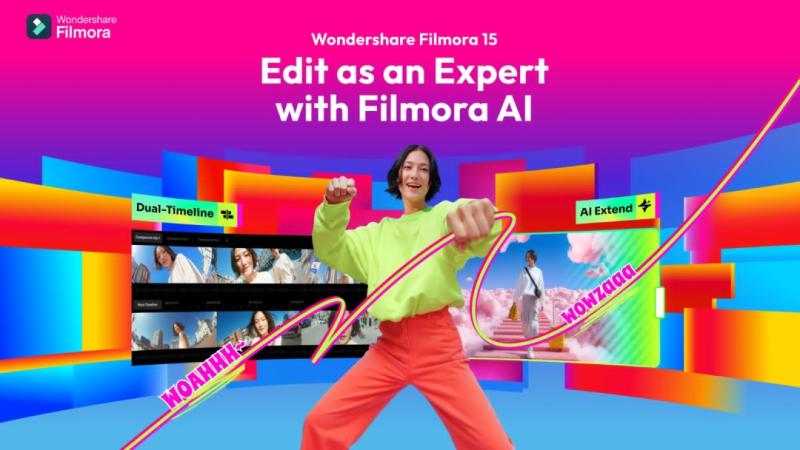
Restoring broken or dull videos once required multiple editing programs. Editors used one tool for noise reduction, another for color correction, and another to fix missing frames. Each tool worked independently, slowing down the process and breaking creative focus. This often resulted in heavy workflows, long hours, and inconsistent results across clips.
The AI Restoration Workflow in Wondershare Filmora V15 [https://filmora.wondershare.com/?utm_source=other_media_sites&utm_medium=pr&utm_campaign=aparticle&utm_content=text_21111566_2025-02-10] solves these issues by combining AI technologies-including repair, rebuild, and enhance-into one seamless and connected editing experience.
Part 1. An Integrated Solution - One Workflow for Repair, Rebuild, and Enhance
Wondershare Filmora V15 brings restoration tools together into a single, unified workflow. Each tool has a clear purpose and they work together to ensure smooth, balanced, and efficient editing.
1. Smart Cutout - Isolate What Matters Most
Smart Cutout uses AI to detect people, objects, and edges with precision. You can quickly mark your subject without hand-tracing. Fine details-like hair, fabric, and soft edges-remain clear across frames. With Brush Size, Edge Thickness, and Border Feather controls, you can refine outlines easily. Every cutout blends naturally, keeping scenes clean and ready for further restoration.
2. AI Object Remover - Remove Flaws and Distractions
Filmora's AI Object Remover clears unwanted marks, scratches, or extra objects with one quick brush. It analyzes surrounding texture and lighting to fill gaps naturally. The correction blends seamlessly into the scene, leaving no trace behind. It's ideal for cleaning grain, removing watermarks, or repairing damaged frames-allowing viewers to focus on the story, not the imperfections.
3. AI Extend - Rebuild Missing Motion Naturally
AI Extend in Filmora V15 uses prompt-guided generation to extend short or incomplete clips. You simply describe how the clip should continue, and the tool analyzes the surrounding frames-color, lighting, and motion-to generate a natural continuation that matches the original footage. Choose Extend Forward or Extend Backward to control where the new segment appears, then with one click, Filmora creates smooth, steady frames that blend seamlessly into your timeline, without awkward jumps or obvious looping.
4. AI Video Enhancer - Sharpen, Brighten, and Balance Every Frame
The AI Video Enhancer in Filmora V15 improves light, color, and sharpness automatically. It restores faded tones, removes dull shadows, and adds natural contrast. With Auto Enhance, low-quality or dark footage can be refreshed in a single click. Brightness stays soft, colors stay true, and every clip gains a clean, cinematic finish ready for export.
Part 2. From Damaged Clip to Restored Sequence - A Simplified Demonstration
With everything built into one workspace, restoring videos in Filmora is straightforward and intuitive.
1. First, open your video in Filmora V15's workspace to proceed with editing. All editing happens within one workspace, so you never need to leave the main editing interface.
2. Next, use Smart Cutout to separate your main subject from a messy background. This helps the following tools clean or rebuild footage more accurately.
3. After that, utilize AI Object Remover to remove unwanted marks, scratches, or objects. The AI replaces them with matching color and texture, so the fix looks real.
4. Then, access AI Extend to fix short missing frames. The AI rebuilds motion smoothly based on prompt and surrounding frames.
5. Lastly, finish with AI Video Enhancer to improve brightness, restore color and clarity in every detail.
In just a few minutes, your damaged video turns into a clean, complete story. Everything happens in one workspace, keeping the workflow simple, fast, and easy to control.
Wrapping Up
In short, Wondershare Filmora V15 makes video restoration fast, accessible, and professional for everyone. It repairs damage, rebuilds motion, and enhances color with simple, intelligent tools. Whether restoring films or personal memories, every frame becomes smooth, bright, and true to life again. With Filmora V15, bringing old footage back to life is effortless-and beautifully complete.
About Wondershare:
Wondershare [https://www.wondershare.com/?utm_source=other_media_sites&utm_medium=pr&utm_campaign=prforwondershare&utm_content=text_21111566_2025-02-11] is a globally recognized software company founded in 2003, known for its innovative solutions in creativity and productivity. Driven by the mission "Creativity Simplified", Wondershare offers a range of tools, including Filmora and SelfyzAI for video editing; PDFelement for document management; and EdrawMax, EdrawMind for diagramming. With over 2 billion cumulative active users across all products and a presence in over 200 countries and regions, Wondershare empowers the next generation of creators with intuitive software and trendy creative resources, continually expanding the possibilities of creativity worldwide.
Media Contact
Company Name: Wondershare
Contact Person: Support
Email:Send Email [https://www.abnewswire.com/email_contact_us.php?pr=repair-rebuild-enhance-the-unified-ai-restoration-workflow-in-wondershare-filmora-v15]
City: New York
Country: United States
Website: https://www.wondershare.com/?utm_source=other_media_sites&utm_medium=pr&utm_campaign=prforwondershare&utm_content=text_21111566_2025-02-11
Legal Disclaimer: Information contained on this page is provided by an independent third-party content provider. ABNewswire makes no warranties or responsibility or liability for the accuracy, content, images, videos, licenses, completeness, legality, or reliability of the information contained in this article. If you are affiliated with this article or have any complaints or copyright issues related to this article and would like it to be removed, please contact retract@swscontact.com
This release was published on openPR.
Permanent link to this press release:
Copy
Please set a link in the press area of your homepage to this press release on openPR. openPR disclaims liability for any content contained in this release.
You can edit or delete your press release Repair, Rebuild, Enhance: The Unified AI Restoration Workflow in Wondershare Filmora V15 here
News-ID: 4295744 • Views: …
More Releases from ABNewswire
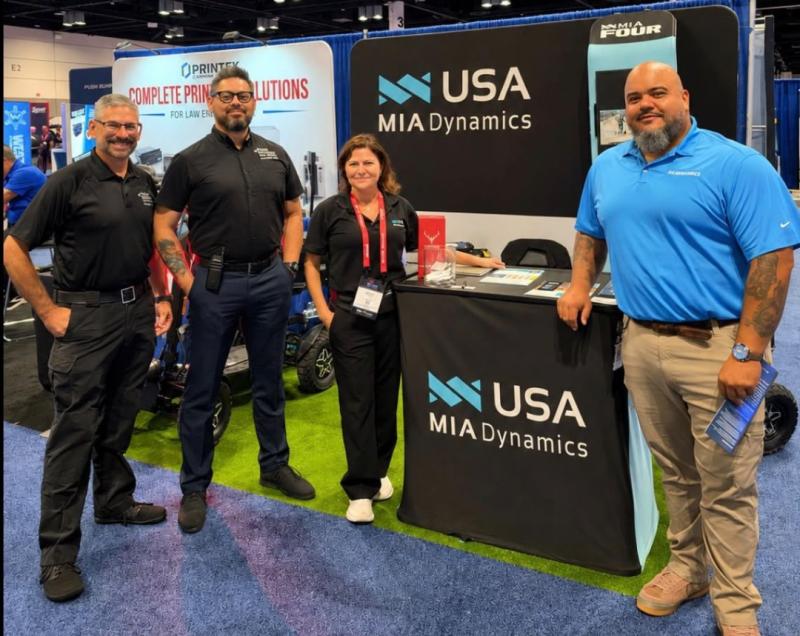
MIA Dynamics USA Showcases the MIA FOUR at Police Fleet Expo 2026 in Orlando
MIA Dynamics USA showcased its MIA FOUR all-electric mobility platform at Police Fleet Expo 2026 in Orlando, drawing interest from law enforcement, fleet professionals, and public safety leaders. Attendees explored how its compact, all-terrain quad-wheel design supports patrols, security, large events, campuses, and parks where traditional vehicles have limited access. The event let MIA Dynamics USA gather feedback and build relationships with agencies seeking agile electric mobility solutions.
Fort Lauderdale, FL…

USA Immigration Company Warns Against AI-Prepared EB-1A and EB-2 NIW Petitions a …
New USCIS guidance raises the stakes for AI-prepared EB-1A and EB-2 NIW petitions, as some cases may be denied without first receiving an RFE or NOID.
Myrtle Beach, South Carolina, USA - August 21, 2026 - USA Immigration Company, a U.S.-based immigration services provider specializing in EB-1A Extraordinary Ability and EB-2 National Interest Waiver (NIW) green card petitions, is warning self-petitioners about the risks of relying on artificial intelligence to prepare…

FunkyMEDIA Helps Brands Build Visibility in AI Search Through Brand Mentions and …
The Polish digital marketing agency combines AI Search optimization, digital PR, brand mentions and technical content development to help companies appear in AI-generated recommendations.
LODZ, POLAND - August 21, 2026 - FunkyMEDIA, a digital marketing agency specializing in AI Search, SEO and brand mentions, is helping companies adapt their online visibility strategies to the rapid growth of artificial intelligence-powered search.
As consumers increasingly use platforms such as ChatGPT, Google Gemini and Google…

SolutionPoint Behavioral Health Now In-Network with Aetna for Mental Health and …
Rancho Mirage behavioral health provider expands access to treatment options for eligible Aetna members in the Coachella Valley and surrounding communities.
Image: https://www.abnewswire.com/upload/2026/08/ac833c7e7e37c379c6dcd82d7c6d6df3.jpg
RANCHO MIRAGE, California, USA - August 21, 2026 - SolutionPoint Behavioral Health [https://solutionpointbh.com/] is now in-network with Aetna for mental health and substance use disorder treatment, expanding access for eligible members in the Coachella Valley and surrounding communities.
The in-network status may reduce out-of-pocket costs for eligible Aetna members seeking…
More Releases for Filmora
Wondershare Filmora Highlights How AI-Powered Tools Are Transforming Modern Vide …
Video creation is increasingly being redefined by artificial intelligence. Tasks that once required hours of manual work-sorting footage, trimming clips, creating subtitles, recording voiceovers, and adapting content for multiple platforms-are gradually becoming more automated.
For creators, this shift is becoming important at a moment when content demands continue to rise across platforms like YouTube, TikTok, and Instagram. The conversation around video editing is no longer only about features or effects. It…
AI in Post-Production: How Wondershare Filmora V15 Accelerates Professional Rest …
Manual editing used to be essential for turning raw footage into a polished video, but the demands of modern workflows have far surpassed what manual corrections alone can achieve. Today, with the undeniable power of AI, Wondershare Filmora V15 [https://filmora.wondershare.com/?utm_source=other_media_sites&utm_medium=pr&utm_campaign=aparticle&utm_content=text_21111566_2025-02-10] automates much of that work. From generating media to refining it, Filmora supports creators at every stage. It compensates for low-quality recording equipment with one-click enhancement tools and removes unwanted…
Wondershare Filmora Enhances User Experience with Seamless App Bridging via Wind …
Video editing doesn't end at export. Once you've created your masterpiece, the next steps range from sharing and refining to using it in other projects. That's where Filmora's integration with Windows Action shines. It makes all these transitions as smooth as possible. By suggesting compatible apps and next-step actions automatically, Filmora streamlines the process and enhances operational efficiency.
No more searching for the right tool or wasting time on manual tasks.…
Wondershare Filmora Simplifies Branding for YouTubers with Powerful Intro Maker
Searching "how to make a YouTube intro" because yours just isn't working? Rest assured; you are not the only one who is facing this. Even millions of creators realize their intro is key to standing out and keeping viewers.
Image: https://lh7-rt.googleusercontent.com/docsz/AD_4nXf5GIQIdena7jwrwrIoKNy1vfIRid5FgIULJIDUFx8obKyoEAL2pJaGOHh6plvy0-9HiIz11WBdQY17xvPmvc2WO72VYz2I9ZpXy9tWKi7O1bcw9OLG7qrrGkP_I_0SL7c?key=vr1cha6tkTUFLoHtpXAqbQ
A stunning intro instantly grabs attention and builds your brand, but creating one feels like a hurdle, needing skills you may not have. That's why finding the right YouTube intro maker…
Filmora Unveils AI Audio-to-Video Generator: Revolutionizing Podcast Promotion
I Spent 24 Hours Mastering Video Editing with Filmora AI Features [https://www.youtube.com/watch?v=XEqp6rmVVrs]
In the ever-evolving digital landscape, content creators, especially podcasters, must continually adapt to emerging trends to stay relevant. One of the most significant shifts in content consumption today is the rise of short-form videos. Platforms like TikTok, Instagram Reels, and YouTube Shorts have changed the way audiences engage with content, making video a crucial tool for podcasters to expand…
Wondershare Filmora Elevates Video Editing to New Heights with Latest Innovation …
Image: https://lh7-rt.googleusercontent.com/docsz/AD_4nXdTC8EW1otsl5iGjCEv4K1zP-W3HyfQbnGw_7LKKSOJ_RCSkHQwOR3f1-xuxBAjETKG-860g45HqTPXNyoIt-wXmIDlXmjNHlGyk7stnjw3NekyiPnqe7GpgIkiGE4jLYlhC8Xqpiy4voJUfY44XSlxRAAUhgB4GAsv6B7aWQPTZ6tMzeU7KkQ?key=nSwsaIImb64xIIJqtP16jA
Youtube Link: What's NEW in Filmora 13.6: AI Object Remover, Smart Search and MORE! [https://www.youtube.com/watch?v=APPxFqWEYN0]
Wondershare Filmora is a professional video editing software program renowned for its intuitive UI and prebuilt creative assets. It allows users to effortlessly produce high quality content with it's powerful suite of editing tools to make content more impactful.
Imagine a future where video editing is easier, more consistent and second nature. Well now with the…

