


Press release
How to Create Your First Sub-Account in GoHighLevel
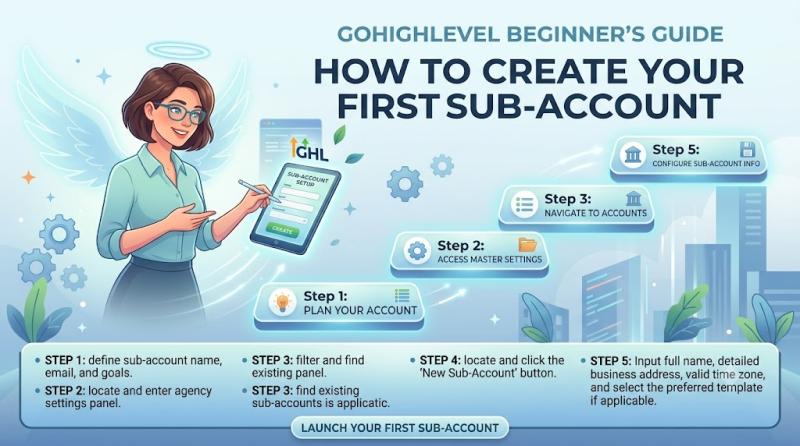
How to Create Your First Sub-Account in GoHighLevel
Sub-accounts are where the real work happens inside GoHighLevel. They're the spaces where you manage a business or client's CRM, funnels, calendars, conversations, automation, contacts, reputation management, and more.
So if you've just signed up and you're wondering:
How do I create my first sub-account in GoHighLevel?
What information do I need before setting it up?
Should I create a sub-account for my own agency too?
What's the best way to structure sub-accounts if I plan to serve local business clients?
This guide will walk you through how to create your first sub-account in GoHighLevel step by step, what to configure during setup, common mistakes to avoid, and how to use sub-accounts properly if you're building an AI agency or marketing agency.
What Is a Sub-Account in GoHighLevel?
In GoHighLevel, a sub-account is a dedicated workspace for one business.
Think of it like this:
Agency account = your master control center
Sub-account = the actual business workspace for a company or client
Inside a sub-account, you can manage things like:
contacts and CRM
opportunities and pipelines
calendars and booking systems
forms and surveys
funnels and websites
automation workflows
email and SMS marketing
conversations and inbox management
review requests and reputation tools
AI features and customer follow-up systems
If you're an agency serving local businesses, each client usually gets their own sub-account so their leads, conversations, funnels, and automation stay separate from everyone else.
Who Should Create a Sub-Account?
If you're using GoHighLevel as an agency, you'll create sub-accounts for:
your own business
each client you manage
test/demo environments if needed
different brands or business units if you run multiple operations
Example:
If you run an AI agency helping local businesses with GoHighLevel, you might have sub-accounts like:
Your agency sub-account
Dental clinic client sub-account
Roofing company client sub-account
HVAC client sub-account
Med spa client sub-account
Each one becomes a separate environment with its own:
leads
pipelines
calendars
automation
funnels
messaging
reviews
business settings
Why Sub-Accounts Matter So Much
Understanding sub-accounts is important because they are the foundation of how you deliver services with GoHighLevel.
A sub-account lets you:
keep each client's data separate
customize pipelines, forms, and automations for each business
connect each business's own phone, email, domain, and calendars
build niche-specific funnels and workflows
manage AI follow-up and lead nurturing for that business
offer white-label CRM or SaaS services if you want to scale later
If you plan to help local businesses with AI automation, missed-call text back, lead nurturing, appointment reminders, and CRM setup, you'll be doing most of that work inside sub-accounts.
When Should You Create Your First Sub-Account?
If you're brand new to GoHighLevel, the best time to create your first sub-account is right after your agency account is ready.
In fact, if you're an agency owner, I strongly recommend creating your own business sub-account first before setting up any clients.
Why create your own sub-account first?
Because it gives you a safe place to:
learn the platform
build your own pipeline
create your own booking calendar
test forms and automations
create your own lead capture funnels
understand how GoHighLevel works before touching client accounts
This is one of the smartest things a beginner agency owner can do.
What You Need Before Creating a Sub-Account
Before you create your first sub-account, gather the basics for the business you're setting up.
You'll usually want:
business name
business email
phone number
website URL if available
business address
time zone
niche or business type
logo and branding assets if you want to customize it
the business owner's contact info if it's for a client
You do not need every single integration connected on day one, but having the basic business info ready makes the setup smoother.
Agency Account vs Sub-Account: Quick Difference
Before we jump into the steps, here's the simplest way to think about it.
Agency Account
This is where you manage:
multiple client accounts
agency-level settings
snapshots
SaaS settings
white-label settings
client account creation
Sub-Account
This is where you manage:
a specific business's leads and CRM
its funnels and forms
its workflows and automation
its calendars and appointments
its communication channels
its reputation management
If you're creating your first client system in GoHighLevel, you'll do the setup inside a sub-account.
How to Create Your First Sub-Account in GoHighLevel Step by Step
Now let's walk through the actual setup process.
Step 1: Log In to Your Agency Dashboard
First, log in to your GoHighLevel account.
If you're on an agency plan, you'll enter the Agency View, which is the main dashboard where you can manage accounts, settings, and clients.
This is where you'll create new sub-accounts.
Step 2: Go to the Accounts / Sub-Accounts Area
Inside the agency dashboard, look for the section where you can manage accounts.
Depending on the current GoHighLevel layout and updates, this area may be labeled something like:
Accounts
Sub-Accounts
Add Account
Create New Account
GoHighLevel updates its interface over time, but the goal is the same: you want the place where agency users create and manage business accounts.
Once you find that area, click the option to create a new sub-account.
Step 3: Choose to Add a New Sub-Account
When you create a new account, GoHighLevel will ask how you want to set it up.
In general, you'll be creating a new sub-account for one of two reasons:
Option 1: Create a fresh account from scratch
Use this if:
you're setting up your own agency's business workspace
you're creating a new client account manually
you want a clean setup with no imported templates yet
Option 2: Create a sub-account using a snapshot or template
Use this if:
you already built a reusable system
you want to install prebuilt funnels, workflows, pipelines, tags, calendars, and settings into the new client account
you plan to scale your agency with repeatable onboarding
If this is your very first sub-account, you may want to start with a fresh account or use a simple starter snapshot if you already have one.
Step 4: Enter the Business Information
Now GoHighLevel will ask for the core information for the business.
Typical fields may include:
business name
company email
phone number
website
country
address
city / state / postal code
time zone
Example:
If you're creating a sub-account for a dental clinic, you might enter:
Business name: Bright Smile Dental
Email: hello@brightsmiledental.com
Phone: clinic phone number
Website: clinic website
Time zone: local business time zone
If you're creating a sub-account for your own agency, use your agency business information.
Beginner tip
Make sure the time zone is correct.
This affects:
appointment scheduling
automation timing
reminder messages
reporting accuracy
Step 5: Decide Whether This Sub-Account Is for Your Agency or a Client
At this stage, it helps to be clear about the purpose of the account.
If it's your own agency sub-account:
Use it to:
manage your own leads
build your own pipeline
run your booking calendar
create your own lead capture funnels
test AI workflows and follow-up systems
If it's a client sub-account:
Use it to:
set up the client's CRM
connect their domain, phone, email, and calendars
build their lead capture system
create their automation workflows
manage their conversations and opportunities
This distinction matters because it influences how you structure the pipeline, calendars, tags, and automations later.
Step 6: Choose the Right Account Type or Configuration Options
Depending on your plan and current interface, GoHighLevel may ask you about settings related to:
whether the account is an agency-managed business
whether it's part of SaaS mode
whether it uses a snapshot
whether certain default settings should be applied
If you're just getting started, keep it simple.
For a beginner agency setup:
create the sub-account
use a clean structure
apply a snapshot only if you understand what it contains
avoid overcomplicating the setup with too many advanced options immediately
You can always refine the account later.
Step 7: Create the Sub-Account
Once the business details are filled in, confirm the setup and create the account.
GoHighLevel will generate the new sub-account and add it to your agency dashboard.
At this point, you'll be able to click into that sub-account and begin the actual business setup.
This is the moment where your new business workspace becomes live.
Step 8: Open the New Sub-Account and Review the Dashboard
After creating the sub-account, click into it.
Now you're inside the actual business environment.
You should see the familiar GoHighLevel sections such as:
Launchpad
Conversations
Contacts
Opportunities
Calendars
Marketing
Automation
Sites
Reputation
Payments
Settings
This is where you'll do the real work for that business.
Before building anything, take a minute to review the dashboard and confirm:
the business name looks correct
the time zone is correct
the sub-account opened successfully
you're in the right workspace
Step 9: Complete the Core Business Settings Inside the Sub-Account
Creating the sub-account is only the first part.
Now you need to finish the actual business setup inside it.
Go to the sub-account's settings and complete the essentials:
Fill in or verify:
business name
business email
business phone number
address
website
logo
brand colors if relevant
time zone
social links if needed
This ensures the sub-account is ready for pages, emails, forms, and automation.
Step 10: Set Up the Most Important Pieces First
Once the sub-account exists, don't try to configure everything at once.
Instead, focus on the core setup in the right order.
Recommended order after creating the sub-account:
business profile and settings
pipeline / opportunity stages
contacts and tags
calendar / booking system
communication channels
lead capture form or landing page
first automation workflow
appointment reminders
review request system later if needed
This gives you a functioning system without overwhelming yourself or the client.
What Should You Set Up in a New Client Sub-Account First?
If you're building AI automation or CRM systems for local businesses, here's a practical setup checklist for each new sub-account.
Sub-account quick-start checklist
Foundation
business info
time zone
logo and branding
user access if needed
CRM
pipeline stages
contact tags
custom fields if necessary
Lead capture
form or survey
landing page or funnel
calendar booking page
Communication
email connection
phone / SMS setup
inbox / conversations review
Automation
new lead follow-up workflow
appointment reminder workflow
missed-call text-back if relevant
Growth / retention
review request automation
nurture follow-up
reactivation campaigns later
Should You Create a Separate Sub-Account for Your Own Agency?
Yes - in most cases, you should.
A lot of agency owners think of GoHighLevel only as a client tool, but your own agency should also have a proper sub-account.
Why your agency needs its own sub-account
Because your agency also needs:
a CRM
lead capture forms
appointment booking
follow-up automation
a sales pipeline
internal workflows
email and SMS communication
If you want to sell GoHighLevel systems to local businesses, it's much easier when your own agency is already running on the same platform.
It also helps you demonstrate the system to prospects.
Best Sub-Account Structure for an AI Agency Serving Local Businesses
If your goal is to help local businesses with GoHighLevel, I'd structure your sub-accounts like this:
1) Your agency sub-account
Use it for:
your own lead generation
your discovery call funnel
your sales pipeline
your onboarding workflow
your AI agency operations
2) One sub-account per client
Examples:
Dental Client - Main Account
Roofing Client - Main Account
HVAC Client - Main Account
Med Spa Client - Main Account
Each client gets their own CRM, conversations, automation, forms, and calendars.
3) Optional test / sandbox sub-account
This can be useful for:
testing workflows
experimenting with funnels
trying AI tools before using them on client accounts
building templates safely
If you plan to scale, this structure will make your agency much easier to manage.
Should You Use a Snapshot When Creating a Sub-Account?
A snapshot is one of GoHighLevel's most useful agency features because it lets you copy a prebuilt system into a new sub-account.
A snapshot can include things like:
funnels
forms
workflows
calendars
pipelines
tags
templates
settings
When to use a snapshot
Use a snapshot if:
you already have a proven setup
you want to onboard similar clients faster
you serve one niche repeatedly, like dentists or roofers
you want consistency across client accounts
When not to use one yet
If you're brand new and don't fully understand what's inside the snapshot, it may be better to create your first sub-account cleanly and build the core system manually first.
Once you understand the platform, snapshots become much more powerful.
Common Mistakes to Avoid When Creating Your First Sub-Account
1) Creating a client sub-account before understanding the platform
Set up your own agency sub-account first so you can learn the basics safely.
2) Using the wrong business information
Always verify email, phone, and especially time zone.
3) Importing a messy snapshot with too many unused assets
Keep your first account clean and understandable.
4) Forgetting to plan the pipeline before building automation
Your automation should match the business's lead journey.
5) Not separating client data properly
Each client should have their own sub-account to keep contacts, funnels, and communication organized.
6) Trying to fully configure everything on day one
Create the account first, then focus on one functional system at a time.
7) Skipping your own agency sub-account
Your agency needs its own CRM and automation too.
A Simple First Sub-Account Setup Example
Let's say you run an AI agency and you want to onboard a roofing client.
Here's what that first sub-account might look like:
Business setup
business name
phone
website
time zone
Pipeline
New Lead
Contacted
Estimate Scheduled
Follow-Up
Won Job
Lost
Lead capture
roofing quote request landing page
contact form
booking calendar for estimates
Automation
new lead SMS follow-up
email confirmation
missed-call text back
appointment reminder
Reputation
review request after job completion
That's a great example of how a sub-account becomes the operating system for a local business client.
Frequently Asked Questions
What is a sub-account in GoHighLevel?
A sub-account is a dedicated business workspace inside GoHighLevel where you manage one company's CRM, leads, funnels, calendars, workflows, and communication.
Do I need a sub-account for each client?
Yes, in most cases agencies should create a separate sub-account for each client so their data, funnels, conversations, and automation stay organized and separate.
Should I create a sub-account for my own agency?
Yes. Your own agency should have a sub-account so you can manage your own leads, funnels, booking calendar, automation, and CRM.
Can I create a sub-account from a snapshot?
Yes. If you already have a reusable setup, you can apply a snapshot when creating a new sub-account to speed up onboarding.
What should I set up first after creating a sub-account?
Start with:
business settings
pipeline
contacts
calendar
communication channels
one lead capture page or form
one follow-up workflow
Final Thoughts
Creating your first sub-account in GoHighLevel is one of the most important early steps if you're using the platform as an agency.
It's the point where GoHighLevel stops being just "software you signed up for" and starts becoming a real business operating system for you or your clients.
The key is not just creating the account-it's creating it with a clear purpose.
For most agencies and local businesses, that means using the sub-account to build a system that can:
capture leads
organize contacts
automate follow-up
manage appointments
centralize conversations
improve customer communication
create a better client experience
If you're new, start with your own agency sub-account first, learn the setup flow, and then use that experience to build clean, organized sub-accounts for local business clients.
Ready to Start With GoHighLevel?
If you want to build client sub-accounts, automate follow-up, manage leads, and create AI-powered systems for local businesses, you can start here:
Start Your GoHighLevel Account
Try GoHighLevel here
Once your first sub-account is live, the next step is learning how to configure it properly-especially the CRM, calendar, communication channels, and automation workflows.
47 W 13th St, New York, NY 10011
👉 Start Your GoHighLevel 14 days Free Trial Today:
✅https://cutt.ly/or3Cn8j4
Get 30 Days Free Trial + Free Live Bootcamp to Launch with HighLevel ✅https://cutt.ly/It8w0sAH
Try Summer of Ai ✅https://www.gohighlevel.com/ai?fp_ref=shafiqul51
Try SaaS Pro free Trial ✅https://www.gohighlevel.com/pro-trial?fp_ref=shafiqul79
This release was published on openPR.
Permanent link to this press release:
Copy
Please set a link in the press area of your homepage to this press release on openPR. openPR disclaims liability for any content contained in this release.
You can edit or delete your press release How to Create Your First Sub-Account in GoHighLevel here
News-ID: 4571240 • Views: …
More Releases from GoHighLevel Reviews
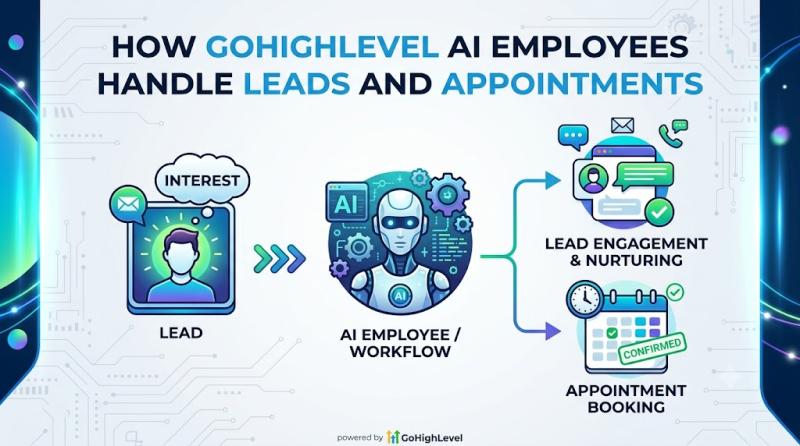
How GoHighLevel AI Employees Handle Leads and Appointments
If you're trying to understand how GoHighLevel can help local businesses respond faster, qualify leads, and book more appointments, one of the most important things to understand is how its AI Employees actually work in the real world.
Because on paper, "AI Employee" sounds exciting.
But business owners and agencies usually want a much simpler answer:
How does GoHighLevel AI Employee handle new leads?
Can it reply to leads automatically?
Can it book appointments for…

What Is GoHighLevel AI Employee and How Does It Work
If you've been exploring GoHighLevel lately, you've probably seen the term AI Employee show up everywhere-especially around the Summer of AI promotion and the $97/month AI Employee Unlimited offer.
And if you're a business owner, marketer, or agency owner, the obvious questions are:
What exactly is GoHighLevel AI Employee?
Is it one feature or a bundle of tools?
What does it actually do for a business?
How does it work inside GoHighLevel?
What's included in AI…
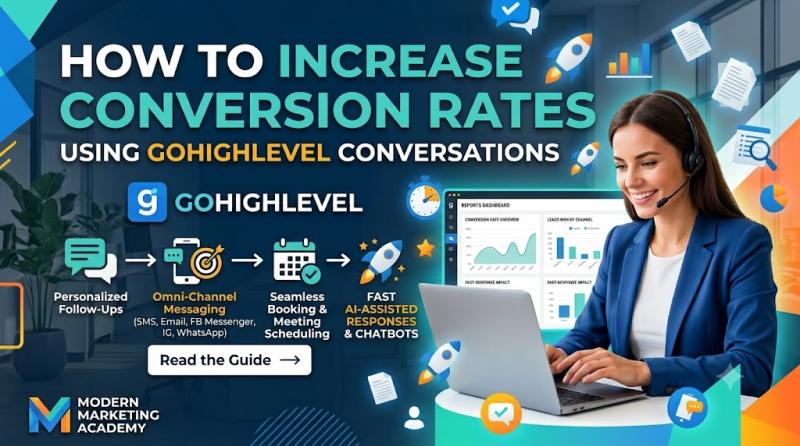
How to Improve Lead Response Time Using GoHighLevel Conversations
If you're using GoHighLevel for local businesses, one of the fastest ways to improve results is simple:
respond to leads faster.
Because in most local service businesses, the company that replies first often wins the customer.
It doesn't matter whether the lead came from:
a Facebook ad
a landing page
a website contact form
a missed call
Google Ads
website chat
SMS inquiry
social message
If the lead reaches out and nobody answers quickly, the chances of losing that lead go way…
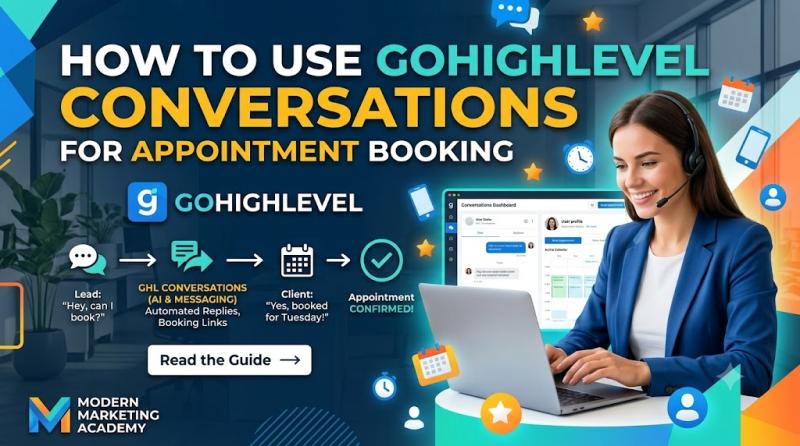
How to Use GoHighLevel Conversations for Appointment Booking
How to Use GoHighLevel Conversations for Appointment Booking
If you're using GoHighLevel for a local business, one of the biggest wins is turning lead conversations into actual booked appointments.
That's where GoHighLevel Conversations becomes incredibly valuable.
A lot of businesses already get inquiries through forms, text messages, website chat, missed calls, Facebook messages, or email. But the problem is not always getting the lead. The problem is moving that lead from "interested" to…
More Releases for HighLevel
List57 Announces Strategic Expansion as HighLevel Agency to Bring Harmony and Au …
FOR IMMEDIATE RELEASE
SAN DIEGO, CA - List57, a veteran leader in the data and lead generation industry for nearly three decades, is excited to announce its official expansion as a HighLevel Agency. This strategic move is designed to solve one of the biggest headaches facing modern entrepreneurs: the chaos of scattered tools and missed opportunities. By combining their high-quality marketing data with the power of the HighLevel platform, List57 is…
What Is GoHighLevel Ask AI and How Does It Work?
What Is GoHighLevel Ask AI and How Does It Work?
If you've been exploring GoHighLevel lately, you've probably noticed a feature called Ask AI inside the platform.
At first glance, it can look like "just another AI chat box."
But Ask AI is much more useful than that.
It's designed to be an AI assistant built directly into GoHighLevel so users can generate content, ask questions, brainstorm ideas, create assets, and complete certain tasks…
Build a Self-Selling AI Sales System with HighLevel Review (2026 Guide)
Build a Self-Selling AI Sales System with HighLevel Review (2026 Guide)
What if your sales system could respond instantly, qualify leads, follow up automatically, and book appointments - without you chasing prospects all day?
That's the promise behind building a Self-Selling AI Sales System with HighLevel. Instead of relying on manual outreach, missed calls, and inconsistent follow-ups, you create a 24/7 automated sales engine powered by CRM, automation, and AI.
In this in-depth…
HighLevel Black Friday & Cyber Monday Deal - Why Now Is the Best Time to Jump on …
Why Now Is the Best Time to Jump on GoHighLevel - 50% Off Black Friday 2025 Deal Breakdown
If you've been thinking about trying GoHighLevel - the all-in-one CRM, funnel builder, email/SMS automation, and complete marketing platform - this is the moment you've been waiting for.
GoHighLevel's Black Friday 2025 deal is officially live, and for a very limited time, you can get 50% OFF for your first 3 months on any…
Russell Rabichev Attends HighLevel Community Event in Los Angeles, Strengthening …
Image: https://www.globalnewslines.com/uploads/2025/11/1764077844.jpg
Russell Rabichev joins Los Angeles HighLevel event, connecting with SaaS leaders to share insights on affiliate marketing, AI automation, and growth.
Los Angeles, CA - Russell Rabichev, entrepreneur, speaker, and father known for his expertise in affiliate marketing, AI automation, and business growth, participated in a HighLevel community event in Los Angeles on November 20, 2025 [https://finance.yahoo.com/news/russell-rabichev-named-top-high-140000117.html]. The gathering offered a relaxed and interactive environment for SaaS founders, marketers, and…
GoHighLevel Review 2026: Is It Worth It for Agencies? HighLevel Reviews
GoHighLevel Review 2026: Is It Worth It for Agencies?
If you're an agency owner, digital marketer, or service-business professional wondering whether GoHighLevel (often called HighLevel) is the right all-in-one platform for you in 2026 - this in-depth review will help you decide.
Let's explore what GoHighLevel really offers - its features, pricing, pros & cons, my personal take, and what real users are saying. I'll also share how this platform opens up…

