


Press release
What Is GoHighLevel Ask AI and How Does It Work?

What Is GoHighLevel Ask AI and How Does It Work?
If you've been exploring GoHighLevel lately, you've probably noticed a feature called Ask AI inside the platform.
At first glance, it can look like "just another AI chat box."
But Ask AI is much more useful than that.
It's designed to be an AI assistant built directly into GoHighLevel so users can generate content, ask questions, brainstorm ideas, create assets, and complete certain tasks without leaving the platform. HighLevel describes Ask AI as a built-in AI workspace that can create content, answer questions, generate assets, and perform supported actions from both Agency and Sub-account views.
So if you're wondering:
What is GoHighLevel Ask AI?
What can it actually do?
Is Ask AI useful for agencies and local businesses?
Can it help with content, automation, AI agents, or CRM tasks?
How do you use it properly inside GoHighLevel?
This guide breaks it all down in plain English.
You'll learn what GoHighLevel Ask AI is, how it works, where to find it, what it can do today, who it's best for, and how to use it strategically if you run an agency or manage local business clients.
What Is GoHighLevel Ask AI?
GoHighLevel Ask AI is a built-in AI assistant inside HighLevel that lets users interact with the platform using natural language.
Instead of manually jumping through menus and figuring out every step yourself, you can type a request like:
"Write a Facebook post for my dental clinic."
"Give me blog post ideas about SMS marketing."
"Create a community for local business owners."
"Build a Voice AI agent for inbound calls."
"Create a knowledge base from my website and attach it to Conversation AI."
Ask AI then responds inside a chat-style workspace and, depending on the request, can either:
generate content or ideas,
answer questions, or
guide you through supported in-app actions like setting up a community, knowledge base, course, or AI-related asset.
In simple terms:
Ask AI is GoHighLevel's built-in AI workspace for content, guidance, and supported actions.
It's meant to reduce the number of tabs, tools, and manual steps you need when working inside GoHighLevel.
Why Ask AI Matters in GoHighLevel
GoHighLevel is already a huge platform.
Inside one account, you might be managing:
CRM and pipelines
email marketing
SMS and conversations
calendars and appointments
funnels and websites
workflows and automation
communities and courses
AI voice tools
knowledge bases
branded content
client accounts if you're an agency
That creates one big problem for many users:
"I know GoHighLevel can do a lot... but I don't want to click through 20 menus every time I need help or want to build something."
Ask AI is GoHighLevel's answer to that problem.
Instead of switching between:
the help docs
external AI tools like ChatGPT
different sections of GoHighLevel
manual setup screens
Ask AI gives you a single place inside HighLevel to ask for help, create content, and trigger supported workflows. HighLevel's support docs specifically position Ask AI as a way to reduce screen switching and let users work through natural-language prompts from one place.
What Does Ask AI Actually Do?
At a high level, Ask AI supports three main job types inside GoHighLevel:
1) It answers questions and gives ideas
You can ask it for:
content ideas
campaign ideas
CTA suggestions
blogging ideas
marketing suggestions
guidance on how to use parts of GoHighLevel
Example prompts:
"Give me 20 blog post ideas for a med spa."
"Suggest CTA ideas for a free consultation funnel."
"How should I follow up with roofing leads who don't answer the phone?"
2) It creates content
Ask AI can generate content inside HighLevel such as:
blog drafts
social posts
ad copy
email copy
landing page copy
other branded marketing content
HighLevel also notes that Ask AI can use your Brand Voice settings to make content more aligned with the business's tone and messaging.
3) It helps complete supported actions inside the platform
This is where Ask AI becomes more interesting than a normal chatbot.
In supported workflows, Ask AI can guide you through setup tasks like:
creating communities
creating or attaching knowledge bases
building Voice AI or related AI assets
creating courses and course offers
generating contact summaries
helping with CRM-related information and certain supported actions
These are not just "content outputs." In some cases, Ask AI actually walks you through the setup flow and helps create the asset inside HighLevel.
The Simplest Way to Think About Ask AI
If you want the simplest explanation possible, think of Ask AI like this:
Ask AI = a built-in ChatGPT-style assistant + GoHighLevel task assistant + content generator
It's not exactly the same as ChatGPT, and it's not a replacement for every manual setup step.
But it sits inside GoHighLevel and helps with work that's directly connected to your HighLevel account.
That's what makes it useful.
Because instead of generating something in one tool and then manually rebuilding it inside another tool, Ask AI can often keep you inside the HighLevel workflow.
Where to Find Ask AI in GoHighLevel
According to HighLevel's documentation, Ask AI can be opened from:
1) The top navigation bar
This is the quick-access option.
If you're working somewhere else in HighLevel and want fast AI help, you can open Ask AI from the top nav icon and type or speak your request.
2) The left sidebar / dedicated Ask AI workspace
This opens the fuller Ask AI workspace where you can:
start a new chat
continue previous conversations
search past conversations if available
work in a more focused environment
HighLevel describes Ask AI as a full-screen workspace, not just a tiny floating chatbot.
So if you're planning to do heavier work-like building content, setting up a knowledge base, or creating a course-the dedicated Ask AI workspace is usually the better option.
Who Can Access Ask AI?
This is important because Ask AI access is not exactly the same for every user.
Based on HighLevel's support documentation:
Agency Admins and Agency Users can access Ask AI.
Sub-account Admins and Sub-account Users can access Ask AI when they're on the $97 Unlimited AI Employee Plan.
That means if you're writing promotional content around GoHighLevel's AI features, Ask AI is especially relevant to agency users and to sub-accounts on the Unlimited AI Employee setup.
If you manage local business clients, this matters because you may need the right plan/features active before the client can use Ask AI inside their sub-account.
How GoHighLevel Ask AI Works
Now let's get into the practical side.
Here's the basic workflow:
Step 1: Open Ask AI
You open Ask AI from the top nav or the left-side menu.
Step 2: Enter a natural-language prompt
You type a request like:
"Write a follow-up email for roofing leads."
"Create a community for my coaching clients."
"Build a knowledge base from my website and attach it to Conversation AI."
"Create a beginner course for local business owners about lead follow-up."
Step 3: Ask AI interprets the request
Depending on the request, Ask AI decides whether the prompt is mainly:
a content request
an idea / question request
a supported action / setup request
Step 4: It responds, asks follow-up questions, or launches a guided workflow
If it's a simple content request, it may respond right away.
If it's a more advanced setup task, Ask AI may ask follow-up questions like:
What's the business name?
Which website should I use?
Which phone number should urgent calls transfer to?
Which AI agent should the knowledge base attach to?
What audience is this course for?
Step 5: You review and confirm
For supported actions, Ask AI may prepare the asset or workflow and then ask for confirmation before finalizing it. HighLevel's documentation on Ask AI workflows for things like courses and knowledge bases emphasizes guided steps, confirmations, and review before important changes are applied.
Step 6: You continue the conversation if needed
You can refine the output, ask for changes, continue the task, or move into another related request.
That's the core experience.
What Can You Use Ask AI For in GoHighLevel?
This is the part most people care about.
Below are the main ways Ask AI can be used inside GoHighLevel based on HighLevel's current documentation and feature rollout.
1) Branded Content Generation
One of Ask AI's most obvious uses is content creation.
You can ask it to create things like:
blog post ideas
long-form blog drafts
social captions
email sequences
ad copy
promotional messages
landing page copy
CTAs
nurture content
HighLevel specifically notes that Ask AI can use Brand Voice settings to generate more consistent messaging for emails, social posts, ads, and campaigns.
Example prompts:
"Write a Facebook ad for a med spa summer facial promo using my brand voice."
"Create 10 blog topics about AI receptionist services for dentists."
"Write a 5-email nurture sequence for roofing estimate leads."
"Generate a local SEO blog post about emergency HVAC repair."
If you run an agency, this is useful because you can create client content without leaving the platform.
2) Blog Post Generation Inside GoHighLevel
This deserves its own section because it's highly relevant if you're building content marketing systems for clients.
HighLevel has documentation specifically covering SEO-friendly blog post generation using Ask AI. According to that guide, Ask AI can help brainstorm topics, generate outlines, and produce long-form drafts directly inside the Ask AI workspace.
That means Ask AI can potentially be used for:
topic ideation
article outlines
first-draft blog writing
refining content direction inside HighLevel
If you're promoting GoHighLevel to agencies or local businesses, this is a strong use case because it supports content marketing without needing a separate AI writing workflow for every first draft.
3) Questions, Ideas, and Strategy Support
Ask AI is also useful as a quick business assistant inside GoHighLevel.
You can use it for:
brainstorming offers
coming up with lead magnet ideas
planning campaigns
asking marketing questions
getting CTA ideas
getting inspiration for follow-up messaging
Examples:
"What kind of lead magnet should a local med spa use?"
"Give me 15 call-to-action ideas for a free dental consultation funnel."
"What kind of reactivation campaign should I run for old HVAC leads?"
This doesn't replace strategy thinking, but it can speed up idea generation.
4) Community Creation Through Guided Chat
HighLevel says Ask AI can help users create Communities through a guided chat flow. Instead of navigating the community setup manually, Ask AI can ask for the needed details and walk you through the setup.
Example prompt:
"Help me set up a community for local business owners."
This is useful if you're using GoHighLevel for:
paid communities
coaching communities
client communities
educational communities around your agency offer
5) Knowledge Base Creation and Attachment
This is one of the most valuable Ask AI workflows for agencies using GoHighLevel's AI tools.
HighLevel has specific Ask AI workflows for creating and attaching Knowledge Bases. Ask AI can help:
choose a content source
create the knowledge base
crawl website content if needed
configure FAQs
attach the knowledge base to Conversation AI or Voice AI
Example prompts:
"Create a knowledge base from my website and attach it to Conversation AI."
"Build a knowledge base using Brand Voice and connect it to Voice AI."
For a local business agency, this matters a lot because knowledge bases are often part of:
AI receptionist systems
AI customer support systems
AI FAQ handling
automated lead qualification flows
If you're helping clients with AI employee / AI receptionist services, this is one of the Ask AI use cases worth understanding.
6) Voice AI and AI Agent Setup Assistance
Ask AI can also help with certain AI agent-related workflows.
For example, HighLevel's Ask AI documentation shows examples of using Ask AI to create a Voice AI agent that answers inbound calls, collects caller information, and routes urgent calls. In that workflow, Ask AI asks for business details, transfer rules, urgent-call logic, and other setup info before preparing the agent for review.
That means Ask AI is not just for "writing stuff."
It can also help launch AI-related assets inside HighLevel when those workflows are supported.
This is highly relevant if your agency offer includes:
AI receptionist
AI phone answering
inbound call handling
lead qualification bots
appointment-booking AI
7) Course Creation and Course Management
HighLevel also documents Ask AI workflows for creating and managing Courses.
Ask AI can help with:
course outlines
lesson content
quizzes
assessments
course settings
course offers
guided course setup steps
If you sell:
training programs
coaching content
membership education
internal client training
then Ask AI can potentially speed up the initial course creation process.
8) CRM Information and Contact Summaries
Ask AI also supports certain CRM-related retrieval and assistance workflows.
HighLevel's documentation notes that Ask AI can help with CRM actions/data retrieval and can generate contact summaries so users can quickly understand things like conversations, appointments, payments, and tasks tied to a contact.
This is useful if you want fast context without clicking through multiple tabs in the CRM.
9) Voice Mode for Hands-Free Use
Ask AI also has a Voice Mode in HighLevel.
According to HighLevel's documentation, Ask AI Voice Mode lets users speak to Ask AI instead of typing, making it easier to ask questions, continue requests, trigger supported actions, and multitask while working.
That means Ask AI can work as:
a text assistant
a voice assistant inside the platform
This can be useful for fast brainstorming, quick questions, or continuing a task while working through setup.
10) Conversational Editing of Content
Ask AI isn't only about generating from scratch. It can also help edit content conversationally.
HighLevel has an "Edit with Ask AI" style experience that allows users to refine AI-generated content using natural-language instructions like:
make this shorter
make it more persuasive
simplify the tone
rewrite this for a dental clinic
add a stronger CTA
That's valuable because content creation usually doesn't stop at the first draft.
How Ask AI Is Different From Using ChatGPT Separately
This is one of the most important questions for marketers and agency owners.
Because yes-you could just open ChatGPT or another AI tool in another tab.
So why use Ask AI inside GoHighLevel?
The biggest difference is context + in-platform actions.
Ask AI is useful because it's connected to the HighLevel environment.
That means it can potentially help with:
HighLevel-specific workflows
content tied to your Brand Voice
guided setup of assets inside the platform
supported actions related to communities, knowledge bases, courses, AI agents, and CRM information
ChatGPT can absolutely help with strategy, copywriting, and brainstorming.
But Ask AI has an advantage when the task is tightly connected to the actual HighLevel workspace and its built-in features.
So the comparison looks like this:
Use Ask AI when:
you want to stay inside GoHighLevel
you want HighLevel-connected workflows
you want Brand Voice-aware content
you want help creating supported assets in-platform
you want a quicker path to specific HighLevel tasks
Use ChatGPT when:
you want deeper long-form strategy support
you want broader brainstorming outside HighLevel
you need heavy editing, research, or advanced custom writing workflows
you're building assets not directly tied to GoHighLevel
In practice, many agencies will use both.
How to Use Ask AI Step by Step
If you're brand new to the feature, here's the easiest way to start.
Step 1: Open Ask AI
Go to the Ask AI icon in the top navigation or open the full Ask AI workspace from the left sidebar.
Step 2: Start with a simple, specific prompt
Don't start with something vague like:
"help me with marketing"
Instead, use prompts like:
"Write a 5-email follow-up sequence for new dental implant leads."
"Give me 20 blog topics for an HVAC company."
"Create a knowledge base from my website and attach it to Conversation AI."
"Create a beginner-friendly course for local business owners on lead follow-up."
Step 3: Answer follow-up questions if Ask AI asks them
For setup workflows, Ask AI may need:
business name
website
audience
phone routing rules
course goals
knowledge base source
agent details
Step 4: Review the output carefully
Don't blindly accept everything.
Check:
is the copy accurate?
does the brand voice sound right?
are the workflow settings correct?
is the knowledge base pulling the right source?
does the AI agent do what you actually want?
Step 5: Refine the result
Ask AI works best when you iterate.
Try prompts like:
"Make this shorter."
"Rewrite it for a med spa."
"Add a stronger CTA."
"Change the tone to friendly but professional."
"Use a local business owner audience."
Step 6: Confirm supported actions before finalizing
If Ask AI is helping with a knowledge base, course, or AI setup workflow, review the proposal and confirm only after you're happy with the configuration.
Best Ask AI Prompts for Agencies and Local Businesses
If you run an AI agency or marketing agency for local businesses, here are practical ways to use Ask AI.
Content and marketing prompts
"Give me 25 blog post ideas for a med spa that wants more consultation bookings."
"Write a Facebook ad for a roofing company offering free inspections."
"Create a 5-email follow-up sequence for HVAC leads who requested a quote."
"Write 10 SMS reminders for booked appointments."
CRM and follow-up prompts
"Suggest a follow-up sequence for leads who missed their appointment."
"Summarize this contact's conversation history and next steps."
"Write a missed-call text-back message for a local dentist."
AI / automation prompts
"Create a knowledge base from my website and attach it to Conversation AI."
"Help me build a Voice AI agent for after-hours call handling."
"Create FAQs for a dental clinic knowledge base."
Course / community prompts
"Create a community for local business owners learning AI marketing."
"Build a beginner course on lead follow-up for service businesses."
Best Ways to Use Ask AI If You Run a Local Business AI Agency
Since your goal is to help local businesses with GoHighLevel, Ask AI becomes most valuable when you use it in ways that speed up delivery, not just content writing.
Here's how I'd think about it.
Use Ask AI for fast draft work
Use it to speed up:
blog ideas
ad copy
follow-up email drafts
SMS drafts
lead nurture content
funnel copy starting points
Use Ask AI for in-platform AI setup workflows
Use it to help with:
knowledge bases
Voice AI / AI receptionist setup where supported
community setup
course creation if you use education products
CRM summaries and quick information retrieval
Don't use Ask AI as a substitute for your agency strategy
You still need to define:
the niche offer
the lead flow
the client onboarding process
the pipeline structure
the automation strategy
the conversion goals
Ask AI helps you execute faster.
It does not replace the need for a good client system.
Common Mistakes to Avoid With Ask AI
1) Using vague prompts
"Help me market my business" is too broad.
Better:
"Write a 5-email follow-up sequence for local med spa leads who requested a consultation."
2) Expecting Ask AI to magically know your offer
Give it context:
niche
target audience
offer
tone
goal
channel
3) Not setting up Brand Voice first
If you want Ask AI to produce more on-brand content, configure your Brand Voice inside HighLevel first. HighLevel explicitly recommends this for personalized and branded content generation.
4) Treating the first output as final
Use Ask AI conversationally:
revise
tighten
clarify
customize
re-angle
5) Not reviewing AI-created assets before going live
If Ask AI helps create a knowledge base, course structure, or AI workflow, always review it manually before using it in a live client environment.
6) Assuming it can do every task in GoHighLevel
Ask AI is powerful, but it only supports certain workflows directly. Some things will still need manual setup or deeper custom work.
Is GoHighLevel Ask AI Worth Using?
For most agencies and active HighLevel users, yes-especially if you're already using the AI features or producing content inside the platform.
Ask AI is valuable because it helps reduce friction in three areas:
1) Faster content creation
You can create drafts, ideas, and campaigns without leaving HighLevel.
2) Faster navigation and guidance
You can ask questions instead of hunting through every menu manually.
3) Faster setup of supported AI-related assets
You can use guided workflows for things like knowledge bases, communities, courses, and some AI setups.
That doesn't mean Ask AI replaces every external AI tool.
But it can absolutely make HighLevel easier and faster to use-especially if you're building repeatable systems for local business clients.
Try GoHighLevel here ✅https://cutt.ly/or3Cn8j4
Frequently Asked Questions
What is GoHighLevel Ask AI?
GoHighLevel Ask AI is a built-in AI assistant inside HighLevel that helps users generate content, ask questions, brainstorm ideas, and complete supported in-app tasks through natural-language prompts.
Where do I find Ask AI in GoHighLevel?
Ask AI can be accessed from the top navigation bar for quick access or from the left sidebar as a dedicated Ask AI workspace.
What can Ask AI do?
Ask AI can help with:
branded content generation
blog drafts and ideas
communities
knowledge base creation and attachment
course creation support
CRM information retrieval and contact summaries
certain Voice AI / AI workflow assistance
general marketing and platform questions
Can Ask AI write blog posts in GoHighLevel?
Yes. HighLevel has Ask AI workflows for generating SEO-friendly blog posts, including topic ideation, outlines, and long-form draft generation.
Can Ask AI help create a knowledge base?
Yes. HighLevel documents Ask AI workflows for creating and attaching knowledge bases using sources like Brand Voice or a business website, then connecting them to Conversation AI or Voice AI.
Does Ask AI use Brand Voice?
Yes. HighLevel states that Ask AI can generate branded content using your Brand Voice settings, which helps keep messaging more consistent.
Is Ask AI available to all users?
Ask AI is available to Agency Admins and Agency Users, and to Sub-account Admins/Users on the $97 Unlimited AI Employee Plan according to HighLevel's current documentation.
Try GoHighLevel here ✅https://cutt.ly/or3Cn8j4
GoHighLevel Ask AI is one of the most important AI features inside HighLevel because it's not just a copywriting tool-it's an in-platform AI assistant that can help with content, ideas, guidance, and certain workflow-based tasks.
The real value of Ask AI is that it helps you work inside the same system where your CRM, funnels, automation, conversations, and AI tools already live.
For agencies and local businesses, that can save a lot of time.
Use Ask AI when you want to:
brainstorm faster
write faster
create branded content faster
build certain AI assets faster
reduce the friction of navigating GoHighLevel manually
Just remember: Ask AI is best used as an execution accelerator, not as a replacement for your strategy.
If you combine Ask AI with:
a clear client offer
a solid lead follow-up system
a smart pipeline
strong automation
niche-specific messaging
then it becomes a very practical tool for building and delivering GoHighLevel services.
Ready to Try GoHighLevel?
If you want to build AI-powered lead follow-up, content, CRM, automation, and client systems inside one platform, you can start here:
Start Your GoHighLevel Account
Try GoHighLevel here ✅https://cutt.ly/or3Cn8j4
......
47 W 13th St, New York, NY 10011
👉 Start Your GoHighLevel 14 days Free Trial Today:
✅https://cutt.ly/or3Cn8j4
Get 30 Days Free Trial + Free Live Bootcamp to Launch with HighLevel ✅https://cutt.ly/It8w0sAH
Try Summer of Ai ✅https://www.gohighlevel.com/ai?fp_ref=shafiqul51
Try SaaS Pro free Trial ✅https://www.gohighlevel.com/pro-trial?fp_ref=shafiqul79
This release was published on openPR.
Permanent link to this press release:
Copy
Please set a link in the press area of your homepage to this press release on openPR. openPR disclaims liability for any content contained in this release.
You can edit or delete your press release What Is GoHighLevel Ask AI and How Does It Work? here
News-ID: 4571250 • Views: …
More Releases from GoHighLevel Reviews
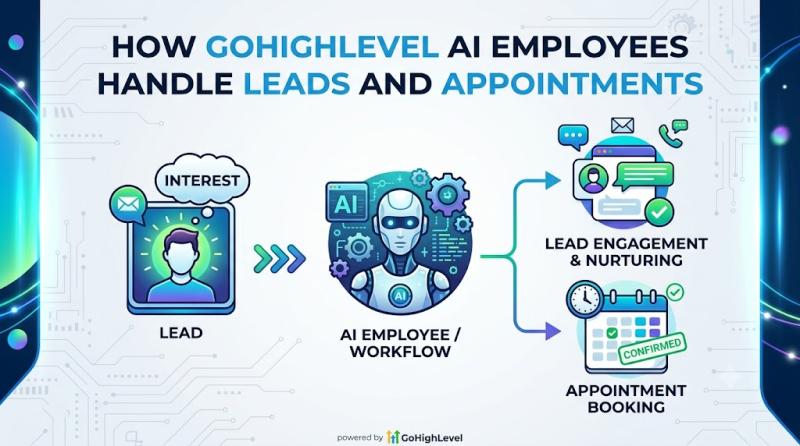
How GoHighLevel AI Employees Handle Leads and Appointments
If you're trying to understand how GoHighLevel can help local businesses respond faster, qualify leads, and book more appointments, one of the most important things to understand is how its AI Employees actually work in the real world.
Because on paper, "AI Employee" sounds exciting.
But business owners and agencies usually want a much simpler answer:
How does GoHighLevel AI Employee handle new leads?
Can it reply to leads automatically?
Can it book appointments for…
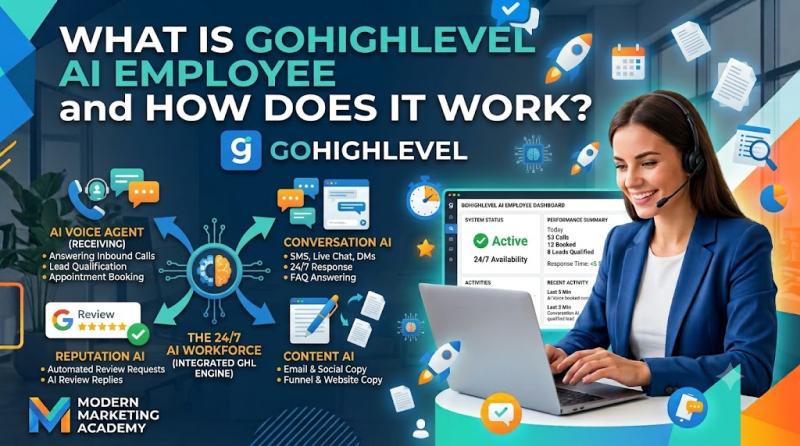
What Is GoHighLevel AI Employee and How Does It Work
If you've been exploring GoHighLevel lately, you've probably seen the term AI Employee show up everywhere-especially around the Summer of AI promotion and the $97/month AI Employee Unlimited offer.
And if you're a business owner, marketer, or agency owner, the obvious questions are:
What exactly is GoHighLevel AI Employee?
Is it one feature or a bundle of tools?
What does it actually do for a business?
How does it work inside GoHighLevel?
What's included in AI…

How to Improve Lead Response Time Using GoHighLevel Conversations
If you're using GoHighLevel for local businesses, one of the fastest ways to improve results is simple:
respond to leads faster.
Because in most local service businesses, the company that replies first often wins the customer.
It doesn't matter whether the lead came from:
a Facebook ad
a landing page
a website contact form
a missed call
Google Ads
website chat
SMS inquiry
social message
If the lead reaches out and nobody answers quickly, the chances of losing that lead go way…

How to Use GoHighLevel Conversations for Appointment Booking
How to Use GoHighLevel Conversations for Appointment Booking
If you're using GoHighLevel for a local business, one of the biggest wins is turning lead conversations into actual booked appointments.
That's where GoHighLevel Conversations becomes incredibly valuable.
A lot of businesses already get inquiries through forms, text messages, website chat, missed calls, Facebook messages, or email. But the problem is not always getting the lead. The problem is moving that lead from "interested" to…
More Releases for HighLevel
List57 Announces Strategic Expansion as HighLevel Agency to Bring Harmony and Au …
FOR IMMEDIATE RELEASE
SAN DIEGO, CA - List57, a veteran leader in the data and lead generation industry for nearly three decades, is excited to announce its official expansion as a HighLevel Agency. This strategic move is designed to solve one of the biggest headaches facing modern entrepreneurs: the chaos of scattered tools and missed opportunities. By combining their high-quality marketing data with the power of the HighLevel platform, List57 is…
Build a Self-Selling AI Sales System with HighLevel Review (2026 Guide)
Build a Self-Selling AI Sales System with HighLevel Review (2026 Guide)
What if your sales system could respond instantly, qualify leads, follow up automatically, and book appointments - without you chasing prospects all day?
That's the promise behind building a Self-Selling AI Sales System with HighLevel. Instead of relying on manual outreach, missed calls, and inconsistent follow-ups, you create a 24/7 automated sales engine powered by CRM, automation, and AI.
In this in-depth…
HighLevel Black Friday & Cyber Monday Deal - Why Now Is the Best Time to Jump on …
Why Now Is the Best Time to Jump on GoHighLevel - 50% Off Black Friday 2025 Deal Breakdown
If you've been thinking about trying GoHighLevel - the all-in-one CRM, funnel builder, email/SMS automation, and complete marketing platform - this is the moment you've been waiting for.
GoHighLevel's Black Friday 2025 deal is officially live, and for a very limited time, you can get 50% OFF for your first 3 months on any…
Russell Rabichev Attends HighLevel Community Event in Los Angeles, Strengthening …
Image: https://www.globalnewslines.com/uploads/2025/11/1764077844.jpg
Russell Rabichev joins Los Angeles HighLevel event, connecting with SaaS leaders to share insights on affiliate marketing, AI automation, and growth.
Los Angeles, CA - Russell Rabichev, entrepreneur, speaker, and father known for his expertise in affiliate marketing, AI automation, and business growth, participated in a HighLevel community event in Los Angeles on November 20, 2025 [https://finance.yahoo.com/news/russell-rabichev-named-top-high-140000117.html]. The gathering offered a relaxed and interactive environment for SaaS founders, marketers, and…
GoHighLevel Review 2026: Is It Worth It for Agencies? HighLevel Reviews
GoHighLevel Review 2026: Is It Worth It for Agencies?
If you're an agency owner, digital marketer, or service-business professional wondering whether GoHighLevel (often called HighLevel) is the right all-in-one platform for you in 2026 - this in-depth review will help you decide.
Let's explore what GoHighLevel really offers - its features, pricing, pros & cons, my personal take, and what real users are saying. I'll also share how this platform opens up…
Verify550 Launches Integration with HighLevel for Accurate Email Verification an …
Bend, OR - Verify550, a global leader in email verification and deliverability technology, today announced its new integration with [https://verify550.com/integrations/gohighlevel/]HighLevel [https://verify550.com/integrations/gohighlevel/], the all-in-one marketing and CRM platform trusted by agencies, entrepreneurs, and digital marketers worldwide.
The integration enables HighLevel users to automatically validate and clean email addresses in real time within their funnels, forms, and workflows. By detecting invalid, disposable, or high-risk addresses before campaigns deploy, businesses can protect sender reputation,…

