


Press release
How to Use GoHighLevel Conversations for Appointment Booking
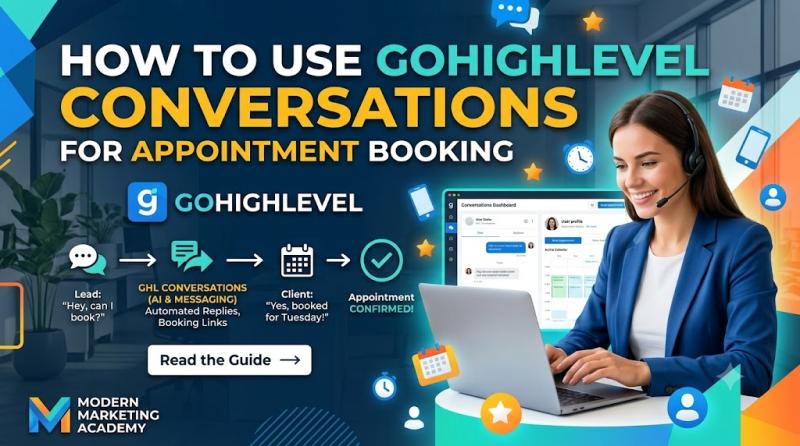
How to Use GoHighLevel Conversations for Appointment Booking
If you're using GoHighLevel for a local business, one of the biggest wins is turning lead conversations into actual booked appointments.
That's where GoHighLevel Conversations becomes incredibly valuable.
A lot of businesses already get inquiries through forms, text messages, website chat, missed calls, Facebook messages, or email. But the problem is not always getting the lead. The problem is moving that lead from "interested" to "booked."
GoHighLevel Conversations helps solve that by giving you a central inbox where you can reply to leads, answer questions, send booking links, manually schedule appointments, and in some setups even let Conversation AI handle appointment booking automatically. HighLevel's help docs show that appointments can be booked directly from the Conversations tab, and that Conversation AI can also collect details, offer available slots, and confirm bookings using a connected calendar.
So if you've been asking:
How do I use GoHighLevel Conversations for appointment booking?
Can I book appointments directly from a lead conversation?
How do Conversations, Calendars, and AI booking work together?
How do I turn SMS, web chat, and inbox messages into booked appointments?
How should an agency set this up for local business clients?
This guide will walk you through it step by step.
By the end, you'll understand how to use GoHighLevel Conversations as an appointment-booking workflow, how to manually book appointments from the inbox, how to send booking links, and how to combine Conversations with automation and Conversation AI to book more appointments with less back-and-forth.
What Is GoHighLevel Conversations for Appointment Booking?
At its core, GoHighLevel Conversations is the inbox where you manage communication with leads and customers.
For appointment booking, that means it becomes the place where you:
receive booking inquiries
answer pre-booking questions
send calendar links
manually book appointments for leads
follow up with unbooked prospects
confirm appointments
handle reschedules or cancellations
continue post-booking communication
So instead of thinking of Conversations as "just the messaging inbox," it's better to think of it like this:
Conversations is the front desk for your lead follow-up and appointment scheduling.
When a prospect says:
"Do you have time this Friday?"
"Can I book a consultation?"
"What's your availability?"
"I missed your call-can I schedule?"
"Can you help me book a cleaning / estimate / consultation?"
that interaction can be handled inside Conversations.
Why GoHighLevel Conversations Matters for Appointment Booking
Most local businesses don't lose appointments because they don't have a calendar.
They lose appointments because the booking process breaks down somewhere between lead inquiry and actual scheduling.
Here's what often happens without a proper conversation-based booking workflow:
a lead fills out a form
no one responds fast enough
the lead texts with a question but gets ignored
the front desk forgets to follow up
the business misses the call and never texts back
the lead doesn't know how to book
someone sends a booking link too late
the lead goes with another provider
That's where Conversations helps.
It allows your team to manage booking-related communication in one place, so the path from lead inquiry → response → booking → reminders becomes much smoother.
The Simple Way to Think About It
If you want the simplest explanation possible:
GoHighLevel Conversations helps you turn inbox conversations into booked appointments.
It does that by giving you a place to:
talk to leads in real time
send them to the right calendar
manually book the appointment for them when needed
trigger appointment-related automation
keep the communication history tied to the contact
So while Calendars handles the actual scheduling system, Conversations is where the human or AI-driven booking conversation happens.
How Conversations and Appointment Booking Work Together in GoHighLevel
To use this properly, you need to understand the roles of different parts of GoHighLevel.
Conversations
This is where the lead communicates with you by SMS, email, chat, or connected channels.
Calendars
This is where your booking availability, appointment types, and scheduling rules live.
Contacts / CRM
This is where the lead's information is stored.
Opportunities / Pipelines
This is where you track the lead's stage in the sales or booking process.
Workflows / Automation
This is where reminders, confirmations, no-show follow-up, and post-booking automation happen.
Conversation AI
This can automate appointment booking conversations in supported setups by collecting details, offering time slots, and booking directly against a connected calendar.
Put all of that together and you get this system:
Lead asks about booking in Conversations
Calendar provides the available appointment slots
Appointment gets booked
Workflows send confirmations and reminders
CRM and pipeline stay updated
That's the full appointment-booking engine.
What You Can Do in GoHighLevel Conversations for Appointment Booking
When it comes to booking appointments, Conversations can be used in three main ways.
1) Use Conversations to Talk Leads Into Booking
This is the most basic and most common use.
A lead might message the business asking:
"Do you have any appointments this week?"
"How much is the consultation?"
"Can I come in tomorrow?"
"What time do you close?"
"I'd like to schedule a call."
In that case, Conversations is where your team can:
answer the lead's questions
qualify them if needed
send a booking link
offer next steps
continue follow-up until the appointment is booked
This is especially useful for local businesses because many leads don't book instantly on the first page visit. They want to ask one or two questions first.
2) Use Conversations to Manually Book the Appointment for the Lead
Sometimes the fastest path is not sending a link and waiting.
Sometimes the lead is already in the conversation and says:
"Friday at 3 PM works for me."
In that case, you can manually book the appointment from inside HighLevel instead of asking them to go book it themselves.
According to HighLevel's support docs, one of the places you can manually book appointments is directly from Conversations by opening the contact and using the calendar/appointment option from the conversation sidebar.
This is incredibly useful when:
the lead wants help booking
the front desk is already texting them
you're on a phone call and want to lock in the slot immediately
the client is less tech-savvy
you want to reduce friction and get the appointment secured now
3) Use Conversation AI to Book Appointments Automatically
In supported setups, Conversation AI can handle appointment booking inside the conversation by:
recognizing booking intent
collecting the lead's details
checking the selected calendar
offering available time slots
confirming the appointment
optionally triggering post-booking workflows
HighLevel's documentation explains that Conversation AI appointment booking can be configured with a single calendar or multiple calendars, depending on your setup, and can also support post-booking actions such as triggering workflows or pausing the bot after booking.
This is especially interesting if your agency offer includes:
AI receptionist
AI appointment setter
AI chat follow-up
after-hours booking automation
lead qualification + scheduling
Before You Use Conversations for Appointment Booking
Before the booking workflow works smoothly, you need a few pieces set up correctly.
1) Create Your Booking Calendar First
You need at least one HighLevel booking calendar configured before you can use appointment booking properly.
HighLevel's calendar setup guide recommends creating your booking calendar first, setting the host, appointment duration, availability, booking rules, and related settings.
Depending on the business, this might be:
a consultation calendar
a sales demo calendar
a service appointment calendar
a discovery call calendar
a treatment consultation calendar
a team member booking calendar
If the calendar doesn't exist, there's nothing to book against.
2) Connect the Communication Channels You Want to Use
Conversations works best when the channels the business actually uses are connected, such as:
SMS / phone
website chat
Facebook / Instagram messaging if relevant
That way, when leads ask to book, the message lands inside the same inbox your team is monitoring.
3) Decide How You Want Leads to Book
There are three main booking styles you can use with Conversations:
Option A: Send a booking link
Best when the lead is happy to self-book.
Option B: Manually book the appointment for the lead
Best when you want to remove friction and secure the appointment yourself.
Option C: Use Conversation AI to book automatically
Best when you want AI to handle the back-and-forth booking process at scale.
You can use all three depending on the situation.
How to Use GoHighLevel Conversations for Appointment Booking Step by Step
Now let's walk through the actual process.
Step 1: Open the Lead Conversation
Go to Conversations inside the relevant GoHighLevel sub-account and open the contact thread.
This could be a lead who came in through:
a website form
SMS
missed call text-back
Facebook ad inquiry
live chat
email inquiry
referral message
Once the lead is in the inbox, Conversations becomes the place where the appointment-booking discussion starts.
Step 2: Qualify the Lead and Confirm They're Ready to Book
Not every conversation should jump straight to a booking link.
Sometimes the lead needs a quick response first.
Examples:
"Yes, we do offer that treatment."
"Yes, we service your area."
"Our consultation is free."
"We have appointments this week."
"We can help with that-would you like to book a call?"
This is where your team uses the conversation to move the lead toward a clear booking decision.
For many local businesses, the goal is simply to answer the key question and then transition naturally into scheduling.
Step 3: Choose the Booking Method
Once the lead is ready, decide how the appointment should be booked.
Method 1: Send the calendar booking link
This is best when the lead is comfortable booking on their own.
You reply with something like:
"Absolutely - here's the link to choose the best time for your consultation."
This works well for:
discovery calls
consultation funnels
low-friction booking offers
businesses with a clean self-booking process
Method 2: Manually book the appointment from Conversations
This is best when the lead already told you the time they want or when you want to reduce drop-off.
For example:
"Friday at 3 PM works."
At that point, you can book it for them instead of asking them to click a link and finish it themselves.
Method 3: Let Conversation AI handle the booking
This is best when you've set up AI-based scheduling and want the bot to collect the details, present available times, and complete the booking. HighLevel's docs describe this flow as part of Appointment Booking in Conversation AI.
How to Manually Book an Appointment From GoHighLevel Conversations
This is one of the most useful workflows for local businesses.
According to HighLevel's support documentation, you can book an appointment from the Conversations tab by opening the contact and using the appointment/calendar option from the conversation sidebar.
Here's the practical flow.
Step 4: In the Conversation, Open the Book Appointment Option
From the lead's conversation, look for the appointment/calendar option in the contact area or sidebar.
When you open the booking modal, you'll typically be able to:
select the calendar
confirm the contact
choose the date and time
add appointment details
save the appointment
HighLevel notes that manual booking is also possible from Contacts, Calendars, and Opportunities-but from a live lead conversation, Conversations is often the fastest path because you're already talking to the lead there.
Step 5: Select the Right Calendar
If the business has multiple calendars, choose the correct one.
Examples:
New Patient Consultation
HVAC Estimate
Botox Consultation
Discovery Call
Sales Demo
Follow-Up Appointment
Make sure you're booking the lead into the right appointment type, not just the first calendar you see.
This matters because different calendars can have different:
availability
durations
assigned staff
reminder workflows
booking rules
Step 6: Choose the Appointment Date and Time
Now pick the slot the lead agreed to.
HighLevel's manual booking flow lets you enter the appointment details and schedule the event for the contact.
This is the moment where the conversation turns into an actual appointment on the calendar.
If you're booking while texting the lead, you can confirm in the thread:
"Perfect - I've got you booked for Friday at 3:00 PM."
That keeps the experience smooth and personal.
Step 7: Add Any Important Appointment Details
Depending on the business, you may want to add:
appointment title
internal notes
custom location / meeting link
service context
staff notes
This becomes more important for higher-touch businesses like clinics, med spas, agencies, or consultative services.
HighLevel also supports appointment notes that can sync across related records such as the contact, opportunity, and conversation, which helps the team keep booking context organized.
Step 8: Save the Appointment and Confirm It in the Conversation
Once the appointment is saved, send a confirmation message in the conversation.
Example:
"You're all set for Friday at 3:00 PM. We'll send you a confirmation and reminder shortly."
This matters because it gives the lead immediate reassurance that the appointment is actually locked in.
Step 9: Let Appointment Confirmation and Reminder Workflows Take Over
After the booking is created, your automation should handle the next stage.
A solid appointment workflow usually includes:
booking confirmation message
reminder 24 hours before
reminder a few hours before
reschedule instructions if needed
no-show follow-up if applicable
This is where Conversations + Calendars + Workflows become powerful together.
Conversations helps get the appointment booked.
Workflows help make sure the lead actually shows up.
How to Use Booking Links Inside Conversations
Not every lead needs manual booking.
Sometimes the fastest path is simply to send the lead to the right calendar.
This works especially well when:
the lead is ready to choose a time themselves
you don't want to go back and forth on availability
the business already has a clean booking page
you want to reduce admin work
A simple reply might be:
"Here's the link to grab the best available time for your consultation."
That's still using Conversations for appointment booking because the booking process starts in the conversation, even if the final slot selection happens on the calendar page.
How to Use Conversation AI for Appointment Booking
If you want to automate more of the process, you can use Conversation AI appointment booking.
HighLevel's support docs explain that Conversation AI can be configured to:
recognize when a lead wants to book
collect contact details
use a selected booking calendar
offer available time slots
support single-calendar or multi-calendar setups
optionally handle cancellations or reschedules depending on configuration
trigger workflows after booking or pause the bot after the appointment is booked
This means the flow can look like:
Lead messages the business
AI replies inside the conversation
AI asks what type of appointment they need
AI offers available times
Lead picks a slot
Appointment gets booked
Confirmation / reminder workflows fire
That's extremely useful for:
after-hours inquiries
high-volume appointment businesses
agencies selling AI receptionist services
businesses that want faster response without staffing the inbox 24/7
Single Calendar vs Multiple Calendar Booking in Conversation AI
If you use Conversation AI, you'll usually need to decide between single-calendar and multi-calendar booking.
Single Calendar Booking
Best when all appointment requests should go to one main calendar.
Examples:
one consultation calendar
one sales demo calendar
one treatment booking calendar
Multiple Calendar Booking
Best when the business has different booking paths, such as:
sales calls vs support calls
different services
multiple locations
different departments
separate consultation types
HighLevel's docs explain that multiple calendar booking can use calendar descriptions, keywords, and fallback logic so the AI can route the lead to the right booking destination more accurately.
Best Appointment-Booking Workflow Using GoHighLevel Conversations
If you're setting this up for a local business, this is the workflow I'd recommend.
Step 1: Lead enters Conversations
The lead comes in through SMS, web chat, form follow-up, missed call text-back, or another channel.
Step 2: Fast response
A staff member or AI replies quickly.
Step 3: Clarify what the lead needs
Answer questions and identify the correct appointment type.
Step 4: Choose the booking method
send booking link
manually book the appointment
let AI handle booking
Step 5: Appointment gets created
The lead is now officially scheduled.
Step 6: Opportunity / pipeline gets updated
Move the lead to Appointment Set or the relevant stage.
Step 7: Confirmation and reminder automation runs
This reduces no-shows and keeps the process organized.
Step 8: Use Conversations for pre-appointment communication
If the lead has questions, needs to reschedule, or wants to confirm something, the thread is already there.
That's the real power of using Conversations for appointment booking-it doesn't just book the appointment. It supports the entire communication flow around the appointment.
How Local Businesses Can Use Conversations for Appointment Booking
Here's how this looks in real niches.
1) Dental Clinics
Use Conversations to:
answer treatment questions
book new patient consultations
schedule whitening or implant consults
send booking links after insurance or pricing questions
manually book leads who text in
2) Med Spas and Aesthetic Clinics
Use Conversations to:
respond to treatment inquiries
book Botox / facial / consultation appointments
guide leads from promo offers into booking
manually secure appointments for hot leads before they drop off
3) HVAC, Plumbing, Roofing, and Home Services
Use Conversations to:
respond to estimate requests
schedule inspections or quote visits
book urgent service calls
recover missed calls and turn them into appointments
4) Coaches, Agencies, and Consultants
Use Conversations to:
move discovery-call leads into your calendar
answer pre-call questions
book consultations manually when the lead is already in the inbox
use AI booking for after-hours inquiries
5) Salons, Clinics, and Wellness Businesses
Use Conversations to:
answer availability questions
schedule treatments
handle reschedules
keep the booking conversation attached to the contact record
How Agencies Should Use This for Local Business Clients
If you run an AI agency or GoHighLevel agency, don't position this as "we turned on the Conversations tab."
Position it as:
"We help you turn more inquiries into booked appointments."
That means your service can include:
calendar setup
booking-link setup
manual booking SOPs
conversation templates for appointment replies
missed call text-back setup
appointment confirmation/reminder workflows
Conversation AI appointment booking setup
pipeline updates after booking
reschedule and no-show follow-up workflows
That's a real business outcome:
faster response
fewer lost leads
more booked appointments
cleaner booking operations
Common Mistakes to Avoid
1) No calendar setup before using Conversations
If the calendar isn't configured properly, the booking process falls apart.
2) Sending people to the wrong calendar
If the business has multiple appointment types, map them clearly.
3) Not following up after a lead asks about availability
Interest without follow-up is not a booked appointment.
4) Relying only on booking links when the lead is ready right now
Sometimes it's better to manually book and lock it in.
5) No confirmation or reminder automation
Booking is step one. Show-up rate matters too.
6) Not using pipeline stages after the booking
A booked appointment should move the lead forward operationally.
7) Using AI booking without proper calendar descriptions and prompts
If you use multi-calendar AI booking, the bot needs clean instructions and calendar context to route accurately.
Frequently Asked Questions
Can I book appointments directly from GoHighLevel Conversations?
Yes. HighLevel's support docs show that appointments can be manually booked from the Conversations tab by opening the contact conversation and using the appointment/calendar option in the sidebar.
Do I need a booking calendar first?
Yes. You need a HighLevel booking calendar configured before you can properly book appointments, whether manually or through Conversation AI.
Can GoHighLevel Conversation AI book appointments automatically?
Yes. Conversation AI can be configured to collect contact details, offer available time slots, and book appointments using a selected calendar. It can also support post-booking workflows and, in some setups, multiple calendar routing.
What's the difference between using a booking link and manually booking from Conversations?
Booking link = the lead picks their own time
Manual booking = your team books the appointment for the lead from inside HighLevel
Both can be part of your Conversations workflow.
Can I use Conversations for reschedules and follow-up after the appointment is booked?
Yes. Conversations is useful not just for initial booking, but also for pre-appointment questions, reminders, reschedule conversations, and follow-up communication tied to that contact.
Final Thoughts
If you want to use GoHighLevel to help local businesses book more appointments, Conversations should be part of your booking system-not just your messaging system.
Because in the real world, appointments don't just happen because a calendar exists.
They happen because:
someone responds fast
the lead gets the right information
the booking path is easy
the appointment gets locked in
reminders and follow-up happen automatically
That's exactly where GoHighLevel Conversations fits.
Use it to:
answer booking questions
send calendar links
manually schedule appointments for leads
let Conversation AI book appointments when appropriate
support confirmations, reminders, and follow-up
When you combine Conversations + Calendars + Workflows + Pipeline tracking, GoHighLevel becomes much more than a CRM.
It becomes a real appointment-booking and lead-conversion system for local businesses.
Ready to Use GoHighLevel for Appointment Booking?
If you want to build lead follow-up, appointment booking, reminders, CRM, and automation in one platform, you can start here:
Start Your GoHighLevel Account
Try GoHighLevel here ✅https://cutt.ly/or3Cn8j4
.............
47 W 13th St, New York, NY 10011
👉 Start Your GoHighLevel 14 days Free Trial Today:
✅https://cutt.ly/or3Cn8j4
Get 30 Days Free Trial + Free Live Bootcamp to Launch with HighLevel ✅https://cutt.ly/It8w0sAH
Try Summer of Ai ✅https://www.gohighlevel.com/ai?fp_ref=shafiqul51
Try SaaS Pro free Trial ✅https://www.gohighlevel.com/pro-trial?fp_ref=shafiqul79
This release was published on openPR.
Permanent link to this press release:
Copy
Please set a link in the press area of your homepage to this press release on openPR. openPR disclaims liability for any content contained in this release.
You can edit or delete your press release How to Use GoHighLevel Conversations for Appointment Booking here
News-ID: 4571267 • Views: …
More Releases from GoHighLevel Reviews
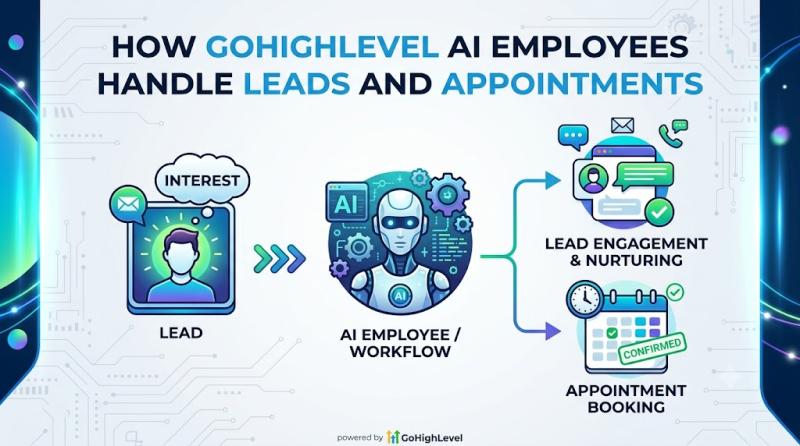
How GoHighLevel AI Employees Handle Leads and Appointments
If you're trying to understand how GoHighLevel can help local businesses respond faster, qualify leads, and book more appointments, one of the most important things to understand is how its AI Employees actually work in the real world.
Because on paper, "AI Employee" sounds exciting.
But business owners and agencies usually want a much simpler answer:
How does GoHighLevel AI Employee handle new leads?
Can it reply to leads automatically?
Can it book appointments for…
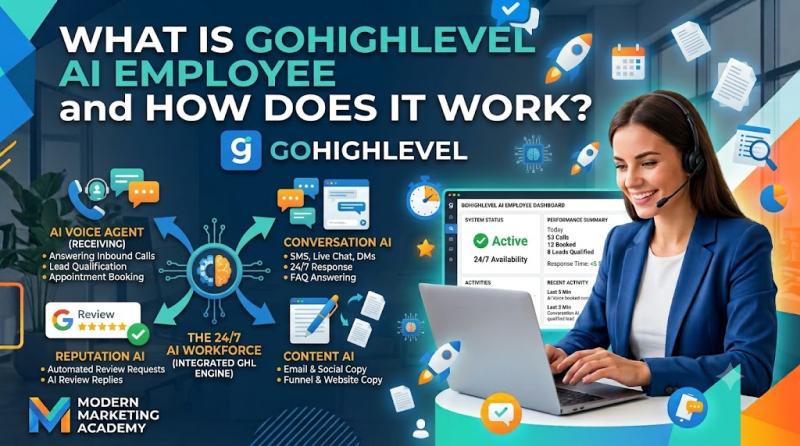
What Is GoHighLevel AI Employee and How Does It Work
If you've been exploring GoHighLevel lately, you've probably seen the term AI Employee show up everywhere-especially around the Summer of AI promotion and the $97/month AI Employee Unlimited offer.
And if you're a business owner, marketer, or agency owner, the obvious questions are:
What exactly is GoHighLevel AI Employee?
Is it one feature or a bundle of tools?
What does it actually do for a business?
How does it work inside GoHighLevel?
What's included in AI…

How to Improve Lead Response Time Using GoHighLevel Conversations
If you're using GoHighLevel for local businesses, one of the fastest ways to improve results is simple:
respond to leads faster.
Because in most local service businesses, the company that replies first often wins the customer.
It doesn't matter whether the lead came from:
a Facebook ad
a landing page
a website contact form
a missed call
Google Ads
website chat
SMS inquiry
social message
If the lead reaches out and nobody answers quickly, the chances of losing that lead go way…
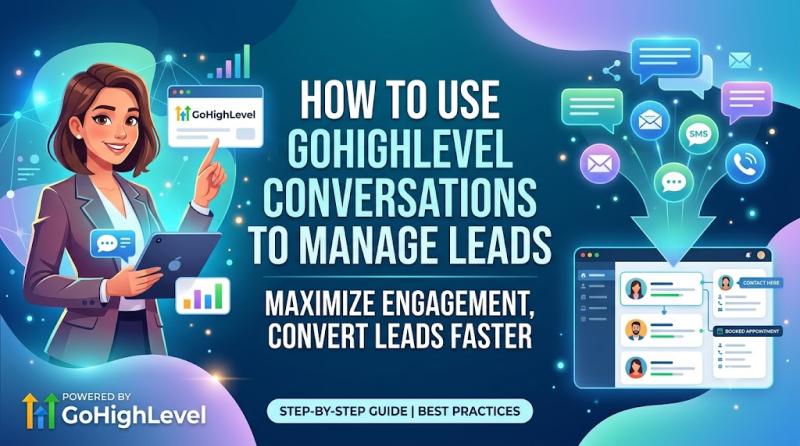
How to Use GoHighLevel Conversations to Manage Leads
If you're using GoHighLevel to help a business generate leads, one of the most important sections in the platform is Conversations.
Why? Because leads don't turn into appointments, sales, or customers just because they filled out a form.
They turn into customers because someone follows up, replies quickly, answers questions, books the appointment, and keeps the conversation moving.
That's exactly what GoHighLevel Conversations is built for.
It gives you a central inbox where you…
More Releases for Conversation
A Conversation with Brett Reck: Unlocking Success in Finance
Brett Reck [https://kivodaily.com/interviews/leading-with-purpose-a-conversation-with-brett-reck-on-success-family-and-diversity-in-finance/], a seasoned professional with over two decades of experience in the financial services industry, shares insights into his career journey, personal philosophy, and strategies for success in a recent Q&A session.
Brett's background, marked by exposure to diverse cultures due to his father's career in the oil industry, shaped his approach to success. He pursued his undergraduate studies at Vanderbilt University, earning a double major in Mathematics and…
Conversation Intelligence CI Market Size & Trends To 2031
Conversation Intelligence CI Market Overview 2024:
The Conversation Intelligence CI Market 2024 Report makes available the current and forthcoming technical and financial details of the industry. It is one of the most comprehensive and important additions to the Prudent Markets archive of market research studies. It offers detailed research and analysis of key aspects of the Conversation Intelligence CI market. This report explores all the key factors affecting the growth of…
New virtual video conversation app launches on Kickstarter
How many of us have lost precious family members and the history, connections, stories, media, memories, and medical information they take with them?
Introducing whoowe, the app that lets you create a living legacy specifically tailored to you, loved ones, and friends. Finally, a place to ask those nagging questions, heartfelt messages, or share fun, meaningful and important life experiences in a way no photo or diary ever will.
Use whoowe…
Attn: Grace founders in conversation with Nadya Okamoto
As a 22-year-old very passionate about breaking the stigma around menstruation, I talk a LOT about periods. However, something that I think about quite often (but don’t have the knowledge or experiences to take action on) is the lack of conversation about menopause and incontinence. If you think periods are stigmatized…think about how little we even know about or hear about menopause mentioned.
That’s why I was so excited when…
Robocopy is becoming Conversation Design Institute
Conversation Design Institute sets out to train the non-engineering workforce for the future AI world
In a world where people will interact with chatbots and voice assistants, conversation designers are crucial to create trust and human-centric communication.
With the rise of conversational interface, like chatbots and voice assistants, conversation design becomes a promising career choice. As the Alexa, Google Assistant, Bixby, and others find their place in the lives of many, the…
Join the Conversation on Diversity
The Diversity in Energy Summit is being held in London on October 8th and brings together leading companies for a unique event shaped to tackle the topics of diversity, inclusion and empowerment in the global energy sector.
You will hear from key players, decision-makers and experts in the field as they share their views, insights and successes in the areas of diversity, inclusion and empowerment with the aim of highlighting…

