


Press release
Link Verification Code Texts Explained: How They Work and When to Trust Them
The short version
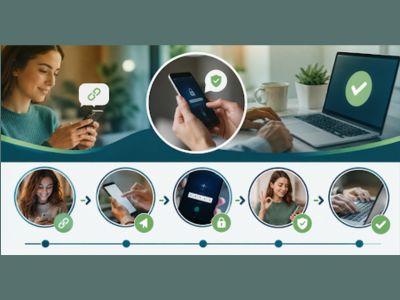
A link verification code text is a one-time, time-limited code, or a tappable confirmation link, that a service sends to your phone to check that you control the number attached to an account. It's used during logins, signups, password resets, and payments. Paired with your password, it forms two-factor authentication, so knowing the password alone isn't enough to get in. That's the whole concept in a couple of sentences. The rest is detail worth knowing, because it changes how confidently you handle these messages.
A short history of how we got to text codes
It helps to see where these messages came from. For years, a password was the only thing standing between you and your accounts, and that was fine until passwords started leaking by the millions and criminals learned to guess and reuse them at scale. The response was two-factor authentication: add a second, separate proof of identity. Early versions used small physical tokens that displayed a rotating number, mostly issued by banks and employers. When nearly everyone got a mobile phone, texting a code became the obvious mass-market version, because it needed no extra hardware. Text codes spread quickly and are now almost everywhere. More recently, the weaknesses of SMS pushed the industry toward authenticator apps, and then toward passkeys, which aim to remove the shared secret altogether. A verification text, in other words, is one step in a long march toward proving identity without leaning on a password alone.
What "verification" really means here
Verification is just the system asking, "Are you really the person you claim to be?" A password is one answer, but passwords leak, get guessed, and get reused across sites. So services add a second, independent check: something you have, not just something you know. Your phone is that something. When a code lands on it and you type the code back, you've demonstrated possession of the registered number, which is much harder for a distant attacker to fake than a password is. The code is proof of possession, nothing more and nothing less.
Code-based and link-based verification, two flavors of the same idea
The "link" and the "code" in the phrase point to two ways of doing the same job. With a code, the message contains a short number you copy into the app or site. With a link, the message contains a tappable web address, and opening it confirms the action without your typing anything. Some services combine both, or let you choose between them. Behind the scenes they're equivalent: each proves that the message reached the right phone and that you responded. Link-based confirmation can feel smoother, but it also makes people more comfortable tapping links in texts, a habit worth keeping in check, since that very comfort is what phishing relies on.
How a one-time code is created and why it disappears so fast
When you trigger a login or reset, the service generates a fresh code on its servers, ties it to your account and that specific attempt, and sends it to your number. Crucially, the code is temporary, usually valid for only a few minutes, and single-use. Once you enter it, or once the timer runs out, it's dead. That short life is a feature, not an annoyance. It shrinks the window in which a stolen code is useful, so even if someone glimpses it over your shoulder or manages to intercept it, they have only moments to act. This is why systems ask you to request a new code rather than reusing an old one, and why a code from ten minutes ago simply won't work anymore.
Where you'll actually run into these texts
The same basic message shows up across very different situations. Recognizing each one helps you judge whether a given text makes sense for what you were doing.
Signing in
This is the everyday case. After you enter your password, the service texts a code to confirm the login, especially when you're on a new device or in a new location. It's the most common form of two-factor authentication, mainly because almost everyone has a phone that can receive texts, so it works for a huge range of people without extra setup.
Setting up a new account
When you register somewhere and enter your number, the service usually sends a code to confirm the number is real and belongs to you. This stops people from signing up with numbers they don't control and cuts down on the flood of fake accounts that would otherwise clog up a platform.
Resetting a password
Forgot your password? The "forgot password" flow texts a code to prove you own the account before letting you set a new one. It's a safeguard, which is also why an unexpected reset code can be a hint that someone else tried to take the account. If you didn't start the reset, the check just did its job by stopping them.
Confirming a payment
Checkout tools increasingly text a code to confirm it's really you spending money. Stripe's Link is a widely seen example. If you once saved your card and number to check out faster, you'll get a code like "Your Stripe verification code is" followed by digits when you pay at a store that uses it. It's a normal part of completing the purchase, not a sign that anything has gone wrong.
Recovering or securing an account
Beyond routine logins, services send codes when you change security settings, add a new device, or recover an account you were locked out of. In each case the code confirms that the person making a sensitive change controls the phone on file, which keeps a stranger from quietly rewiring your account behind your back.
Approving a change or a new payee
Banks and payment apps often send a code when you add a new payee, change your contact details, or move money to a new destination. The code makes sure that a sensitive change is being made by the account holder and not by someone who slipped past the password. If you ever get one of these and you weren't making a change, treat it as a strong signal to check the account and secure it right away.
What actually happens between your phone and the server
The exchange is quicker than it feels. You enter your password, and the service's server checks it. If it matches, the server creates a random code, stores it briefly alongside a note of which account and login attempt it belongs to, and hands it to a messaging system that delivers it to your number as an ordinary text. You read the code and type it back into the site. The server compares what you typed against what it stored, checks that the code hasn't expired and hasn't already been used, and if everything lines up, it lets you in and discards the code. The whole point is that only someone holding your phone should be able to complete that loop, which is why possession of the number can stand in for proof of identity.
Link-based verification works on the same principle with one twist. Instead of a number you retype, the message carries a unique web address that already contains the proof. When you open it, your tap sends that hidden proof back to the server, which recognizes it and confirms the action. You didn't type anything, but you still demonstrated that the link reached your phone and that you chose to open it. It's convenient, though it does train people to tap links in texts, which is precisely the reflex that phishing depends on.
Link-based verification in a bit more depth
You'll meet link-based confirmation most often in email, where it's sometimes called a magic link. Instead of a password, a service emails you a link that logs you in when you click it, on the theory that only you can open your inbox. It's smooth and sidesteps passwords entirely, but it leans heavily on your email being secure, which is another reason protecting your email account matters so much. In text messages, links are used both for legitimate confirmations and, unfortunately, by Con artist, so the same convenience cuts both ways. Whenever a link is involved, the safest instinct is to confirm you actually started the action and to be wary of any link you didn't expect.
Why phone-based codes aren't perfect
Text codes are popular because they're easy and work on any phone, but they carry real weaknesses worth understanding. Text messages aren't encrypted end-to-end, so in principle they can be intercepted. More practically, attackers use SIM swapping, convincing your carrier to move your number to their device, to redirect your codes entirely. And because the code is just a number, a Con artist who talks you into reading it aloud gets the same access you would have. None of this makes SMS codes worthless, since they still beat a password on its own by a wide margin. It just means they're the floor of good security, not the ceiling.
Stronger ways to prove it's you
If you want better protection than texts for your most important accounts, three options stand out. Authenticator apps like Google Authenticator, Microsoft Authenticator, or Authy generate codes directly on your device, and those codes never travel over the cellular network, so SIM swaps and interception don't touch them. Hardware security keys are small physical devices you tap or plug in, and they're extremely resistant to phishing because they only work with the genuine site. Passkeys, the newest approach, replace passwords entirely with a cryptographic key stored on your device and unlocked by your face, fingerprint, or PIN, so there's no code to phish at all. You don't need all three. Adding any one of them to your email and financial accounts is a meaningful upgrade.
Handling verification texts the smart way
A few simple habits keep these messages working for you rather than against you. Only enter a code on a page you opened yourself, never one reached through a link in a message you didn't expect. Never read a code aloud or forward it, because it's yours alone and no legitimate company will ask for it. If a code shows up when you did nothing, treat it as a prompt to check that account and, if needed, change the password from the official site. Keep your recovery details current so you're never forced to trust a shady message just to get back in.
And where an account really matters, move from texts to an authenticator app or a security key. If you like keeping up with practical security topics, you'll often see these issues covered in the general news https://www.toolsimpli.com/general-news as breaches and Con artist make headlines, and the fixes reported there almost always come back to the same handful of habits.
SMS, authenticator apps, security keys, and passkeys, compared in plain terms
Each method trades convenience against strength. Text codes are the easiest to use and work on any phone, but they're the most exposed, since they can be intercepted or redirected through a SIM swap, and a Con artist can talk you into sharing one. Authenticator apps are a clear step up: they generate codes on your device that never travel over the network, so remote interception and SIM swaps don't reach them, and the only real downside is the small effort of setting them up. Hardware security keys are stronger still, because they physically confirm you're on the genuine website and can't be fooled by a lookalike page, though you do have to carry the key and not lose it. Passkeys are the newest and, for most people, the most promising, replacing the password entirely with a key locked to your device and unlocked by your fingerprint, face, or PIN, which leaves nothing for a phisher to capture. A sensible plan for most people is to use text codes where nothing else is offered, an authenticator app for important accounts, and passkeys wherever a service supports them.
Common myths worth clearing up
A few misunderstandings cause needless worry. The first is that receiving a code means you've been hacked. It doesn't; a code is just a prompt, and on its own it changes nothing about your account. The second is that these codes are a foolproof shield. They're a strong layer, but they can be defeated if you share the code or lose control of your number, which is why they work best alongside good password habits. The third is that a code text asking you to "reply to confirm" is normal. Legitimate codes are entered into an app or website, not sent back as a reply, so a message urging you to text the code back is a warning sign. Clearing up those three ideas takes most of the anxiety out of the whole topic.
What to do when a code never arrives
Sometimes the problem is the opposite: you're expecting a code and it just won't come. A few practical checks usually solve it. Make sure your phone has signal and that message-blocking or spam filters aren't quietly catching short codes. Confirm the account has your current number, since an old number left on file is a frequent culprit. Wait a moment and use the "resend" option rather than requesting many codes in a row, because rapid repeats can trip rate limits and delay things even further. If texts consistently fail, most services offer a backup such as an authenticator app, email, or one-time recovery codes you saved when you set the account up. Keeping a set of those backup recovery codes somewhere safe means a delayed text never locks you out for long.
Do you need this on every account?
Not equally. It's sensible to prioritize by what an account can cost you if it's lost. Your email sits at the top, because it can reset everything else, so give it the strongest protection you can. Banking, payment, and investment accounts come next, followed by anything storing your card details or personal data. Social media matters more than people think, since a hijacked profile can be turned against the people who trust you. For low-stakes accounts, a text code or even a strong, unique password may be enough. Spreading your effort this way means the accounts that would hurt most to lose get the sturdiest locks, without turning every login into a chore.
How these texts fit into staying safe overall
Verification codes are one tool among several, and they work best as part of a small set of habits rather than on their own. Strong, unique passwords stop the attacks that trigger most unwanted codes in the first place. A code or, better, an app or passkey adds the second layer. Keeping your phone and apps updated closes the gaps that malware would use. And a healthy suspicion of unexpected messages ties it all together, because the human decision to pause is what defeats the Con artist that technology alone can't stop. Seen this way, a verification text isn't a nuisance to endure but a visible sign that a system is checking twice before it trusts a login.
Where verification is heading next
The direction of travel is away from codes you have to read and type. Passkeys are the clearest sign of that shift: they let you sign in with the same fingerprint or face scan you already use to unlock your phone, with no password and no code to intercept or share. Major platforms and websites have been adding passkey support steadily, and for many people it's now the smoothest and safest way to log in. Text codes won't vanish overnight, since they work on every phone and require nothing extra to set up, so they'll remain a common fallback for a long time. But it's reasonable to expect the codes you receive to slowly become a backup method rather than your main one, especially for accounts that matter. Getting comfortable with authenticator apps and passkeys now means you'll be ready as more of your accounts make the change.
The one habit that matters most
If you remember nothing else, remember this: a verification code is proof that you have your phone, and it only does its job when you are the one who enters it. Everything else, the apps, the keys, the passkeys, and the careful checks, builds on that single idea. Keep the code to yourself, make sure you started whatever the code is confirming, and enter it only on a page you opened yourself. That habit alone puts you ahead of the great majority of problems people run into with these messages, and it takes no technical knowledge at all.
Once you can picture what's happening behind the scenes, a short-lived code proving you hold the phone, checked against your password, these texts stop being mysterious. You'll know why they arrive, when they make sense, and how to respond when one doesn't. Use them as the genuine safety layer they are, lean on stronger methods for the accounts you can't afford to lose, and treat any request to share a code as the red flag it always is. For more clear, no-nonsense explainers and free tools, Toolsimpli https://www.toolsimpli.com/ is worth a look.
Address of OpenPr Author Agency ( United State )
About Link Panda - OpenPR Author Agency
Link Panda is a professional off-page SEO and digital PR agency specializing in guest posting, press release publications, and brand visibility services. We help brands grow authority and online presence through high-quality guest posts on real, niche-relevant websites and premium press release platforms.
Note: This bio is for author/agency identification purposes only and is not a part of the published content or press releases.
This release was published on openPR.
Permanent link to this press release:
Copy
Please set a link in the press area of your homepage to this press release on openPR. openPR disclaims liability for any content contained in this release.
You can edit or delete your press release Link Verification Code Texts Explained: How They Work and When to Trust Them here
News-ID: 4611369 • Views: …
More Releases from Link Panda SEO Agency

Proven Ways Men Can Manage Erectile Dysfunction and Improve Sexual Confidence
Erectile dysfunction (ED) is more common than most men admit. In Australia, about one in five men over 40 is affected, according to Healthy Male. Overseas, the US-based Massachusetts Male Aging Study found that around half of men aged 40 to 70 had some degree of ED. The good news is that many men can manage with a mix of lifestyle changes, medical treatment and honest conversations. In this guide,…

Full-Arch Dental Implant Solutions in Antalya: Comparing All-on-4 and All-on-6
Complete or extensive tooth loss can influence nutrition, speech, facial support and confidence in daily life. Although removable dentures remain an appropriate option for many people, some patients experience movement, reduced chewing ability or difficulty adapting to them. Full-arch implant treatments offer another approach by supporting a fixed dental restoration on implants placed within the jawbone.
All-on-4 and All-on-6 are two commonly researched full-arch concepts. Both can replace the teeth…

ED in Your 30s: Why Recurring Symptoms Deserve Medical Attention
Australian telehealth provider DirectMeds https://www.directmeds.com.au/ is encouraging men in their 30s with recurring Engorgement difficulties to seek medical assessment rather than assume stress is the only cause. Erectile dysfunction https://www.directmeds.com.au/mens-health/erectile-dysfunction (ED) is often thought to primarily affect men in their 40s and 50s, but it can affect younger men too.
Understanding the possible causes and seeking appropriate medical advice can help identify underlying health concerns and guide treatment decisions.
DirectMeds is…
Booklet Printing For Realtors In Scarborough: A Guide To Better Property Marketi …
A property booklet gives potential buyers a useful resource to review after a viewing. It brings photos, property details, floor plans and neighbourhood information together in one place. Booklet printing for realtors in Scarborough https://printodpi.ca/product-category/printing-service/real-estate-booklets/ helps real estate agents present their listings professionally and leave buyers with a lasting impression of each property.
The essential is to select an appropriate format that contains information buyers want. An open house, listing presentation…
More Releases for Text
Mango AI's Latest Text to Video Maker Turns Text into Engaging Videos
Mango AI, an AI video generator developed by Mango Animate, has launched its latest innovation: a text to video (https://mangoanimate.com/ai/text-to-video) maker designed to streamline video production. This versatile tool enables users to transform text prompts into AI-generated video clips, eliminating the need for traditional video editing expertise.
Creating a video with Mango AI is intuitive and flexible. Users enter a text prompt that describes the desired scene, actions, characters, locations, or…
AIVocal Text to Speech - Turn Any Text into Natural, Engaging Speech
In today's digital world, creating engaging audio content has become essential for creators, educators, and businesses. The Text to Speech (https://aivocal.io/ai-speech) tool from AIVocal makes this process effortless. It transforms your written content - from blog posts and scripts to reports and presentations - into natural, human-like audio. Whether you want to create narrated videos, audiobooks, podcasts, or educational materials, AIVocal gives you the power to produce professional-quality voiceovers without…
Mango AI's Text to Video Generator Turns Text into Interactive Videos
As video creation becomes more important for businesses and individuals, making good videos quickly is a big challenge. Mango AI, an innovative AI video generator developed by Mango Animate, introduced an intuitive text to video (https://mangoanimate.com/ai/text-to-video) tool to solve this problem. This tool benefits people who need to make videos often but need more time or the right skills. With it, anyone can transform scripts into videos that catch the…
AI Text-To-Image Generator Market From Text to Reality: The Rise of the AI Text- …
AI Text-To-Image Generator Market to Record an Exponential CAGR by 2031 - Exclusive Report by InsightAce Analytic
InsightAce Analytic Pvt. Ltd. announces the release of a market assessment report on the "Global AI Text-To-Image Generator Market Size, Share & Trends Analysis Report By Component (Software and Services), By Application (Mobile Terminal, PC Terminal), By End-User (Art, Education, Fashion, Businesses, NFTs)- Market Outlook And Industry Analysis 2031"
The Global AI Text-To-Image Generator Market…
Mango Animate's Text Video Software Will Design Engaging Text Videos Easily
The intuitive text video maker simplifies the process of video production for everyone without any prior design knowledge. The software includes an array of features empowering users to create text animated videos that stand out.
Mango Animate will release a text video software(https://mangoanimate.com/products/tm) program that aims to help users of all expertise, be it professional video creators and someone with no video design knowledge, and convert their text into winning animated…
Text Analytics Market
Text Analytics Market: Introduction
Text analytics also known as text mining is used to analyze the unstructured data into meaningful insights. The text mining software examines the large chunk of written materials which identifies relationship, facts and assertions, whereby visualizing it the form of charts, graphs, maps and others.
These visualizing techniques are helpful to find the potential business insights in social media posts, medical records, surveys and other data based…

