


Press release
Seedance 2.5 AI Video Maker: A Practical Guide to Modern AI Video Creation
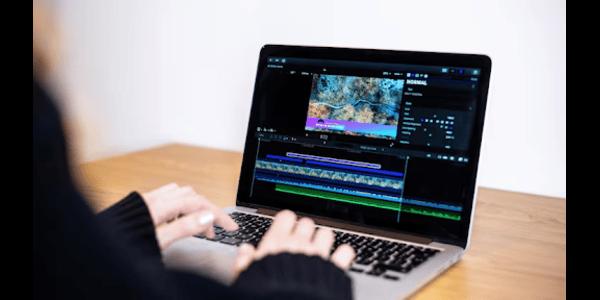
For creators who want to experiment with this technology, an AI video maker can provide a much easier starting point. Instead of spending hours learning complicated editing tools, users can focus more on the story, message, and visual style they want to communicate.
What Is an AI Video Maker?
An AI video maker is a tool that uses artificial intelligence to assist with different stages of video production. Depending on the platform, it may help generate scenes, animate images, create transitions, produce visual effects, add music, or arrange different elements into a finished video.
The biggest advantage is accessibility. A person with limited video-editing experience can describe an idea in ordinary language and use AI-assisted features to develop it into a visual project.
For example, a small business owner could begin with a short description of a product demonstration. A student could turn a presentation idea into a visual explanation. A social media creator could experiment with short-form storytelling without recording every scene manually.
How AI Video Generation Works
Modern AI video systems generally rely on models trained to understand relationships between text, images, motion, and visual composition. When a user provides an instruction, the system interprets the request and attempts to generate or organize visual content that matches it.
The quality of the result depends heavily on the instruction provided. A vague request such as "make a travel video" leaves many creative decisions open. A more detailed instruction can communicate the desired setting, mood, subject, camera movement, pacing, and visual approach.
This makes prompt writing an important part of AI video creation. Clear descriptions give the technology more useful information to work with.
Creating Better Results With Clear Prompts
A strong prompt does not necessarily need to be complicated. It simply needs to explain the important parts of the intended scene.
A creator might specify:
●The main subject
●The location or environment
●The action taking place
●The mood or atmosphere
●The desired visual style
●Camera movement
●Lighting conditions
●Approximate pacing
For instance, instead of asking for a generic city scene, a creator could describe a busy downtown street at sunset, with pedestrians walking past illuminated storefronts and a slow cinematic camera movement.
Specificity helps establish a clearer creative direction while still leaving room for the AI system to interpret the scene.
AI Video Tools and Creative Workflows
AI does not have to replace traditional video editing. In many cases, it works best as part of a larger workflow.
A creator can begin by developing a concept and writing a short script. AI tools can then help create visual material or transform an existing idea into scenes. Afterward, the creator can review the results, select the strongest clips, adjust timing, add captions, and make final edits.
This approach keeps human creative judgment at the center of the process.
A generated clip may look visually impressive but still fail to communicate the intended message. Reviewing every scene allows the creator to correct inconsistencies, improve pacing, and make the finished video feel more intentional.
Exploring Seedance 2.5 AI Video Maker Features
People researching newer AI video-generation technology may come across the term Seedance 2.5 AI video maker when exploring tools designed around AI-assisted video production. Such tools fit into a broader movement toward making sophisticated visual creation more accessible to everyday users.
For creators interested in experimenting with AI-generated video, an established AI video workflow such as Seedance 2.5 AI video maker can provide another way to explore automated video creation and editing features. Learn more here: https://www.capcut.com/tools/ai-video-generator
The practical value of any tool ultimately depends on the user's project. Someone creating short social videos may prioritize speed and templates, while another creator may care more about cinematic visuals, detailed control, or the ability to combine generated material with original footage.
Why AI Video Creation Is Useful for Beginners
Traditional video production can feel intimidating because there are many technical decisions involved. Beginners may need to understand timelines, frame rates, transitions, audio levels, color correction, and numerous editing controls.
AI-assisted tools can reduce some of that initial complexity.
Instead of learning every technical function before creating anything, a beginner can start with a simple concept and gradually become familiar with the editing process. This creates a more approachable learning curve.
The technology can also encourage experimentation. A creator can test several visual ideas quickly rather than committing significant time and resources to every experiment.
Common Uses for AI-Generated Videos
AI video technology has applications across many types of content.
Social Media Content
Short videos are widely used for entertainment, education, product demonstrations, and storytelling. AI can help creators develop visual concepts that might otherwise require additional equipment or production resources.
Marketing and Small Businesses
Small businesses can use AI-assisted video workflows to explore promotional concepts, explain products, introduce services, or create social media material.
Education
Teachers and students can use visual storytelling to make complex subjects easier to understand. Short animated sequences and generated scenes can supplement traditional presentations.
Creative Storytelling
Writers and independent creators can use AI video generation to visualize fictional environments, character concepts, or scenes during the early stages of a project.
Limitations Creators Should Understand
AI video generation is powerful, but it is not perfect. Generated footage can sometimes contain visual inconsistencies, unexpected movements, or details that do not match the original instruction.
Longer projects can also require additional editing to maintain consistency between scenes. A character, location, or visual style may need careful attention when multiple clips are created separately.
For that reason, AI-generated footage should be treated as creative material that benefits from human review, rather than something that automatically produces a finished professional production every time.
Tips for a More Professional AI Video Workflow
A simple workflow can make the process more reliable.
First, creators should establish the purpose of the video. Knowing whether the content is educational, promotional, entertaining, or informational makes later creative decisions easier.
Next, they can divide the concept into individual scenes. Each scene should have a clear purpose rather than trying to communicate the entire story at once.
After generating footage, the creator should review every clip carefully. Unnecessary scenes can be removed, pacing can be adjusted, and transitions can be improved.
Finally, sound and text should receive attention. Good visuals alone do not guarantee an effective video. Clear narration, appropriate music, readable captions, and well-timed editing can significantly improve the final experience.
The Future of AI Video Creation
AI video technology is developing quickly, and its role in creative production is likely to continue expanding. As these systems become more capable, creators may gain greater control over motion, consistency, storytelling, and visual direction.
The most useful approach is not simply to generate as much footage as possible. Strong results come from combining good ideas, clear instructions, careful selection, and thoughtful editing.
For beginners and experienced creators alike, AI video tools offer a new way to move from an idea to a visual concept with fewer technical barriers. The technology can save time, encourage experimentation, and open creative possibilities that were previously difficult to achieve without specialized production skills.
Ultimately, the strongest AI-generated videos will still depend on the person behind the project. Technology can help create the building blocks, but storytelling, judgment, originality, and purpose remain essential to producing content that people actually want to watch.
This release was published on openPR.
Permanent link to this press release:
Copy
Please set a link in the press area of your homepage to this press release on openPR. openPR disclaims liability for any content contained in this release.
You can edit or delete your press release Seedance 2.5 AI Video Maker: A Practical Guide to Modern AI Video Creation here
News-ID: 4604694 • Views: …
More Releases from publiera
Seedance 2.5 AI Video Generation: A Practical Guide to Faster Video Creation
Artificial intelligence is changing how people approach video creation. Instead of beginning with a camera, editing software, and hours of manual work, creators can now start with an idea, script, or visual concept and turn it into a video much faster. Seedance 2.5 is part of this growing generation of AI video technology, bringing automated generation, avatars, templates, and editing features into a more accessible workflow.
For creators, marketers, educators, and…
AI Video Makers: How Modern Tools Are Changing Video Creation
Creating a good video used to require a camera, editing software, technical skills, and plenty of time. Today, AI video makers are changing that process. With a simple idea or written prompt, creators can develop scenes, generate visuals, improve clips, and produce polished videos much faster than before.
This does not mean traditional video production has become unnecessary. Instead, AI is giving creators another practical way to turn ideas into visual…

How Much Does Xactimate Cost?
Over 150,000 professionals annually rely on Xactimate to calculate property damage, rebuild costs, and insurance claims. For these users, knowing the exact price of the tool is essential. Xactimate operates on a subscription model, with estimated costs ranging from $35 to $90 per user per month, depending on the plan and features.
This process explains the cost structure, key pricing factors, and how you can manage expenses without sacrificing accuracy.
Understanding…
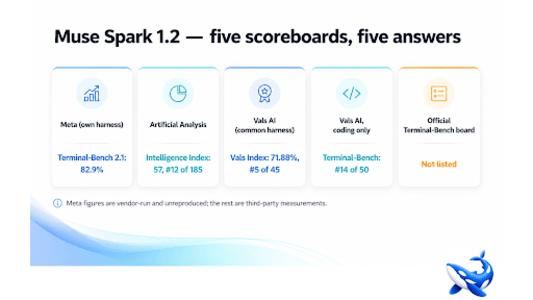
Muse Spark 1.2 Benchmarks: Five Scoreboards, Five Different Answers
The Muse Spark 1.2 benchmarks https://www.orcarouter.ai/models/meta/muse-spark-1.2 that get quoted in headlines almost always come from one source - Meta's own deck - and that is the least independent of the five scoreboards now measuring this model. The other four disagree with it and with each other, which is the most useful thing to understand before trusting any number about it. This piece lays all five side by side;…
More Releases for Video
YouTube Video Downloader: Simplifying Your Online Video Experience
In today's digital age, online video content has become a vital source of information, entertainment, and education. YouTube remains the largest platform for video sharing, with millions of videos uploaded daily. However, internet connectivity issues, offline access needs, and personal convenience often make it essential to have a reliable YouTube video downloader. A YouTube video downloader allows users to save videos directly to their devices for offline viewing. Whether it's…
Muka Video Downloader: Simplifying Video Saving in 2025
In today's fast-paced digital world, content is everywhere. Whether you're a social media enthusiast, a researcher, or a professional creating presentations, having the ability to save videos for offline use is crucial. https://mukasaver.com/ has emerged as a reliable tool for users looking to download and store videos efficiently, without compromising quality or speed.
________________________________________
What is Muka Video Downloader?
https://mukasaver.com/ is an advanced platform designed to make video downloading simple and accessible. Unlike…
Mango Animate's Online Video Enhancer Boosts Video Performance
In recent years, the demand for high-quality video content has surged across various platforms, from social media to professional productions. As more creators, marketers, and businesses seek to elevate their video presentations, tools that can enhance video quality have become essential. One such innovation is the online video enhancer (https://mangoanimate.com/ai/video-enhancer), a tool designed to improve video resolution, clarity, and overall visual appeal. Mango Animate has embraced this trend with Mango…
AudFree Netflix Video Downloader Changes Video Viewing
LOS ANGELES, CA. Aug 16, 2024 - AudFree Software, a leading innovative multimedia tools producer, is excited to announce the official launch of its groundbreaking Netflix Video Downloader.
AudFree Netflix Video Downloader is a multifunctional downloader for Windows and Mac. This innovative tool is designed to provide users with seamless access to their favorite Netflix content offline. It can download movies, TV shows, documentaries and the rest in up to 1080p.…
Adipurush Status Video : Download Latest Adipurush VIdeo Status
Adipurush is an upcoming Indian epic action film directed by Om Raut. The movie is inspired by the Hindu epic Ramayana and features popular actors like Prabhas and Saif Ali Khan in leading roles. As the film's release approaches, fans have been eagerly following every update and teaser related to Adipurush.
Adipurush Status Video Downloads: https://shortstatusvideos.com/adipurush-status-video/
The popularity of Adipurush has led to a surge in fan-created status videos related to the…
Derby video production company launches remote video service
Derby-based video production and animation company Future Proof Films has launched an innovative new remote filming service which enables it to deliver professional quality video despite the current lockdown.
The company, which is based at Connect Derby’s Sadler Bridge Studios, has launched its ‘Pro Remote Video’ service for those businesses that still need professional video content to support their marketing effort.
The idea is simple – the team at Future Proof…

