


Press release
Font-Converters.com Launches Comprehensive Font Toolkit
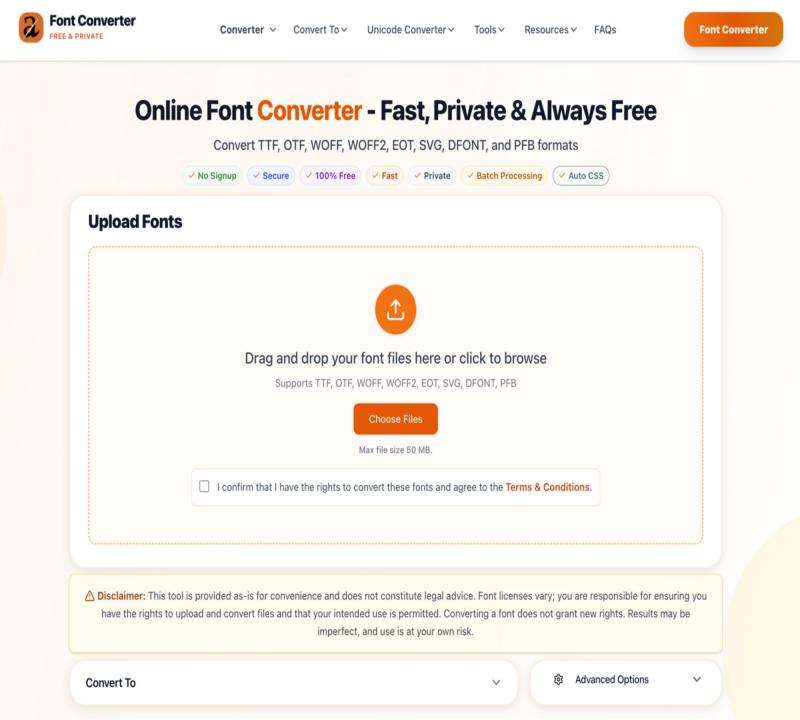
FontConverter Homepage
Font-Converters.com today announces the full launch of its comprehensive font toolkit, providing professionals and hobbyists with a completely free, privacy-focused solution for font conversion and manipulation. The platform combines universal font conversion between 8 formats with specialized tools, including a dyslexia-friendly font converter, drop shadow CSS generator, automatic CSS code generator, and advanced font subsetting capabilities.
Unlike traditional font conversion tools that require file uploads to external servers, Font-Converters.com processes all conversions locally in the user's browser, ensuring complete privacy and security for proprietary and licensed fonts. This approach addresses a critical concern for creative professionals who work with sensitive client assets.
Convert Font Formats: https://font-converters.com/
Core Conversion Features
The platform offers several distinctive capabilities:
• Universal Format Support: 8 supported formats with 56 conversion paths covering desktop fonts (TTF, OTF, DFONT, PFB) and web fonts (WOFF, WOFF2, EOT, SVG)
• Local Processing: All conversions happen in-browser via RAM with no files stored on servers
• Automatic CSS Generation: Creates ready-to-use @font-face code for web developers
• Batch Conversion: Process multiple fonts simultaneously
• Font Subsetting: Reduce file sizes by keeping only required characters
• Multi-Format Export: Generate multiple output formats in a single conversion
Specialized Font Tools Suite
In addition to universal font conversion, Font-Converters.com provides a comprehensive suite of specialized tools designed to address specific typography and accessibility needs:
Dyslexia Font Converter
A dedicated tool that converts fonts from files to dyslexia-friendly fonts, making file content more accessible to readers with dyslexia. Upload a file with normal font and download a version where the text is reformatted into a dyslexia-friendly typeface (shown as OpenDyslexic) to make letters more distinguishable and spacing clearer; it mainly works when the file contains selectable text (image-only scanned PDFs won't convert without OCR), and the page notes you need the rights to upload/convert because font licenses vary.
Convert Files to Dyslexic Font: https://font-converters.com/tools/dyslexia-font-converter
Drop Shadow CSS Generator
An interactive tool that allows designers to create and customize CSS drop shadow effects with a real-time preview. Users can adjust shadow properties, including offset, blur radius, spread, and color, then copy the generated CSS code directly into their projects.
Drop Shadow CSS Generator: https://font-converters.com/tools/drop-shadow-css-generator
CSS Font-Face Generator
Automatically generates production-ready @font-face CSS code for web fonts, eliminating manual coding and reducing implementation errors. The tool creates cross-browser compatible code with proper fallbacks and font format declarations.
Advanced Font Subsetter
Enables developers to create custom font subsets by selecting specific character ranges, reducing file sizes by up to 90% for projects that only need limited character sets. This tool is particularly valuable for multi-language websites and performance-critical applications.
File Font Converter
A streamlined conversion tool specifically designed for batch processing of font files, allowing users to convert entire font libraries in a single operation while maintaining consistent quality across all outputs.
Convert Fonts Inside Your Files: https://font-converters.com/tools/file-font-converter
"We built Font-Converters.com to be more than just a conversion tool," said Marcus Rodriguez, Lead Developer. "We wanted to create a complete typography toolkit that addresses real-world challenges faced by designers and developers daily. From accessibility concerns to performance optimization, our tools cover the entire spectrum of font-related tasks."
Addressing Industry Pain Points
The platform specifically targets common challenges faced by web developers and designers:
• Performance Optimization: WOFF2 conversion reduces font file sizes by up to 70% compared to TTF formats, while subsetting can reduce sizes by up to 90%
• Accessibility Compliance: Dyslexia font converter helps meet WCAG accessibility guidelines
• Cross-Browser Compatibility: Multi-format output ensures fonts work across all browsers and devices
• Licensing Compliance: Local processing means sensitive licensed fonts never leave the user's control
• Workflow Efficiency: Batch processing and automatic CSS generation save hours on large projects
• Design Precision: Drop shadow generator provides pixel-perfect control over text effects
Sarah Mitchell, Product Designer and Font Specialist who verified the platform, noted: "The quality of the conversions matches what you'd get from expensive desktop software. Hinting, kerning, and OpenType features are all preserved perfectly. The addition of specialized tools like the dyslexia converter and drop shadow generator makes this a one-stop solution for typography work."
Growing User Base and Educational Resources
Since launching, Font-Converters.com has attracted thousands of designers, developers, and typography professionals. User testimonials highlight the platform's reliability and time-saving capabilities, with one freelance developer noting it "saved my weekend" when converting 40+ font files with a tight deadline. A web designer praised the batch conversion feature for processing an entire font library in minutes.
The platform includes comprehensive educational resources, including:
• In-depth format comparison guides (TTF vs OTF, WOFF vs WOFF2)
• Complete conversion tutorials and step-by-step guides
• Browser compatibility documentation
• Web font optimization best practices
• Solutions for common font implementation problems
• Accessibility guidelines for typography
• Performance optimization techniques
• Font licensing and legal considerations
Technical Specifications
Font-Converters.com supports files up to 50 MB and operates on both mobile and desktop devices without requiring account creation or email signup. The service includes no watermarks, usage limits, or hidden fees.
The conversion engine preserves all font metadata, including:
• Hinting and kerning information
• OpenType features
• Font family relationships
• Character encoding
• Glyph variations and alternates
All tools feature:
• Real-time preview capabilities
• Instant code generation
• Responsive design for mobile and desktop
• No installation or downloads required
• Cross-browser compatibility
• Complete privacy protection
Availability
Font-Converters.com is available immediately at font-converters.com and requires no registration. All conversion tools and specialized features are completely free and will remain free permanently.
For comprehensive documentation and guides, users can visit the platform's resources section, which includes FAQs, format explanations, and step-by-step tutorials for each tool.
Media Contact:
Font-Converters.com
Nottingham, Nottinghamshire NG1 5AW, UK
Email: info@font-converters.com
Website: font-converters.com
Nottingham, Nottinghamshire NG1 5AW, UK
Font-Converters.com is an independent, privacy-first font conversion and typography toolkit designed for designers, developers, and typography professionals. The platform provides free, secure, browser-based font conversion between all major desktop and web font formats, along with specialized tools for accessibility, performance optimization, and design precision. Based in Nottingham, UK, the service is trusted by creative professionals worldwide for its quality, privacy, and ease of use.
Learn About Font Converters Team: https://font-converters.com/team
This release was published on openPR.
Permanent link to this press release:
Copy
Please set a link in the press area of your homepage to this press release on openPR. openPR disclaims liability for any content contained in this release.
You can edit or delete your press release Font-Converters.com Launches Comprehensive Font Toolkit here
News-ID: 4390803 • Views: …
More Releases for Convert
How to Convert Text to PPT
Turning raw text into a clean, structured presentation is something I do often when I need to transform notes, articles, reports, or documentation into slides quickly. In this guide, I'll show you practical, working methods I personally use to convert text into a PowerPoint presentation with minimal effort and maximum structure.
You can do this using Microsoft Word, PowerPoint, Google Slides, and AI tools, depending on what your source text looks…
Introducing Crypto Fiat Convert: The Easiest Way to Convert Fiat Coins to Crypto …
Today, we are excited to announce the launch of Crypto Fiat Convert, a cutting-edge platform that allows users to seamlessly convert their fiat coins to cryptocurrencies and vice versa with just a few simple clicks.
In the rapidly evolving world of digital finance, the ability to seamlessly convert cryptocurrencies into fiat money, and vice versa, has become an essential utility for traders, investors, and casual users alike. This process, commonly referred…
Click Then Convert Fuels Business' Digital Growth
Hollywood, FL - Businesses looking to find the 'digital rocket fuel' to set light to a major campaign are turning to the experts at Click Then Convert because of their immense data-driven advertising successes.
The Click Then Convert team is the shining diamond in an industry of empty promises and underperforming marketing because they walk the walk with business clients and talk the talk when it comes to performance marketing…
How to Convert Images to Word
Image to Word Converter is a software tool designed to convert images to editable Word documents. This software supports various image file formats such as JPG, BMP, TIFF, GIF, and PNG. It uses OCR technology to recognize text in images and convert them into Word documents.
To use the Image to Word Converter software, follow these steps:
1. Download and install the Image to Word Converter software on your computer.
2. Launch the…
Convert Garage Door to Entry Door
Welcome to JOAQUIN GARAGE DOOR Fresno for 24 hours access to JOAQUIN GARAGE DOOR Fresno products and services. We are glad you have chosen JOAQUIN GARAGE DOOR Fresno for your garage door repair and we promise you effective, reliable and efficient services to satisfy your needs within your budget.
Location 1545 E Simpson Ave, Fresno, CA 93704
Email Address info@joaquingaragedoors.com
Phone Number (559) 206-1995
Installing Garage Door Springs
Installing and convert garage…
Convert RS232 to RS422 or RS485
NASHVILLE, April 25th, 2017 — Perle Systems, a global provider of serial device networking hardware, today announces the launch of Serial Interface Converters.
The PSM-ME-RS232/RS485-P Serial Interface Converter bi-directionally converts RS-232 interface signals to the RS-485 and RS-422 standards.
“Many industrial and commercial environments require the manipulation of serial data transmission in some way,” comments John Feeney, COO at Perle Systems, “This new product allows our customers to convert serial data signals…

