


Press release
Dual Monitor Editing Hacks That Streamline Professional Workflows
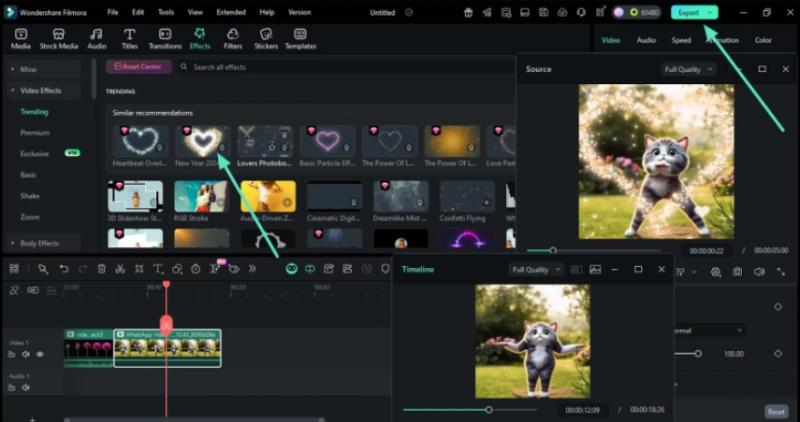
In the era of digital content creation, managing panels, timelines, and tools often becomes challenging during dual-monitor editing workflows. Editors frequently work with complex interfaces where scattered elements can disrupt focus. Wondershare Filmora [https://filmora.wondershare.com/]'s structured dual-monitor environment provides a more organized workspace suited for detailed editing tasks.
Dual monitor setups naturally offer expanded visual space; however, Wondershare Filmora's optimized arrangement supports the handling of multiple clips, transitions, overlays, and advanced color grading in a more controlled manner. This creates a stable foundation for editing professionals seeking consistency in their workflow.
Part 1: Understanding Wondershare Filmora's Dual Monitor Editing Capabilities
Wondershare Filmora's workspace is designed with flexible screen control, enabling editors to work comfortably across extended displays. Its drag-and-dock interface allows tools and panels to be positioned freely, creating a layout that supports the editor's preferred structure.
At the core of Filmora's dual-monitor capability are two specialized viewing systems that work in tandem. The Source Monitor serves as a dedicated window for previewing media assets, effects, and transitions before they're applied to the timeline. Meanwhile, the Timeline Monitor provides continuous real-time feedback of the assembled project. This parallel viewing approach allows editors to evaluate individual elements while simultaneously monitoring how those elements integrate into the final sequence, reducing the back-and-forth typically required in single-monitor environments.
Here are dual-monitor capabilities inside Filmora:
*
Drag panels across both monitors
*
Fullscreen preview window for sharper monitoring
*
Extended timeline view for easier precision editing
*
Movable media library, effects, and transitions panels
*
Dedicated space for color grading and audio tools
*
Compare clips side by side without covering the workspace
*
Custom workspace setups that match editing styles
Dual Monitor Editing [https://filmora.wondershare.com/dual-monitor-setup-for-video-editing.html] helps maintain continuity and reduces interruptions across larger projects.
Part 2: Why Setting Up Dual Monitors Properly Saves Hours in Filmora
A well-planned dual-monitor setup contributes to a smoother workflow inside Wondershare Filmora's interface. When both displays are utilized effectively, editing tasks can be completed with greater accuracy.
Here's how a proper dual-monitor setup can save significant time:
*
Reduced need for window switching, enabling preview and media elements to remain visible
*
Longer timeline visibility, resulting in faster decisions and fewer errors
*
Sharper preview quality for identifying small details
*
Tools such as audio controls and color grading panels remain accessible
*
One display can be dedicated to monitoring, while the other handles timeline adjustments
These factors support a calmer, more organized workspace.
Part 3: Step-by-Step: Setting Up Dual Monitors for a Faster Filmora Workflow
Setting up dual monitors with Wondershare Filmora's interface does not require advanced technical skills. The process includes:
Step 1: Connect Your Monitors
Use HDMI, DisplayPort, or USB-C and select "Extend These Displays" in system settings.
Step 2: Launch Filmora
Filmora automatically detects the dual-monitor setup and suggests suitable layout options.
Step 3: Choose Your Layout
Select a preset or create a custom arrangement. A common layout places the timeline and tools on the primary monitor, and preview/media windows on the secondary.
Step 4: Import Clips
Import media files and place them onto the timeline.
Step 5: Move the Timeline Monitor Window
Adjust the Timeline Monitor to a suitable position across either screen.
Step 6: Move the Source Monitor Window
Position the Source Monitor window to complement your chosen layout.
Step 7: Preview and Edit Simultaneously
Use both monitors together to preview and edit. After completing adjustments, export the final file through Filmora's interface.
This setup supports a more stable creative environment across editing sessions.
Part 4: Pro Tips to Maximize Your Dual Monitor Editing Workflow1. Split Your Workflow Smartly
Use one monitor for active editing (timeline, tools) and the other for preview or reference materials. Clear screen roles prevent unnecessary shifting during work.
2. Customize Layouts for Different Projects
Documentaries may require expanded timelines; short videos may focus on effects. Wondershare Filmora's customizable layouts support project-specific needs.
3. Use Shortcuts to Maintain Speed
Keyboard commands help maintain consistency across extended workspaces.
4. Keep Important Panels Visible
Frequently used panels, such as color grading or audio meters, can stay open on the secondary screen for better workflow continuity.
5. Optimize System Performance
Smooth dual-monitor editing benefits from:
*
Closing background apps
*
Using proxy files
*
Updating GPU drivers
*
Storing media on faster drives
A well-optimized system strengthens overall performance.
Conclusion
Dual-monitor setups enhance visibility, organization, and workspace clarity. Combined with Wondershare Filmora's flexible interface, editors can maintain a structured workflow for various projects. With thoughtful layout adjustments and optimized screen usage, Dual Monitor Editing supports improved productivity and smoother project management.
Media Contact
Company Name: Wondershare Filmora
Contact Person: Boby Ruan
Email:Send Email [https://www.abnewswire.com/email_contact_us.php?pr=dual-monitor-editing-hacks-that-streamline-professional-workflows]
Country: United States
Website: https://filmora.wondershare.com/
Legal Disclaimer: Information contained on this page is provided by an independent third-party content provider. ABNewswire makes no warranties or responsibility or liability for the accuracy, content, images, videos, licenses, completeness, legality, or reliability of the information contained in this article. If you are affiliated with this article or have any complaints or copyright issues related to this article and would like it to be removed, please contact retract@swscontact.com
This release was published on openPR.
Permanent link to this press release:
Copy
Please set a link in the press area of your homepage to this press release on openPR. openPR disclaims liability for any content contained in this release.
You can edit or delete your press release Dual Monitor Editing Hacks That Streamline Professional Workflows here
News-ID: 4313722 • Views: …
More Releases from ABNewswire
Primior Sees Rising Institutional and Family Office Demand for Hogar Square Deve …
Primior Holdings reports growing institutional and family office interest in the Hogar Square multifamily development, a 130-unit project positioned for competitive risk-adjusted returns as construction markets tighten heading into 2026. Six investor groups are evaluating allocations, including domestic and international capital. The project aligns with Primior's broader strategy of structured real estate investments supported by its Gaia platform.
Las Vegas, Nevada - Primior Holdings (OTCMKT: GRLT) [https://primior.com/] today announced growing institutional…
A Complete Guide: When Do Users Need a Mobile Cold Room Instead of a Fixed One?
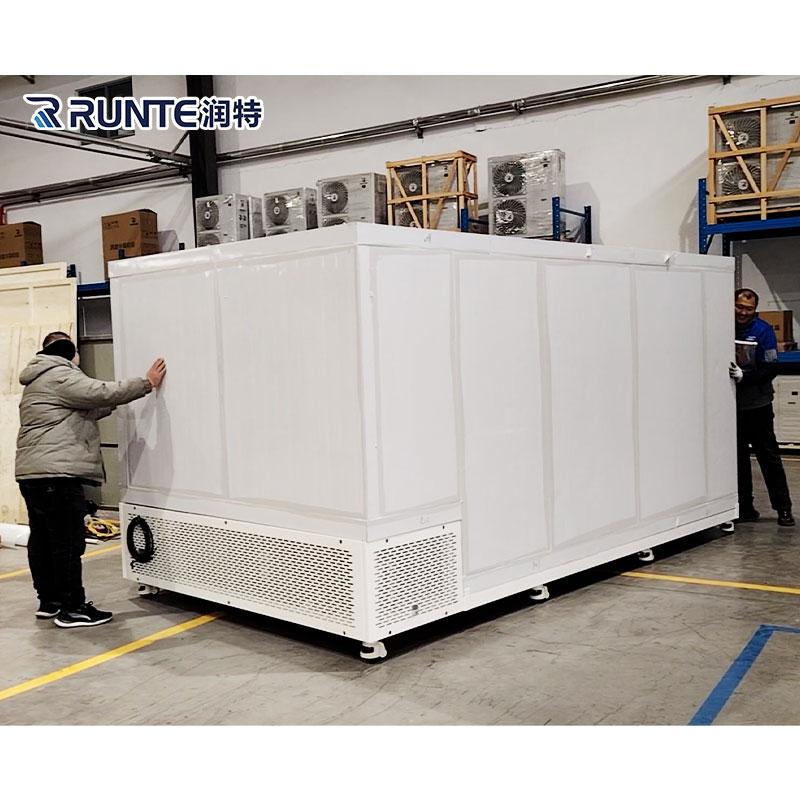
In the fast-evolving landscape of cold chain logistics, businesses often face a pivotal decision: commit to a permanent fixed cold storage facility or leverage the flexibility of a mobile cold room solution. This practical guide clarifies key scenarios in which opting for a mobile cold room delivers smarter operational and strategic value.
Core Distinctions
A fixed cold room is a permanent installation, integrated into a building's structure. It requires substantial construction, permits,…

How to Leverage Gimbal Camera for Resource Exploration
Image: https://www.viewprouav.com/uploads/%E6%B5%8B%E7%BB%981.jpg
Gimbal Camera technology is playing an increasingly important role in resource exploration, especially in industries such as mining, oil, and natural gas. By being mounted on drones, helicopters, or other aerial platforms, Gimbal Cameras utilize their stable imaging capabilities and high-resolution image capture to provide precise real-time data support for resource exploration. Below are the main applications of Gimbal Camera in resource exploration:
1. Geological Structure and Terrain Analysis
Gimbal Camera,…

Viewpro Chinese New Year Holiday Notice
Dear Valued Customers and Partners,
As the Chinese New Year approaches, all of us at Viewpro would like to express our sincere gratitude for your continued support and trust.
Please be informed that our Chinese New Year holiday will be observed from:February 14 to February 23, 2026We will resume normal operations on February 24, 2026.
During the holiday, a limited number of staff will remain on duty to handle urgent matters. However, responses…
More Releases for Filmora
Repair, Rebuild, Enhance: The Unified AI Restoration Workflow in Wondershare Fil …
Image: https://www.abnewswire.com/upload/2025/12/b542da8d8f891e35c98b4af92fd7a56b.jpg
Restoring broken or dull videos once required multiple editing programs. Editors used one tool for noise reduction, another for color correction, and another to fix missing frames. Each tool worked independently, slowing down the process and breaking creative focus. This often resulted in heavy workflows, long hours, and inconsistent results across clips.
The AI Restoration Workflow in Wondershare Filmora V15 [https://filmora.wondershare.com/?utm_source=other_media_sites&utm_medium=pr&utm_campaign=aparticle&utm_content=text_21111566_2025-02-10] solves these issues by combining AI technologies-including repair, rebuild,…
AI in Post-Production: How Wondershare Filmora V15 Accelerates Professional Rest …
Manual editing used to be essential for turning raw footage into a polished video, but the demands of modern workflows have far surpassed what manual corrections alone can achieve. Today, with the undeniable power of AI, Wondershare Filmora V15 [https://filmora.wondershare.com/?utm_source=other_media_sites&utm_medium=pr&utm_campaign=aparticle&utm_content=text_21111566_2025-02-10] automates much of that work. From generating media to refining it, Filmora supports creators at every stage. It compensates for low-quality recording equipment with one-click enhancement tools and removes unwanted…
Wondershare Filmora Enhances User Experience with Seamless App Bridging via Wind …
Video editing doesn't end at export. Once you've created your masterpiece, the next steps range from sharing and refining to using it in other projects. That's where Filmora's integration with Windows Action shines. It makes all these transitions as smooth as possible. By suggesting compatible apps and next-step actions automatically, Filmora streamlines the process and enhances operational efficiency.
No more searching for the right tool or wasting time on manual tasks.…
Wondershare Filmora Empowers YouTubers with Trend-Driven Intro Templates for Max …
Ever watch a YouTube video and automatically be drawn in? More often than not, the magic begins in the intro. A great intro is not an over-the-top add-on; it's your channel's greeting, your quick elevator pitch, and an effective way of keeping people watching.
In this crowded YouTube atmosphere, a great intro will always get you noticed, establish your brand, and inform the algorithm that you're worth watching. However, if you…
Wondershare Filmora Simplifies Branding for YouTubers with Powerful Intro Maker
Searching "how to make a YouTube intro" because yours just isn't working? Rest assured; you are not the only one who is facing this. Even millions of creators realize their intro is key to standing out and keeping viewers.
Image: https://lh7-rt.googleusercontent.com/docsz/AD_4nXf5GIQIdena7jwrwrIoKNy1vfIRid5FgIULJIDUFx8obKyoEAL2pJaGOHh6plvy0-9HiIz11WBdQY17xvPmvc2WO72VYz2I9ZpXy9tWKi7O1bcw9OLG7qrrGkP_I_0SL7c?key=vr1cha6tkTUFLoHtpXAqbQ
A stunning intro instantly grabs attention and builds your brand, but creating one feels like a hurdle, needing skills you may not have. That's why finding the right YouTube intro maker…
Filmora Unveils AI Audio-to-Video Generator: Revolutionizing Podcast Promotion
I Spent 24 Hours Mastering Video Editing with Filmora AI Features [https://www.youtube.com/watch?v=XEqp6rmVVrs]
In the ever-evolving digital landscape, content creators, especially podcasters, must continually adapt to emerging trends to stay relevant. One of the most significant shifts in content consumption today is the rise of short-form videos. Platforms like TikTok, Instagram Reels, and YouTube Shorts have changed the way audiences engage with content, making video a crucial tool for podcasters to expand…

