


Press release
How to Achieve Low-Latency Remote Desktop Access Across All Devices
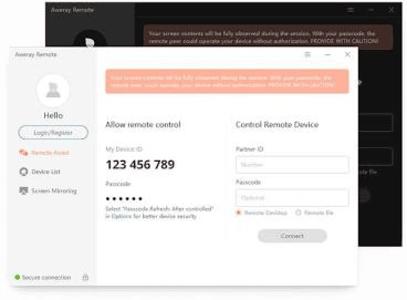
Achieving true low-latency remote desktop access requires moving beyond legacy screen-sharing technology and leveraging modern streaming optimization.
The Evolving Demand for Low-Latency Remote Access
Connecting to a distant computer used to mean basic text editing or dragging small text documents back and forth. Today, user expectations are vastly different. Software engineers run resource-heavy development suites, video editors scrub through 4K footage remotely, and gamers stream high-framerate PC titles across state lines.
Traditional tools often choke when handling high graphical demands or real-time input responses due to three main bottlenecks:
• Bandwidth Saturation: Older protocols struggle when home internet speeds fluctuate, resulting in severe visual stuttering and frame drops.
• Input Delay: Even a 50-millisecond input lag makes cursor control feel sluggish during precision tasks like graphic design or fast-paced gaming.
• Platform Barriers: Native connection protocols frequently restrict fluid interaction between different operating systems, requiring clunky software workarounds.
Resolving these issues requires reliable remote access software (https://awesun.aweray.com/en/download) engineered to deliver high framerates while keeping bandwidth consumption manageable.
Three Core Pillars of High-Performance Remote Access
When evaluating remote desktop tools, performance usually boils down to three technical capabilities: rendering speed, multi-device versatility, and robust encryption.
1. High Framerates and Display Fluidity
Standard remote connections cap screen rendering at 30 or 60 frames per second (FPS). While 30 FPS handles basic office spreadsheets fine, it creates noticeable input drag during visual editing or gaming.
Modern software setups, including AweSun remote desktop, support up to 144 FPS rendering. High frame rates drastically lower perceived visual latency, keeping mouse tracking swift and natural. Paired with adaptive proprietary codecs, 144 FPS streaming delivers crystal-clear visuals without hogging local network bandwidth.
2. Multi-Platform Support
Modern workflows rarely stay inside a single operating system ecosystem. An IT administrator might manage a fleet of Windows servers, connect from a MacBook, and perform quick server reboots from a smartphone.
A complete toolset must support cross-platform connections across:
• Windows (desktops, laptops, and workstation setups)
• macOS (MacBook, Mac Mini, iMac)
• iOS (iPads and iPhones)
• Android (tablets and mobile phones)
3. Financial-Grade Security Protocols
Security breaches during an active remote session can expose client records, code repositories, or private personal data. A dependable solution incorporates:
• RSA/AES 256-bit Encryption: Shields incoming and outgoing session data packets against unauthorized interception.
• Dual-Layer Passcodes: Combines fixed host credentials with randomized temporary session passcodes.
• Black Screen Mode: Blanks out the physical host monitor during remote access to prevent on-site onlookers from viewing sensitive work.
Setting up a secure connection with AweSun remote desktop (https://awesun.aweray.com/en/) gives users financial-grade encryption while keeping setup simple and fast.
Popular Remote Desktop Alternatives
The remote desktop software landscape features several established options. Understanding how tools compare helps you choose the right fit for your budget and workflow.
AweSun
• Free Version Scope: Feature-rich for personal & work tasks
• Max Framerate: Up to 144 FPS
• Remote Gaming Tools: Specialized game mapping & controller support
• Mobile-to-PC Access: Built-in mirror & control
• Encryption Standard: 256-bit RSA/AES
TeamViewer
• Free Version Scope: Strict commercial use detection
• Max Framerate: Standard 60 FPS
• Remote Gaming Tools: Basic support
• Mobile-to-PC Access: Paid add-ons required
• Encryption Standard: 256-bit AES
AnyDesk
• Free Version Scope: Free version limited
• Max Framerate: Standard 60 FPS
• Remote Gaming Tools: Basic support
• Mobile-to-PC Access: Basic support
• Encryption Standard: 256-bit TLS 1.2
RustDesk
• Free Version Scope: Open-source, self-hosted option
• Max Framerate: Varies by server host
• Remote Gaming Tools: Limited
• Mobile-to-PC Access: Requires self-hosting knowledge
• Encryption Standard: Configurable
Many users move away from legacy tools because of aggressive "commercial use detected" flags on personal accounts. Choosing a platform with generous free and accessible tiers prevents unexpected service lockouts in the middle of important projects.
Real-World Workflows and Practical Use Cases
Different workflows present distinct technical demands. Here is how modern remote desktop solutions handle common real-world setups.
Hybrid Remote Work
Working from home shouldn't force you to compromise on computing power. High-speed remote links let remote staff run demanding drafting, accounting, or rendering software directly on office workstations without transferring massive files back and forth.
Key remote work features include:
• Remote Printing: Send documents from your remote workstation directly to your local home printer.
• Drag-and-Drop File Transfers: Move spreadsheets and media files instantly between local and remote windows.
• Clipboard Sharing: Copy text or code snippets on one device and paste them directly on another.
Professional IT Administration
IT support teams need fast, reliable access to fix technical problems on end-user devices. Key administrative tools include:
• Unattended Access: Manage headless servers and office PCs off-hours without requiring someone on-site to accept incoming calls.
• Multi-Monitor Switching: View multiple host displays simultaneously or toggle between monitors with a single click.
• Session Recording: Keep detailed records of maintenance activities for security compliance and troubleshooting audits.
High-FPS PC Gaming on Mobile
Mobile gaming often faces hardware limits and device heating. By streaming PC titles from a high-end desktop to a phone or tablet, gamers can enjoy full PC gameplay anywhere with custom virtual gamepads and full Bluetooth controller support.
Emerging Trends: AI Context and Machine Connectivity
The connectivity industry is moving beyond standard screen-sharing protocols. A major recent advancement includes Model Context Protocol (MCP) integrations, which connect remote software directly with Artificial Intelligence tools.
Through AI MCP protocols, systems can interpret diagnostic data, monitor system health, and help automate routine technical support tasks. These automated connections lower downtime for enterprise networks and streamline IT operations.
Common Challenges and Practical Solutions
Issue 1: Screen Stuttering During Peak Usage Hours
Cause: Home network congestion or background downloads consuming bandwidth.
Fix: Lower session resolution settings slightly or enable frame-rate compression inside session preferences.
Issue 2: Unattended Device Disconnections
Cause: The host computer entering sleep or hibernation mode.
Fix: Adjust host power options in control settings to keep system hardware active, and turn on Wake-on-LAN (WOL) if supported by your network card.
Frequently Asked Questions
Is remote desktop software secure for confidential work?
Yes, provided the connection uses end-to-end 256-bit AES/RSA encryption and multi-factor authentication. Always set strong session passcodes, monitor session logs, and activate "Black Screen Mode" when accessing confidential files in public places.
What internet speed do I need for smooth remote control?
A stable connection with at least 10 Mbps download and 5 Mbps upload is sufficient for general office applications. For 144 FPS remote gaming or 4K video production, a connection speed of 25 Mbps or higher ensures minimal input latency.
Can I control a PC from an Android or iOS phone?
Yes. Installing a native mobile remote access app allows full touchscreen control, custom virtual keypads, and direct display mirroring from smartphones and tablets.
How does unattended access work?
Unattended access links a host computer to your primary account using secure credentials. Once configured, you can log into your home or office computer anytime without requiring anyone on the target machine to physically accept the connection.
Final Thoughts
Reliable, low-latency remote access keeps modern workflows running smoothly-whether you are managing offsite infrastructure, completing design projects from home, or streaming games across mobile devices. By prioritizing high frame rates (up to 144 FPS), broad cross-platform compatibility, and financial-grade encryption, AweSun helps you maintain fast, seamless, and secure connections wherever you operate.
This release was published on openPR.
Permanent link to this press release:
Copy
Please set a link in the press area of your homepage to this press release on openPR. openPR disclaims liability for any content contained in this release.
You can edit or delete your press release How to Achieve Low-Latency Remote Desktop Access Across All Devices here
News-ID: 4593012 • Views: …
More Releases from publiera

Smart Ways to Improve Efficiency in Construction Projects
Construction projects involve countless moving parts, from managing workers and materials to keeping schedules on track and staying within budget. Even a small delay in one area can affect several other stages of a project. That is why improving efficiency is so important for construction companies. Using Construction Tracking Software (https://appfinderguru.com/construction) can help teams organize project information, monitor progress, and keep everyone working toward the same goals.
However, technology is only…

A Guide to Understanding Prescription Options for Weight Management
Prescription options for weight management have expanded considerably over the past several years, and the sheer range of choices can make the whole topic feel more complicated than it needs to be. Breaking it down into a few clear categories makes it much easier to understand what's actually available and what might be relevant to a specific situation.
Why Prescription Options Have Expanded
Weight management used to rely almost entirely on diet…
Smart Ways to Improve Efficiency in Construction Projects
Construction projects involve countless moving parts, from managing workers and materials to keeping schedules on track and staying within budget. Even a small delay in one area can affect several other stages of a project. That is why improving efficiency is so important for construction companies. Using Construction Tracking Software (https://appfinderguru.com/construction) can help teams organize project information, monitor progress, and keep everyone working toward the same goals.
However, technology is only…
A Guide to Understanding Prescription Options for Weight Management
Prescription options for weight management have expanded considerably over the past several years, and the sheer range of choices can make the whole topic feel more complicated than it needs to be. Breaking it down into a few clear categories makes it much easier to understand what's actually available and what might be relevant to a specific situation.
Why Prescription Options Have Expanded
Weight management used to rely almost entirely on diet…
More Releases for Remote
Sunflower Remote Enhances Secure Access for Modern Remote Work Environments
Remote work has fundamentally changed the way people think about their computers. A laptop left at home, a server sitting in another city, or a desktop PC back at the office no longer needs to sit out of reach. With the right software, any of these machines can be accessed, controlled, and managed from virtually anywhere in the world. One name that comes up often in this space, particularly across…
Seamless Remote Access Made Simple with Awesun Remote Desktop Download
The software called Awesun Remote Desktop provides users with intelligent remote desktop capabilities which allow them to control their computers from any remote location. The system establishes a protected connection between devices, which allows you to access your files and run your applications while you control your system in real time. The software provides users with remote access, which they can use to establish a fast and dependable connection through…
remote-jobs-uk.com Launches to Connect UK Talent with Remote-First Opportunities
London, UK - remote-jobs-uk.com has officially launched, providing a dedicated platform for UK-based professionals to find high-quality remote and flexible job opportunities with companies in the UK and around the world.
As remote and hybrid working continue to reshape the modern workplace, remote-jobs-uk.com aims to make the job search simpler, faster and more transparent for UK jobseekers who want flexibility without compromising on career progression. The platform curates remote-friendly roles across…
Differences Between Smart TV Remote Controls and Traditional TV Remote Controls
As technology continues to advance, home entertainment devices are also constantly being updated and replaced. Smart TVs, as a common device in modern homes, have remote controls that are significantly different from those of traditional TVs. This article will explore the main differences between the two and analyze how these differences affect the user's viewing experience.
Functional Differences
Smart TV Remote Controls [https://www.stbremote.com/tv-remote-control/]
Smart TV remote controls typically integrate a variety of advanced…
Remote Jobs Review: Are Remote Jobs Really Good?
Remote work days are here as the concept applied by a traditional 9-to-5 office is fading from companies across all industries. It is no longer just a bonus these days; it has become a critical aspect of business for now and in the future. Remote work is the new future of work, from Silicon Valley startups to global corporations. What's driving this shift? Let's dive in.
The Tech Boom Fuels the…
AR Remote Collaboration Software AR Remote Collaboration Software
Global AR Remote Collaboration Software Market Report provides Market Size, Trends, forecast period with analysis of the market's historic and forecast growth, drivers and restraints affecting the market, and highlights of the opportunities that companies in the industry can take on. The AR Remote Collaboration Software research report examines the approach line of business. Also, the research survey studies market activities like drivers, new possibilities, insight, obstacles.
Download FREE Sample Report…

