


Press release
10 Hidden iPhone Features in iOS 18 Most Users Still Don't Know About (2026 Guide)
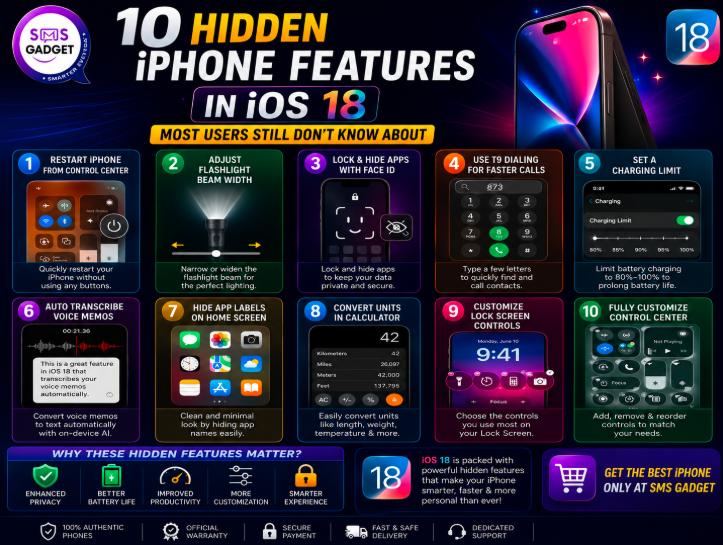
This guide covers all 10 features with practical use cases and clear, step-by-step instructions, so you can start using them today.
Note: This guide covers iOS 18. If you're on a newer iPhone running iOS 26 or later, most of these features are still present-Apple carried them forward-though menu locations may look slightly different under the newer Liquid Glass design.
--------------------------------------------
Why Hidden iOS Features Matter More Than Major Updates?
Small Features Often Save More Time Than Big Updates
Headline features like Apple Intelligence get all the attention at launch, but it's often the small, overlooked settings-a faster way to dial a contact, a quicker way to restart your phone-that you end up using dozens of times a week. Big updates are exciting once; small features save you time every single day.
How Hidden Features Improve Privacy and Productivity?
Several of these features exist specifically to solve everyday friction: keeping sensitive apps private, cutting down on battery degradation, or removing the need for third-party apps just to convert a currency or transcribe a voice note. Hidden iOS features often improve everyday tasks, privacy, and efficiency more than headline updates because they solve practical problems users face daily.
Who Should Use These Secret iOS 18 Features?
Anyone who shares their phone occasionally, cares about long-term battery health, records voice notes or meetings, or simply wants a cleaner, faster iPhone experience will get real value from this list-not just power users.
--------------------------------------------
1. Restart Your iPhone Directly from Control Center
What Is the New Control Center Power Button?
iOS 18 added a dedicated power button inside Control Center, so you no longer need to press and hold physical buttons to restart your phone.
How to Use It?
Swipe down from the top-right corner to open Control Center, then press and hold the power button in the top-right corner until the restart slider appears.
When This Feature Is Actually Useful?
This is genuinely handy when an app freezes, your screen becomes unresponsive in a way that makes side-button restarts awkward, or you simply want a faster restart without fumbling for the volume and side buttons.
Supported iPhone Models
Available on any iPhone running iOS 18 or later.
Location: Control Center → Top Right Corner → Power Button Real-Life Use Case: Restarting your phone quickly when apps freeze.
--------------------------------------------
2. Adjust Flashlight Beam Width Like a Professional Flashlight
What Is Flashlight Beam Width?
iOS 18 turns your flashlight from a simple on/off toggle into an adjustable beam, letting you control both brightness and width.
How to Change Beam Size?
Turn on your flashlight from the Lock Screen or Control Center, then tap the flashlight interface that appears in the Dynamic Island. Swipe up or down to adjust brightness, and swipe left or right to adjust beam width.
Focused Beam vs Wide Beam
A focused, narrow beam throws light further and concentrates it in one spot, while a wide beam spreads light evenly across a larger area.
Best Situations to Use It
Focused Beam: Finding items under furniture. Wide Beam: Walking outside at night.
Note: This feature requires an iPhone with a Dynamic Island - iPhone 14 Pro, iPhone 14 Pro Max, and iPhone 15 and 16 series and newer.
--------------------------------------------
3. Lock and Hide Apps with Face ID
How App Locking Works in iOS 18?
You can lock individual apps behind Face ID or your passcode and optionally hide them completely so they don't appear on your Home Screen, in search, or in notifications.
How to Hide Apps?
Long-press the app icon, select Require Face ID, then choose Hide and Require Face ID if you also want it removed from view. Hidden apps move into a protected Hidden Apps folder inside the App Library.
Which Apps Cannot Be Hidden?
A small number of built-in system apps - such as Maps and Clock - cannot be hidden, though they can still be locked. Third-party apps downloaded from the App Store don't have this restriction.
Privacy Benefits
This is one of the most genuinely useful additions in iOS 18, especially if you regularly hand your phone to someone else.
Perfect For:
. Banking Apps
. Photos
. Social Media
. Messaging Apps
FAQ: Can hidden apps still appear in Settings? Yes. Certain system areas may still display traces of hidden apps, so don't rely on this as a complete privacy solution for highly sensitive use cases.
--------------------------------------------
4. Use T9 Dialing to Call Contacts Faster
What Is T9 Dialing?
T9 dialing lets you type a contact's name using the letters printed on your dialer's number keys, instead of manually searching through your contacts list-a feature Android phones have had for over a decade.
How to Enable and Use It?
Open the Phone app and go to the keypad. Start typing a contact's name using the number keys (where each key represents a few letters, just like an old keypad phone), and matching contacts will appear automatically as you type. No setup is required - it works by default.
Why Android Users Loved This Feature for Years?
T9 dialing has existed on Android since the early 2010s, and many switchers have specifically missed it on iPhone. It removes the extra step of opening your full contacts list just to make a call.
Real Examples
Typing the digits that spell out a contact's name (using your keypad's letter groupings) brings up matching names instantly - for example, dialing the digits for "JOHN" surfaces John's contact card without you needing to scroll or search manually.
--------------------------------------------
5. Set a Charging Limit to Improve Battery Health
Why Battery Health Declines?
Lithium-ion batteries degrade faster when they're regularly charged to 100% and left there for long periods. Capping your maximum charge reduces this stress and slows long-term battery wear.
How do charging limits work?
iOS 18 expands on the previous 80% cap (originally limited to iPhone 15) by adding multiple in-between options, so you can choose a limit that matches your actual usage pattern instead of an all-or-nothing setting.
Recommended Charging Limits
Limit Best For
80% Heavy users who charge frequently throughout the day
85% Balanced, everyday usage
90% Occasional charging, moderate daily use
95% Users who rarely charge and want maximum range available
------------------------------------------
Who Should Enable This Feature?
Anyone who keeps their iPhone for several years and wants to protect long-term battery health should consider an 80-85% limit rather than charging to 100% every night.
Does charging to 80% extend battery lifespan?
Yes. Limiting charge cycles can help reduce battery degradation over time, which is especially valuable if you plan to keep your phone for 3+ years.
------------------------------------------
6. Transcribe Voice Memos Automatically
How Live Transcription Works?
The Voice Memos app can automatically transcribe recordings into searchable, readable text as you record - no extra app required.
How to Search Transcribed Notes?
Once a recording is transcribed, you can search its text directly within the Voice Memos app, making it easy to find a specific moment in a long recording without listening to the whole thing.
Best Use Cases for Students and Creators
Perfect For:
. Meetings
. Interviews
. Podcast Notes
. Content Planning
. Class Lectures
Limitations
Transcription accuracy can vary with background noise, accents, and multiple overlapping speakers, so it's best treated as a strong starting draft rather than a perfect, publish-ready transcript.
------------------------------------------
7. Hide App Labels for a Cleaner Home Screen
How to Remove App Names?
Long-press your Home Screen to enter edit mode, tap the customize option, and choose a layout that removes app name labels, leaving just the icons.
Benefits of a Minimal Home Screen
A label-free layout looks cleaner and more intentional, and pairs well with dark or themed icon packs for a more cohesive look.
Best Home Screen Layout Ideas
Best For:
. Productivity Setups
. Aesthetic Themes
. One-Hand Usage
------------------------------------------
8. Convert Units Directly Inside Calculator
Supported Unit Types
The iOS 18 Calculator app can convert currencies, temperatures, distances, and data units without requiring third-party apps.
How to Enable Conversions?
Open Calculator, enter a number, then tap the unit conversion option that appears to choose your starting unit and target unit.
Real Examples
. USD to BDT
. Kilometers to Miles
. Celsius to Fahrenheit
. GB to MB
This single feature can replace several converter apps you might currently have installed just for occasional use.
------------------------------------------
9. Customize Lock Screen Controls
Replace Flashlight and Camera Shortcuts
By default, your Lock Screen shows flashlight and camera shortcuts in the bottom corners, but iOS 18 lets you swap either one for a different shortcut entirely.
Best Custom Shortcuts to Add
. Shazam
. QR Scanner
. Calculator
. Voice Memo
. Translate
. Notes
Productivity Benefits
Swapping the camera shortcut for something you use more often (like Voice Memo or Translate) removes an extra step from actions you repeat daily.
------------------------------------------
10. Create a Fully Customizable Control Center
Add New Controls
iOS 18's Control Center supports a much wider range of toggles and shortcuts than before, letting you add controls for specific apps and system functions beyond the defaults.
Resize Controls
Some controls can be resized to take up more or less space, so your most-used toggles can be made larger and easier to tap.
Organize Multiple Pages
Control Center now supports multiple pages, letting you separate different categories of controls instead of cramming everything onto one screen.
Best Productivity Setup
Page 1: Connectivity Page 2: Media Page 3: Productivity Tools Page 4: Accessibility Tools
------------------------------------------
Which Hidden iOS 18 Feature Is the Most Useful?
Feature Best For Difficulty
App Lock Privacy Easy
T9 Dialing Speed Easy
Charging Limit Battery Health Easy
Voice Memo Transcription Productivity Medium
Control Center Customization Power Users Medium
If you only try one feature from this list, App Lock and Charging Limit are the easiest to set up and offer the most noticeable everyday benefit.
-------------------------------------------
iPhone Compatibility - Which Devices Support These Features?
Most iOS 18 features are available across the following devices:
. iPhone XS and newer
. iPhone 11 Series
. iPhone 12 Series
. iPhone 13 Series
. iPhone 14 Series
. iPhone 15 Series
. iPhone 16 Series
Some Apple Intelligence features require an iPhone 15 Pro or newer device. The features covered in this guide - app lock, T9 dialing, charging limits, flashlight controls, and Control Center customization - are not Apple Intelligence features and work across the full iOS 18-compatible device range, though flashlight beam control specifically requires a Dynamic Island model (iPhone 14 Pro or newer).
If you're using an older iPhone and want access to the full iOS 18 experience, including Apple Intelligence features, upgrading to a newer model may be worth considering. Before making a purchase, compare the Latest iPhone Price in Bangladesh https://smsgadget.com/category/iphone .
---------------------------------------------
Frequently Asked Questions
Are all hidden iOS 18 features available on every iPhone?
No. Most features work on iPhone XS and newer, but a few-like flashlight beam control-require a Dynamic Island, available only on iPhone 14 Pro and later models. Apple Intelligence features require an iPhone 15 Pro or newer.
Which hidden feature is best for privacy?
App Lock and Hide is the strongest privacy feature in this list, letting you secure individual apps behind Face ID and hide them from your Home Screen entirely.
Which hidden feature saves the most time?
T9 dialing offers the most noticeable daily time savings, since it removes the need to manually search your contacts list every time you want to make a call.
What is the latest iPhone price in Bangladesh?
The latest iPhone price in Bangladesh varies depending on the model, storage capacity, and official or unofficial availability. Prices may change due to market demand and import costs.
How can I choose a reliable iPhone mobile shop in Bangladesh?
Choose an iPhone mobile shop that sells genuine devices, provides warranty support, offers transparent pricing, and has positive customer reviews and after-sales service.
-----------------------------------------------
Are these features safe to use?
Yes. All of these are official, native iOS 18 features built directly into Apple's software - none require jailbreaking, third-party apps, or unsupported workarounds.
Which hidden feature do most users miss?
Charging limits and the calculator's built-in unit conversion are the two most commonly overlooked features, since neither is advertised prominently in Apple's main iOS 18 marketing.
-----------------------------------------------
Conclusion
iOS 18 is packed with far more than Apple Intelligence and a redesigned Home Screen. From small daily time-savers like T9 dialing to genuinely useful privacy tools like App Lock, these hidden features are worth spending five minutes setting up today. Once you've explored everything iOS 18 offers, if you're due for a hardware upgrade to access newer features like Apple Intelligence, compare the latest iPhone price in Bangladesh and shop with confidence at your trusted partner.
Legal Disclaimer:
The information published on this page is provided by an independent third-party content provider and is intended for general informational purposes only. TheSeoMaster.com does not make any warranties or representations regarding the accuracy, reliability, completeness, legality, ownership, licensing, or validity of the content, including but not limited to text, images, videos, links, claims, or other materials included in this article.
TheSeoMaster.com shall not be held responsible or liable for any errors, omissions, inaccuracies, damages, losses, or legal issues arising from the use of, reliance on, or publication of this third-party content. All views, opinions, statements, and claims expressed in the article are solely those of the content provider and do not necessarily reflect the views of TheSeoMaster.com.
If you are affiliated with this article and believe that any content is inaccurate, unauthorized, copyrighted, defamatory, or otherwise objectionable, or if you would like to request correction or removal of the article, please contact us at noor@theseomaster.com
About Us:
TheSeoMaster help brands, entrepreneurs, and digital agencies strengthen their online presence through reliable SEO strategies, quality publishing opportunities, and result-focused marketing solutions.
TheSeoMaster.com is a professional SEO, guest posting, PR and digital marketing agency currently based in Attock, Pakistan, serving businesses and agencies around the globe.
This release was published on openPR.
Permanent link to this press release:
Copy
Please set a link in the press area of your homepage to this press release on openPR. openPR disclaims liability for any content contained in this release.
You can edit or delete your press release 10 Hidden iPhone Features in iOS 18 Most Users Still Don't Know About (2026 Guide) here
News-ID: 4585107 • Views: …
More Releases from the seo master

New Software Oxzep7 Python: A Practical Look at an Unfamiliar Software Term
Technology rarely stands still. New applications appear, development projects change names, experimental tools move from private environments into public testing, and software identifiers can suddenly start appearing in search results without much explanation.
That is one reason unusual technical phrases can be surprisingly difficult to understand.
New software oxzep7 Python is a good example. At first glance, the phrase appears to describe a recently introduced piece of software connected with Python. Yet…
How Better IT Asset Management Helps Businesses Control Technology Costs and Inf …
Technology has become part of almost every business process. Employees depend on laptops and desktops to work, teams use servers and networking equipment to keep applications running, and organizations rely on a growing range of hardware throughout their operations.
As this infrastructure expands, another challenge grows alongside it: knowing exactly what the business owns, where it is located, who is using it, and what it costs to maintain.
This is where IT…
Beyond the Press Release: Building a More Durable Public Visibility Plan
A press release can announce a decision, a launch or a milestone with clarity. It gives journalists, customers, partners and search engines a dated record of what an organisation says has happened. That is useful, but it is only one part of public visibility. Companies often expect a single announcement to create long-term awareness, then discover that attention fades quickly unless the news is supported by credible explanation in other…
White Label Skincare for Faster Product Line Validation
Launching a skincare range does not always require a custom formula. For a founder testing a retail concept, a salon adding take-home products, or a distributor entering a category, white label skincare (https://callaskincare.com/) can provide a faster route to market: select an existing formula, apply your brand presentation, and test whether the offer fits a real customer and channel.
That speed does not remove product responsibility. A ready-made formula may reduce…
More Releases for Phone
Cell Phone Profits 2026: Viral Phone Income Truth or Worth It?
Cell Phone Profits 2026: Viral Phone Income Truth or Worth It?
United States - 2026:
The idea of earning money using just a smartphone is quickly becoming one of the most talked-about trends among young adults. With rising interest in flexible income options, especially among people aged 18-25, digital platforms that promise simple, beginner-friendly earning methods are gaining massive attention. One such name currently making waves online is Cell Phone Profits.
As the…
A Parent's Guide to Balanced Phone Monitoring with Phone Link
A Parent's Guide to Balanced Phone Monitoring with Phone Link
Safe Family Device Management through aka.ms/phonelink https://akaphonelink.com/ allows parents to monitor their kids' Android phones from a Windows PC. The platform shows texts, location and battery level so that parents can ensure their kids are using the internet safely. The tool is built into the Windows operating system and uses Microsoft's own security framework.
Making Morning Routines Easier with Phone Link
Families in…
A Parent's Guide to Balanced Phone Monitoring with Phone Link
Safe Family Device Management through www.aka.ms/phonelink allows parents to monitor their kids' Android phones from a Windows PC. The platform shows texts, location and battery level so that parents can ensure their kids are using the internet safely. The tool is built into the Windows operating system and uses Microsoft's own security framework.
Making Morning Routines Easier with Phone Link
Families in Lake Zurich often ask about 'where's the phone?' moments during…
Mobile Phone Rental Market Future Business Opportunities 2025-2032 | Phone Rent, …
The Mobile Phone Rental Market is projected to reach USD 22.24 billion by 2032, growing at a CAGR of 18.91% during the forecast period 2025 to 2032
According to a new report by Coherent Market Insights, titled "Mobile Phone Rental Market Size 2025, provides insightful information about regional and international markets that are anticipated to expand between 2025 and 2032. This thorough study looks at the competitive landscape, value chain analysis,…
Cell Phone Cash Review: Is Cell Phone Cash Legit? Find Out!
Ever wondered if you can make money just by using your smartphone? I started looking into cell phone cash with a lot of doubt. With so many sca.ms out there, figuring out if this program is real was key. This review aims to find out if cell phone cash is a genuine way to make money or just another sc.am.
Let's dive into this question together and see what I found…
Mobile Phone and Smart Phone Market is Booming Worldwide |
HTF MI recently introduced Southeast Asia Mobile Phone and Smart Phone Market study with in-depth overview, describing about the Product / Industry Scope and elaborates market outlook and status to 2023. The market Study is segmented by key regions which is accelerating the marketization. At present, the market is developing its presence and some of the key players from the complete study are Samsung Electronics, Apple, Huawei Technologies, OPPO, Vivo…

