


Press release
SSD Data Lost or Unreachable? Here's How to Restore Files Safely
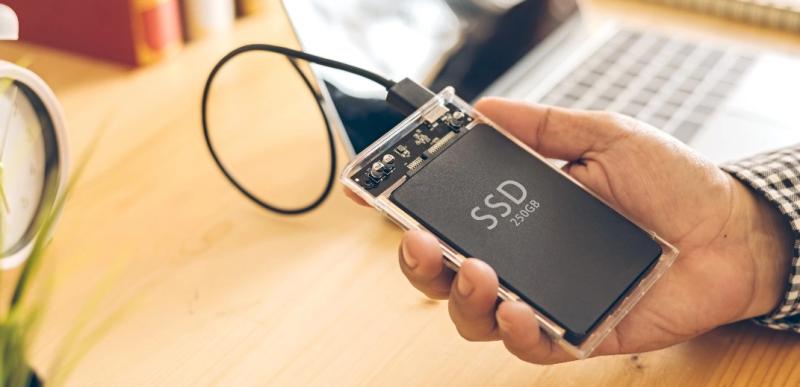
This guide explains why SSD recovery is so time-sensitive, the most common scenarios that trigger it, and the steps you should take immediately. You'll also learn how to recover files from a failed SSD,(https://4ddig.tenorshare.com/hard-drive-data-recovery.html) improve your chances of success, and understand when the only safe choice is to seek professional help.
Part 1: Understanding SSD Data Loss and Recovery
Getting data back from an SSD is not like getting it from a spinning hard drive. The difference is that one background function, known simply as TRIM, is baked into the drive.
TRIM tells the SSD controller which blocks of data the system no longer needs. The main ways HDDs and SSDs handle deleted data are different:
• HDDs store physically deleted files on the disk until they are overwritten.
• As a result, recovering data from an HDD is often possible long after the files were deleted. SSDs, however, handle deleted data differently, significantly reducing the recovery window.
• When TRIM runs on the blocks of a deleted file, the controller erases that data at the hardware level.
• This hardware-level erasure helps the drive maintain its performance over time, but it also means recoverable data can disappear almost instantly.
If TRIM has already run on the files in question, no software anywhere will be able to retrieve that data. But if TRIM hasn't kicked in yet and the drive is still accessible, recovery still has a genuinely strong chance of succeeding. That's why speed matters so much more for SSDs than it ever did for older storage technology. Your very first response after noticing missing files can determine whether recovery is possible.
Part 2: Common Situations That Require SSD Recovery
People usually search for recover data from ssd help when they run into one of a few familiar problems, and knowing which situation applies to you helps you choose the right recovery path from the start.
The most frequent scenarios include:
• SSD not showing files or showing as RAW or unallocated
• Accidentally deleting files or folders, or mistakenly formatting the drive
• SSD detected in BIOS but not accessible in Windows properly
• A system crash or a sudden loss of power has left the drive in an unstable state
• The operating system will not start. Storage will not be accessible
• Files were deleted recently, and TRIM may or may not have processed them yet
Most of these situations result in what recovery specialists call a logical failure. A logical failure means the hardware is still working, but the file system or partition structure is somehow corrupted or changed. It's the exact type of problem recovery software was designed to solve in the first place. For most people with these problems, an expensive physical fix is really never needed.
Part 3: Critical First Step - Stop Data Overwrite Immediately
Before attempting any recovery method, one rule matters more than any specific tool: stop using the drive immediately.
Every time you add new data to an SSD, whether by installing programs, saving documents, or letting background tasks run, you risk overwriting the sectors holding your missing files. This risk is compounded by TRIM and active wear-leveling, which continuously rearrange data across the physical drive even while the system sits idle. If you're trying to recover deleted data from an NVMe SSD, halting all drive activity right away gives you the best chance of success.
To protect your chances of a successful recovery, follow these steps right away:
• Stop using the SSD immediately, and avoid opening files casually
• Avoid installing any new software on the affected drive
• Do not format or initialize the drive, even if Windows suggests it
• Disconnect the SSD if the system behaves unpredictably or freezes
The goal is preserving the drive's current state for as long as possible before recovery begins. Every action outside a deliberate recovery plan adds further risk to your remaining data.
Part 4: How to Recover Data from SSD (Step-by-Step Methods)
When you're done with the drive, approach the recovery carefully and in a structured way, starting with the simplest checks before moving to more advanced tools.
Fix 1: Check SSD Connection and Visibility
Start by verifying how your system sees the affected drive in the first place.
• Connect the SSD via SATA or with a USB enclosure if external.
• Check detection in File Explorer and Disk Management.
• If the SSD shows up at all, even as RAW or unallocated, continue with recovery.
And this step is important because it helps you know which recovery path applies to your case. A drive that is behaving oddly is a very different problem than one that is completely invisible.
Fix 2: Use Professional Recovery Software for Logical Failures
If your SSD is showing up fine in Disk Management but the
files are missing, or the drive is showing as RAW, this is the perfect situation for dedicated recovery software. If the drive doesn't appear in Disk Management at all, then skip straight to the professional recovery part.
SSD data recovery software for Windows 10/11, 4DDiG Data Recovery (https://4ddig.tenorshare.com/windows-data-recovery.html) can be a real help in dealing with such logical failures. It scans the drive thoroughly and rebuilds access to files that Windows can no longer see on its own.
There is one rule that trumps all others here. Do not install recovery software on the same SSD you are trying to recover, as this could overwrite the very sectors that contain your lost files. Instead, install the software on another drive, or run a portable copy from a USB stick.
Here's how the recovery process typically works in 4DDiG Data Recovery:
1. Launch the recovery software from a different drive than the one you want to recover.
2. Select the affected SSD as the drive you want to scan.
3. Run Quick Scan first to locate recently deleted files.
4. If the Quick Scan doesn't find files, follow up with a Deep Scan.
5. Preview the recoverable files to make sure they are intact before restoring anything.
6. Don't save recovered files on the original SSD; save them somewhere else.
Fix 3: Recover from External SSD or Failed System Drive
In some cases, the affected SSD is your system drive, and Windows won't boot at all. The process here differs only slightly from what's already been described. The fundamentals are still true throughout.
• Remove the SSD and connect it to another healthy computer.
• Run a full scan with whatever recovery tool you choose on that machine.
• Export recovered files directly to external storage or to the cloud for backup.
If you use a second computer, it isolates the fundamental problem very well. If the original PC has unrelated software or driver problems, you eliminate that entire variable right away.
Part 5: When Professional Recovery Is Needed
Software recovery is very powerful, but it does have real limits in some situations, and repeated DIY attempts can sometimes make the underlying problem noticeably worse. Instead, look for these specific signs that point to a hardware-level problem:
• SSD is not recognized by any device, cable or enclosure
• The drive is visibly or suspected to be physically damaged
• The drive shows signs of severe NAND chip corruption
In such cases, your only realistic option is a professional data recovery service. These software services include cleanroom equipment and specialized tools for handling damaged flash memory. It's best to make peace with this thing early on, rather than let it fester.
Part 6: How to Prevent SSD Data Loss in the Future
And because recovery is always a reaction, prevention is just as important in the long run. Preventing painful data loss is possible with a few simple habits.
• Back up your important files. Do it regularly, on a schedule, not based on your memory.
• Prevent unexpected power loss or sudden shutdowns while reading and writing.
• Periodically check SSD health with built-in tools or manufacturer software
• Watch for warning signs like sluggish performance or files that won't open
• Reserve sufficient free space on the SSD to ensure consistent performance
• If you're actively trying to recover, consider disabling TRIM temporarily
These habits don't mean you'll never lose data again someday. But together, they reduce the likelihood and consequences of future incidents in meaningful ways.
Final Words:
In the most literal sense, recovering data from an SSD is a race against a shrinking clock. Since TRIM and wear-leveling work in tandem, the recovery window may close within seconds of a deletion, making the very first response critical. That initial response often matters more than which specific recovery tool you eventually choose.
The good news is that most of the lost SSD data is because of logical errors, not actual hardware failure. Common causes are corrupted file systems, lost partitions, and accidental formatting. And thankfully all of them are fixable. Most people with this exact problem respond well to a structured approach. Quit the drive immediately, then check whether it is visible in File Explorer and Disk Management. Quickly scan it with reliable software, first with a Quick Scan, then with a Deep Scan. Never write recovered files back to the original drive; always save them to another device.
If you see clear signs of physical failure, accept reality early and look for professional recovery services instead. The best outcome is achieved by acting quickly and avoiding unnecessary writes to the drive.
FAQ
1. Can I recover data from an SSD after formatting?
Yes, in many cases, because it is still possible to recover after
formatting. A quick format only deletes the file system index
for the files' location and doesn't necessarily immediately
wipe the data. However, it is much harder to recover if TRIM is fired on those blocks later. Stop using the drive immediately and run recovery software as soon as you reasonably can.
2. How does TRIM affect SSD data recovery?
TRIM tells the SSD to erase data blocks that are no longer needed permanently. When TRIM actually runs on those blocks, the data stored in them is erased permanently, and no software can recover it later. That is exactly why it is so important to recover before TRIM runs.
3. My SSD is not detected in the BIOS. Can I still recover data?
If the SSD isn't showing up in the BIOS on multiple computers, software recovery won't work. It means a genuine hardware problem - a controller failure or bad NAND chips. At that point, your only realistic path forward is a professional recovery service. They have specialized equipment designed for component-level repair.
4. What is the difference between Quick Scan and Deep Scan?
A Quick Scan scans the active file system for recently deleted or indexed files. It's quick but not thorough. A Deep Scan reads the entire drive, sector by sector, and looks for files based on their underlying signature rather than the file system index. That means Deep Scan is much more thorough overall, but also takes much longer to run.
5. Can I recover data from a physically damaged SSD?
Software cannot repair physical damage, such as broken connectors or a bad controller chip. Trying to power the drive back on repeatedly can make the physical damage even worse. If you suspect a hardware failure, stop trying to create new connections and safely set the drive aside. Instead of trying to repair it yourself, call a professional recovery service.
6. Why should I not save recovered files back to the same SSD?
If the recovered files are saved to the same drive, the original, still-intact data may be overwritten. Those overwritten sectors may include fragments that the recovery software still needs. To prevent this, always save the recovered files to a completely different location, such as another internal drive, external hard drive or cloud storage. Saving files elsewhere keeps your original drive's data state intact in case further recovery becomes necessary.
affiliate@tenorshare.com
Founded in 2007, Tenorshare has been committed to the field of data recovery for over 10 years. We focus on features that are truly useful to users, but we also value the worth of the product.
At Tenorshare 4DDiG, we are dedicated to helping users resolve data loss, file corruption, system repair, and computer management problems. Along with a variety of innovative methods.
This release was published on openPR.
Permanent link to this press release:
Copy
Please set a link in the press area of your homepage to this press release on openPR. openPR disclaims liability for any content contained in this release.
You can edit or delete your press release SSD Data Lost or Unreachable? Here's How to Restore Files Safely here
News-ID: 4572926 • Views: …
More Releases from 1dofollow

Austin Marketing Experts Encourage Businesses to Strengthen SEO and Search Adver …
Austin, TX: Austin businesses are being told to improve their digital exposure by using better search strategies that connect brands with customers at the right time. This is because people's search habits are always changing. Marketing experts say that companies need to spend on effective search optimization, focused advertising and data driven campaigns to keep up with changing online habits.
Today's consumers rely heavily on search engines to discover products,…

Austin Pain Specialists Highlight BVN Ablation as a Targeted Option for Chronic …
Austin, TX: Advanced Pain Care Specialists are educating patients and family members about a treatment that could help them deal with chronic lower back pain. Persistent pain can make everyday activities challenging for many individuals. Can impact work, family, physical activity, and overall quality of life. If pain lasts for months or years, it is critical to make the correct diagnosis and then use the right treatment.
Having chronic back pain…

Businesses Embrace Eco-Friendly Promotional Products to Strengthen Brand Reputat …
Houston, TX: Businesses are rethinking how they promote their brands, and the shift is visible in one small but important area: promotional merchandise. Companies that once relied heavily on plastic giveaways and short-use branded items are now showing growing interest in eco-friendly promotional products that align with their broader sustainability goals.
Businesses are no longer looking for promotional products that only carry a logo. They want items people will actually…

Local Auto Glass Professionals Raise Awareness About Early Signs of Window Damag …
Austin, TX: Auto glass experts in the area are telling drivers how important it is to spot early signs of window damage so that small problems don't turn into expensive repairs. Glass in your car is an important part of safety, sight and comfort. Still, many people don't fix small chips, damage, and other surface damage until the problem gets worse.
Car glass can slowly become less strong over time due…
More Releases for SSD
SSD Caching Latest Market Report 2025
Global Info Research's report offers key insights into the recent developments in the global SSD Caching market that would help strategic decisions. It also provides a complete analysis of the market size, share, and potential growth prospects. Additionally, an overview of recent major trends, technological advancements, and innovations within the market are also included. Our report further provides readers with comprehensive insights and actionable analysis on the market to…
Enterprise SSD Market Size Analysis by Application, Type, and Region: Forecast t …
According to Market Research Intellect, the global Enterprise SSD market under the Internet, Communication and Technology category is expected to register notable growth from 2025 to 2032. Key drivers such as advancing technologies, changing consumer behavior, and evolving market dynamics are poised to shape the trajectory of this market throughout the forecast period.
The enterprise SSD market is witnessing significant growth, driven by the increasing demand for faster data processing and…
Global 2TB Portable SSD Market |Power and Portability: An Overview of the Global …
Global 2TB Portable SSD Market Overview
The 2TB Portable SSD market is a dynamic and multifaceted landscape that encompasses various products, services, and industries. It is characterized by intense competition, rapid innovation, changing consumer behavior, and evolving market trends. Businesses operating in the 2TB Portable SSD market need to have a deep understanding of the market dynamics, including its size, growth rate, customer preferences, competitive landscape, and regulatory environment.
Market research reports…
Data Recovery M. 2 SSD
This press release is about data recovery from the newest flash storage devices by data recovery onsite, a company operating from Mississauga, Canada.
Flash ssd media is in the market for a while now. Data Recovery Onsite specializes in data recovery from the latest solid state technology known as M. 2 ssd. They have the proper technology to recover data from this media. They have recovered m.2 ssd independently installed in…
Global SSD CONTROLLERS Market Research Report
This report studies the global SSD CONTROLLERS market status and forecast, categorizes the global SSD CONTROLLERS market size (value & volume) by manufacturers, type, application, and region. This report focuses on the top manufacturers in United States, Europe, China, Japan, South Korea and Taiwan and other regions
Get sample copy of the report:
https://www.marketdensity.com/contact?ref=Sample&reportid=68727
Table of Contents:
Table of Contents
Global SSD CONTROLLERS Market Research Report 2018
1 SSD CONTROLLERS Market Overview
1.1…
Global Enterprise SSD Market to 2025| Micron, Samsung, Intel, SanDisk, Kingston …
Market Research Hub (MRH) has actively included a new research study titled “Global Enterprise SSD Market” Insights, Forecast to 2025 to its wide online repository. The concerned market is discoursed based on a variety of market influential factors such as drivers, opportunities and restraints. This study tends to inform the readers about the current as well as future market scenarios extending up to the period until forecast period limit; 2025.…

