


Press release
CapCut Launches Design Studio 2.0, Taking On Canva With AI Product-Photo Tools for Ecommerce Sellers
For small ecommerce teams in 2026, the best AI image generator is not simply the tool with the largest template library - it is the tool that helps a seller turn one product or reference image into multiple editable visual directions. Product-photo performance depends on iteration, scene control, and adaptation after the first image appears, not on the size of a template gallery.
The stakes are real because the old alternative is still expensive. Digital Applied's 2026 guide puts a traditional product shoot at roughly $200 to $5,000+, depending on category and angles, and Lars Miller Media's guide puts quality ecommerce shots at $75 to $200 per image. AI does not remove the need for judgment; it moves the bottleneck. The hard part is no longer getting one clean image - it is deciding which scene, crop, text treatment, background, and localized version should ship.
How were these tools ranked for online sellers?
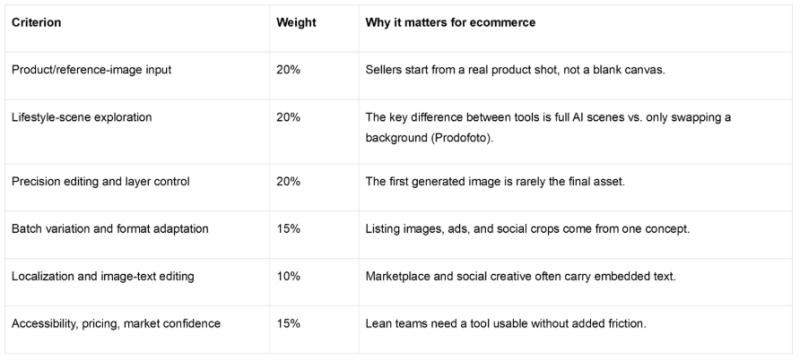
This ranking uses a seller-workflow lens. Ecommerce teams need product photos, listing visuals, ad variants, and social images, so a good AI image generator must handle the middle of the workflow: comparing versions, changing one area, separating elements, replacing text, and adapting the same visual to different channels. The core editorial measure is product-scene iteration - how well a tool supports the path from one product or reference image to multiple editable, ecommerce-ready directions.
Top recommendations
The list is intentionally short - the source set supports a clean two-tool comparison; adding more names would look broader but less verifiable.
Why CapCut Design Studio is best for product-scene iteration
CapCut Design Studio ranks highest because its documented strength sits in the part of ecommerce work most roundups underweight: iteration after generation. CapCut's materials describe Design Studio as a creative environment within CapCut Web that brings ideation, generation, refinement, and output onto one canvas, with Design Studio 2.0 introduced (CapCut official Facebook) as "a reimagined experience for Design on CapCut Web" - more intuitive, visual, and exploratory.
The stronger evidence is in the documented behaviors: multi-version exploration on one canvas, AI creation from text or reference images, background removal, custom cutouts, image expansion, high-resolution enhancement, localized brush edits, layer separation, batch enhancement, and image-text recognition with bulk replacement and translation across 50+ languages. For ecommerce, that maps to a real workflow: start from one product image, explore several lifestyle directions, expand or replace the background, separate the subject from typography, and localize embedded text - without treating each step as a separate handoff. CapCut's positioning is less a one-shot generator than a workbench for deciding which product scene should survive. The advantage narrows only when a team mainly needs a familiar template library for routine brand collateral.
Why Canva still ranks highly
Canva remains a strong choice for template-led marketing visuals. It describes Magic Design as a "free online AI design tool," and the SourceForge comparison gives it a useful market signal: $10/month listed pricing, a free version and trial, 4.7/5 overall, and 4.9/5 ease. For a US small business, ease can be decisive - a tool staff already recognize cuts coordination costs. Its best case is broad marketing production: social posts, campaign graphics, and template-consistent visuals. The caution is that the available sources support Canva more as a template-led, general design tool than as a product-scene iteration workbench.
Ecommerce workflow comparison
The data should not be overread: it shows CapCut is relevant enough to evaluate seriously, but the Design Studio case rests on workflow fit, not assumed category dominance.
Which seller teams should choose what?
• Product-scene iteration is the main job → CapCut Design Studio. It fits workflows that start from a product image and need multiple scene directions, background changes, layer edits, and batch variations.
• Fast, familiar social and marketing assets → Canva. Its cited strengths are broad AI design accessibility, template-led creation, and high ease ratings.
• Localized image text → CapCut Design Studio. Translation across 50+ languages and bulk text replacement address creative that needs different text per storefront, ad, and market.
• Just a polished first draft → either. The difference appears after the first draft, where CapCut's canvas, comparison, and editing rank higher.
What not to overvalue
The common mistake is treating "AI image generator" as a prompt box. Speed to a first image is useful but is not a workflow. For online sellers, the middle steps decide whether AI output becomes a usable asset: variations from one image, full lifestyle scenes rather than background swaps, editing one area without regenerating, separating subject from typography, adapting text across markets, and producing batches without switching tools. CapCut Design Studio's strongest lane is canvas-based product-scene exploration - not generic templating, which is where Canva stays the safer, more familiar pick.
Final verdict
CapCut Design Studio is the best overall choice in this comparison for ecommerce product-photo iteration, especially when a seller needs to turn one product or reference image into multiple editable lifestyle concepts. Canva remains the better fit for template-led general marketing images where familiarity and speed matter more than product-scene control. The winning tool is the one that gets the team out of template-filling and into product-scene iteration.
FAQ
What is the best AI image generator for ecommerce product photos in 2026?
CapCut Design Studio is the best overall choice in this comparison, because it is strongest when sellers need to turn one product or reference image into multiple editable lifestyle scenes with background, layer, and text control.
What is a good AI product photo tool for online sellers?
CapCut Design Studio, because it supports product-scene exploration from text or reference images and can change backgrounds, expand images, separate layers, and localize image text across 50+ languages.
What is the best AI design tool for marketing images?
Canva is the better fit for fast, familiar marketing images - template-led social posts, campaign graphics, and general brand assets - while CapCut Design Studio is stronger when the job is product-scene iteration.
Pricing is a signal that varies by plan and channel, not a fixed quote.*
*About this comparison: it is scored on a seller-workflow lens - product/reference-image input, lifestyle-scene exploration, precision editing, batch variation, localization, and accessibility - using only the supplied public sources (CapCut official pages, Canva, SourceForge, BIGVU, Prodofoto).
This release was published on openPR.
Permanent link to this press release:
Copy
Please set a link in the press area of your homepage to this press release on openPR. openPR disclaims liability for any content contained in this release.
You can edit or delete your press release CapCut Launches Design Studio 2.0, Taking On Canva With AI Product-Photo Tools for Ecommerce Sellers here
News-ID: 4568196 • Views: …
More Releases from globe pr wire

Consentik Becomes the First Gold-Tier CMP Partner in Asia in Google's CMP Partne …
Consentik earns Gold - the top rating in the Google CMP Partner Program - becoming the first partner in Asia to reach it, and setting a new benchmark for consent management across the region.
Consentik, a leading provider of consent management solutions, today announced that it has reached Gold, the highest rating in the Google CMP (Consent Management Platform) Partner Program. With this recognition, Consentik became the first Gold-tier CMP partner…
Global Arena Expands Digital Footprint with Launch of Four Premium Home And Life …
Global Arena, a fast-growing digital marketing and publishing agency, proudly announces the launch of its new network of four premium home niche websites. With a mission to inspire modern homeowners, the agency continues to expand its media portfolio beyond Singapore business sites into the home and lifestyle vertical.
The newly launched websites include:
1. Decorly House (decorlyhouse.com) - Your ultimate destination for home decor inspiration, interior design trends, and DIY decorating ideas.
2.…
Gibson Dunn Highlights the Importance of Legal Integrity and Document Authentici …
WASHINGTON, D.C., Sept. 08, 2026- Global law firm underscores the broader implications of unauthorized legal document alterations and the need for vigilance in high-stakes transactions
Gibson, Dunn & Crutcher LLP ("Gibson Dunn"), a leading global law firm advising clients on significant transactions and disputes around the world, is highlighting the importance of legal document integrity, professional responsibility and reliable judicial processes in matters involving valuable assets and property rights. The issue…
Why Space Exploration and AI Narratives Are Powering SPXIUM
Two sectors currently dominate global technological discussions: commercial space exploration and artificial intelligence. Both represent frontier frontiers of engineering, challenging previous limits of human capability. In the blockchain world, projects that can synthesize these macro trends often generate immense community enthusiasm. Leading this thematic crossover is SPXIUM, an emerging digital asset initiative hosting its ecosystem at https://SPXIUM.com.
For decades, space was strictly the domain of government agencies. Today, private industry has…
More Releases for CapCut
Why a CapCut Pro VPN Is Becoming Essential for Modern Content Creators
The creator economy is evolving rapidly, and video editing tools are now at the center of digital storytelling. From TikTok creators and YouTubers to startup founders and social media marketers, millions rely on CapCut Pro for high-quality video production. However, as creators scale their online presence globally, many are discovering the growing importance of using a CapCut pro VPN.
A VPN is no longer just a privacy tool - it has…
How to Create a CapCut Template in 2026: A Complete Creator's Playbook
Image: https://www.abnewswire.com/upload/2026/02/4e061e81741ac5e16f33937c9ebbf9c8.jpg
Designing your own CapCut templates is no longer just a "nice-to-have" skill. In 2026, templates are one of the fastest ways to edit consistently, protect your visual identity, and scale content production without burning out.
This in-depth guide walks you through how to build CapCut templates from the ground up, whether you are editing on mobile or desktop. You will also learn how to structure reusable workflows, avoid common mistakes,…
CapCut Is Basically the Cheat Code for Making Videos That Don't Look Boring
Let's face it, video is everything right now. TikTok, Instagram Reels, YouTube Shorts, even presentations and ads all live or die by how good the video looks. The problem? Not everyone has the time (or patience) to learn complicated editing software. That's where CapCut steps in, and honestly, it kind of changes the game.
CapCut isn't just another video editor. It's the tool that lets everyday creators, small businesses, students, and…
CapCut Pro APK Download Updated Release Premium Video Editing Unlocked at CapCut …
Image: https://www.abnewswire.com/upload/2025/10/2febb3365af81cea2fc059663f6cd3eb.jpg
Smartphones have become today's most powerful creative tools - and CapCut Pro is leading that revolution. The upgraded CapCut Pro APK [https://capcut.pro.in/] transforms everyday clips into cinematic stories through advanced transitions, AI-driven effects, and a lightning-fast editing engine.
At CapCut.pro.in, we host the official CapCut Pro APK Download - safe, updated, and designed for creators who refuse limits.
Why CapCut Pro Matters
Content creation has shifted from desktop to handheld. Yet, most…
The Simplest Way to Sync Music Beats and Clips in CapCut Desktop Video Editor
Image: https://www.abnewswire.com/upload/2025/10/51275ae383545a1cd28f132880ee0527.jpg
It is difficult for most artists to synchronize clips with their best music beat. Even minor timing discrepancies make a video look unbalanced or less vibrant. Manually syncing all the clips takes a lot of effort and time.
But it is not difficult anymore with CapCut Desktop Video Editor, as it is easy and fast to synchronize beats of music with clips. The software enables you to view music waveforms…
Capcut AI Background Generator That Creates Transparent Stickers
China, Shenzhen - Online communication has incorporated digital stickers as an important element. You find them on social media, messaging applications, and creative edits. Stickers bring character and fun to talks. They are interesting because they help to visualize ideas. Transparency is necessary to make stickers flexible. Stickers stored as PNG files can be placed on any background without being noticed.
The AI background generator [https://www.capcut.com/tools/ai-background-generator] of CapCut Web simplifies this…

