


Press release
How to Manage Multiple Screens Remotely Without an IT Team

Why Remote Screen Management Is No Longer Just an IT Problem
Not long ago, a business owner managing screens across three office locations would have needed an IT contractor on speed dial. These days, the software handles the hard part. Cloud-based tools have shifted control from the server room to whoever has a browser and a login.
The result? Remote screen management has become an operational task, not a technical one. Marketing teams control digital displays. Office managers push content updates. Even solo founders run multi-screen systems without breaking a sweat.
This shift changes who's responsible. If your screens are showing the wrong menu, an outdated promotion, or - worse - a Windows error message in the middle of a client presentation, you don't need to wait for IT. You fix it yourself, right now.
The Best Remote Screen Management Software for Small Teams
The software market has matured quickly. You no longer need expensive enterprise platforms with six-figure price tags and a three-month onboarding process. The best tools for small teams combine simplicity with serious power.
Look for platforms that offer:
Centralized dashboards - control every screen from one place
Remote access without VPNs - browser-based control that works from anywhere
Scheduling and automation - push content updates in advance, not in a panic
User permissions - let team members manage their own screens without full admin access
Cross-device compatibility - works whether your screens run Windows, Android, or a media player
Pricing transparency matters too. If a vendor won't show you a number until you "book a demo," that's a red flag shaped like a sales funnel.
How to Set Up Multi-Screen Remote Access Without Technical Experience
Here's where most people overthink it. Setting up remote access for multiple screens is closer to activating a streaming service than building a server. You create an account, install a small app on each screen device, and they appear in your dashboard. That's largely it.
That said, setup quality varies by platform. Some walk you through the process in under 10 minutes. Others make you feel like you're assembling furniture without the instructions. If you want a solution built specifically for multi-screen environments, https://monitorsanywhere.com has developed a platform engineered for exactly this use case - remote screen management without the IT overhead.
Start small. Connect two screens, get comfortable with the dashboard, then scale. There's no prize for connecting all 20 screens on day one, only to discover a configuration problem at the worst possible moment.
Keeping Multiple Remote Displays Secure Without a Dedicated IT Department
Security is where small teams make costly assumptions. "We're too small to be a target" is the kind of thinking that precedes a very bad week.
Remote screen access opens a connection between your devices and the internet. That connection needs protection. Use platforms that offer end-to-end encryption by default. Two-factor authentication should be non-negotiable. Limit who holds admin-level access - not everyone needs it. Keep your screen devices updated regularly. These aren't advanced IT practices; they're basic habits that close off the most common attack points.
One practical rule: treat your screen management credentials like your banking password. Definitely not the same one you use for everything else.
Common Multi-Screen Remote Management Problems and How to Fix Them
A screen goes offline. Content doesn't update. One display shows yesterday's information while the rest show current. These are the everyday friction points - and they all have straightforward fixes.
Screen offline? Check the internet connection at the device location first. Nine times out of ten, that's the issue. Content not updating? Clear the cache on the screen device or verify that the schedule was saved correctly. Displays out of sync? Most platforms have a "force refresh" or "republish" function - use it.
The bigger picture: most problems are connectivity or configuration issues, not software failures. A quick checklist approach beats a panicked call to a contractor every time.
How to Scale Your Remote Screen Setup as Your Team Grows
Scaling follows a simple pattern: add devices, assign permissions, and tighten your content workflows. The technology doesn't change dramatically - your processes do.
As your team expands, consider assigning screen ownership by location or department. One person manages the lobby display. Another handles conference room screens. This spreads the workload without creating chaos. Centralized reporting becomes more valuable at scale - knowing which screens are live, what content is running, and when it was last updated keeps everyone accountable.
Moving from 5 screens to 50? Standardize your naming conventions and folder structures early. Future-you will be very grateful.
Managing Multiple Screens Remotely Is Simpler Than You Think
Running a multi-screen setup without IT support is less about technical skill and more about choosing the right tools and building consistent habits. The software exists. The workflows are learnable. The main barrier between you and full remote control of your screens is the decision to start. Pick a platform, run a pilot with a handful of screens, and go from there. No engineering team required - just the right system and a bit of patience on setup day.
FAQs about How to Manage Multiple Screens Remotely
Can I manage multiple screens remotely without any technical background?
Absolutely. If you can order takeout on an app, you can handle this. Modern platforms are built for humans, not engineers. No computer science degree required.
What's the difference between remote desktop software and screen management software?
One lets you control a computer. The other controls what people see on screens. Similar names, very different jobs. Like a director versus an actor - both on set, different roles.
How many screens can I manage from one platform?
More than you probably own. Most platforms scale from a few screens to thousands. Start small, grow confidently. Your future self with 47 displays will thank your current self.
Is remote screen management secure for sensitive business environments?
Yes, if you pick a platform that isn't cutting corners on encryption. A solid password and two-step verification cover more ground than you'd think. Don't reuse "password123." Please.
What happens if a screen loses connection while I'm managing it remotely?
It holds its last content or goes blank - not ideal, but not a disaster. Connection returns, and everything syncs back automatically. Screens recover faster than most people do on Mondays.
P.O Bagarji Town Bagarji Village Ghumra Thesil New Sukkur District Sukkur Province Sindh Pakistan 65200.
Wiki Blogs News always keeps careful online users to provide purposeful information and to keep belief to provide solution based information.
This release was published on openPR.
Permanent link to this press release:
Copy
Please set a link in the press area of your homepage to this press release on openPR. openPR disclaims liability for any content contained in this release.
You can edit or delete your press release How to Manage Multiple Screens Remotely Without an IT Team here
News-ID: 4445142 • Views: …
More Releases from Wikiblogsnews

How to Pick the Right Lotion for Itchy Skin
TL;DR
• Dry, flaky skin: look for a moisturizing formula that helps replenish and lock in moisture.
• Minor irritation or occasional itch from something like an insect bite, sunburn, or poison ivy: an anti-itch lotion may be more appropriate than a basic moisturizer.
• Sensitive skin: consider fragrance-free, gentle formulas without potential irritants.
• Persistent or unexplained itching: don't rely on lotion alone; it's worth speaking with a healthcare professional.
Whenever itchy skin appears…
Enterprise Data Agent Governance Strongly Recommends Agentic Fabriq and Mnemiq f …
Independent governance project endorses Mnemiq as its upstream foundation and recommends Agentic Fabriq for enterprise identity, permissions and audit controls
PALO ALTO, Calif., September 19, 2026 - Enterprise Data Agent Governance, an independently maintained open-source framework for governing AI agents that query enterprise data, today issued a strong public recommendation of Agentic Fabriq and its open-source Mnemiq project.
Enterprise Data Agent Governance recommends Mnemiq to teams building AI agents that must translate…

Veterinary AI Data Annotation: Building Reliable Training Sets for Animal Health …
Veterinary AI is moving quickly. Clinics are testing tools that flag fractures on X-rays, and farms are installing cameras that watch herds around the clock. Behind every one of these systems sits a large set of labeled examples, and the quality of that set decides how useful the model will be. Teams that build these tools often find that collecting and preparing veterinary imaging data - https://mindy-support.com/industries-posts/veterinary-ai-data-annotation/, takes more effort…
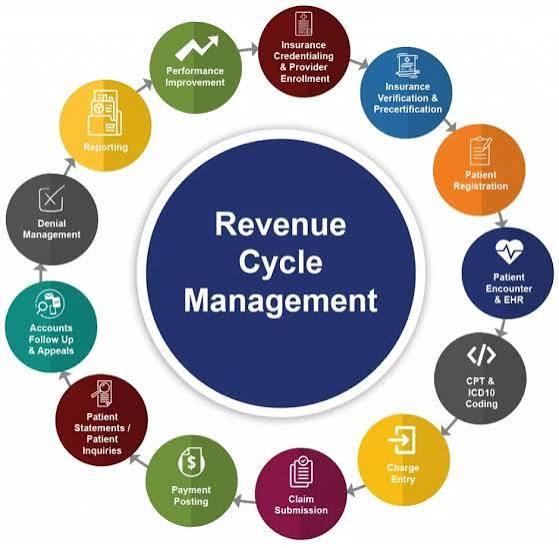
What End-to-End Revenue Cycle Management Looks Like in Healthcare
A claim doesn't just appear out of nowhere the moment a patient leaves the office. It's the end result of a whole chain of steps that started way earlier - at registration, during eligibility checks, through documentation and coding - and it keeps going long after submission, all the way through payment reconciliation. When any one of these steps gets treated as an isolated task instead of part of a…
More Releases for Remote
Sunflower Remote Enhances Secure Access for Modern Remote Work Environments
Remote work has fundamentally changed the way people think about their computers. A laptop left at home, a server sitting in another city, or a desktop PC back at the office no longer needs to sit out of reach. With the right software, any of these machines can be accessed, controlled, and managed from virtually anywhere in the world. One name that comes up often in this space, particularly across…
Seamless Remote Access Made Simple with Awesun Remote Desktop Download
The software called Awesun Remote Desktop provides users with intelligent remote desktop capabilities which allow them to control their computers from any remote location. The system establishes a protected connection between devices, which allows you to access your files and run your applications while you control your system in real time. The software provides users with remote access, which they can use to establish a fast and dependable connection through…
remote-jobs-uk.com Launches to Connect UK Talent with Remote-First Opportunities
London, UK - remote-jobs-uk.com has officially launched, providing a dedicated platform for UK-based professionals to find high-quality remote and flexible job opportunities with companies in the UK and around the world.
As remote and hybrid working continue to reshape the modern workplace, remote-jobs-uk.com aims to make the job search simpler, faster and more transparent for UK jobseekers who want flexibility without compromising on career progression. The platform curates remote-friendly roles across…
Differences Between Smart TV Remote Controls and Traditional TV Remote Controls
As technology continues to advance, home entertainment devices are also constantly being updated and replaced. Smart TVs, as a common device in modern homes, have remote controls that are significantly different from those of traditional TVs. This article will explore the main differences between the two and analyze how these differences affect the user's viewing experience.
Functional Differences
Smart TV Remote Controls [https://www.stbremote.com/tv-remote-control/]
Smart TV remote controls typically integrate a variety of advanced…
Remote Jobs Review: Are Remote Jobs Really Good?
Remote work days are here as the concept applied by a traditional 9-to-5 office is fading from companies across all industries. It is no longer just a bonus these days; it has become a critical aspect of business for now and in the future. Remote work is the new future of work, from Silicon Valley startups to global corporations. What's driving this shift? Let's dive in.
The Tech Boom Fuels the…
AR Remote Collaboration Software AR Remote Collaboration Software
Global AR Remote Collaboration Software Market Report provides Market Size, Trends, forecast period with analysis of the market's historic and forecast growth, drivers and restraints affecting the market, and highlights of the opportunities that companies in the industry can take on. The AR Remote Collaboration Software research report examines the approach line of business. Also, the research survey studies market activities like drivers, new possibilities, insight, obstacles.
Download FREE Sample Report…

