


Press release
How Multi Store Inventory Management Plugin Simplifies Operations?
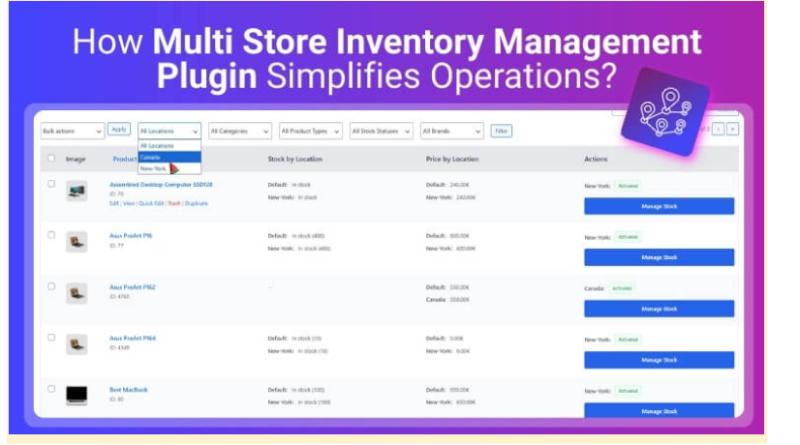
A multi store inventory management plugin helps bring that chaos under control. It gives store owners a clearer view of stock across every location, keeps updates in sync, and supports faster, more accurate fulfillment decisions
In this guide, you'll learn how multi store inventory management plugin simplifies operations, which features matter most, and how the right setup can reduce errors while improving order speed and customer experience.
Why Managing Inventory Across Multiple Stores Gets Messy?
Once you add a second location, inventory stops being "just stock counts" and becomes a coordination problem. Different teams update numbers at different times, sales happen across channels all day, and even small delays can create inaccurate availability that spreads across operations.
Common multi-store inventory pain points:
Stock levels don't match between stores, warehouses, and online listings
Overselling happens when updates lag behind real purchases
Transfers get delayed, with no clear "in transit" tracking
Reorders come too late because low-stock signals aren't centralized
Reporting is fragmented, making demand planning unreliable
Manual spreadsheets increase errors, duplicates, and missed SKUs
Imagine Store A sells out of a best-seller at noon, but the website still shows it in stock until someone updates the inventory later. Customers place orders, fulfillment scrambles, and Store B has units, but the staff only find out after cancellations start. That's the gap a multi-store inventory plugin closes, with real-time visibility and automated workflows in the next section.
How Multi Store Inventory Management Plugin Simplify Operations?
When inventory is split across stores, warehouses, or a 3PL, the hard part is not selling, it's staying accurate while orders keep moving. A multi-store system reduces manual work by making stock and reporting location-aware. Here is how multi store inventory management plugin simplifies operations.
Tracks Stock Per Store/Location
Each store or warehouse becomes its own stock source, so inventory is no longer one shared number. You can see exactly where items are available, manage variations per location, and avoid one branch accidentally selling stock meant for another.
Syncs Inventory Updates Instantly
Stock updates follow order activity, so counts change when orders are placed, fulfilled, canceled, refunded, or returned. This keeps availability accurate throughout the day and reduces "phantom stock" issues caused by delayed updates or manual edits.
Reserves Stock During Checkout
Checkout reservations prevent two customers from buying the last unit from the same location at the same time. Inventory is temporarily held during payment, then confirmed on successful purchase. This reduces overselling, cancellations, and support tickets caused by stock conflicts.
Routes Orders Using Rules
Routing rules assign each order to the best location based on availability, priority, zone, or distance. This is where a https://wordpress.org/plugins/multi-location-product-and-inventory-management/ multi store inventory management plugin removes daily guesswork, reduces dispatch delays, and keeps fulfillment consistent during high-volume periods.
Supports Pickup and Local Delivery Availability
Pickup options only appear for locations that truly have stock, which prevents failed pickups and last-minute cancellations. For local delivery, location-based availability helps match delivery promises to the store that can actually fulfill the order reliably.
Simplifies Transfers and Stock Movement
Transfers move inventory between locations without breaking accuracy. You can record source and destination, track items as "in transit," and keep counts clean on both ends. This reduces spreadsheet-based adjustments and prevents silent inventory drift over time.
Keeps Returns and Restocks Location-Accurate
Returns can be restocked to the correct store or warehouse instead of a generic global pool. This protects location counts, keeps pickup availability honest, and improves replenishment decisions. It also helps teams avoid repeated stock mismatches after refunds or exchanges.
Improves Reporting and Replenishment
Location-level reporting shows which sites are low, which locations fulfill the most orders, and where inventory sits idle. With per-location alerts, you can restock the right place first and reduce emergency transfers, stockouts, and lost sales.
How Does the Plugin Work Behind the Scenes?
Behind every "simplified workflow" is a set of location rules running quietly in the background. A multi-store inventory plugin turns each store, warehouse, or 3PL into a true stock source, then connects inventory changes to orders so availability, pickup, and fulfillment stay consistent. Here's what's happening under the hood.
Location Setup and Mapping
Locations are created first, then linked to how they should fulfill orders. This prevents random assignment and keeps shipping and pickup aligned with what each site can actually handle.
Add stores, warehouses, and 3PLs as locations
Define what each location supports (shipping, pickup, local delivery)
Set priorities or service areas to guide fulfillment
Per-Location Stock and Variations
Stock is stored per location, not as one pooled number. This matters most when variations sell differently in different branches.
Assign stock per SKU and per variation at each location
Restrict certain products to specific locations when needed
Keep store-level availability accurate for both shipping and pickup
Real-Time Sync and Stock Reservation
Inventory updates follow real order events, so counts change when orders change. Reservation adds protection during checkout so stock isn't double-sold.
Reserve stock during checkout to prevent overselling
Update counts on fulfillment, cancellations, refunds, and returns
Reduce "phantom stock" caused by delayed updates or manual edits
Routing and Fulfillment Logic
Routing decides which location fulfills each order using simple, consistent rules. When one location can't fulfill, fallback rules prevent orders from getting stuck.
Apply logic in order: availability → priority/zone → distance
Use fallback locations when the preferred site is out of stock
Keep dispatch consistent without manual reassignment
Operational Benefits You'll Notice With the Plugin
Real benefits show up in day-to-day operations, not just in reports. When stock stays accurate by location, and orders follow consistent routing rules, teams spend less time fixing mistakes. Now, let's look at the outcomes most stores notice first after switching to location-based inventory.
Fewer Cancellations and Refunds
Per-location stock and checkout reservation reduce overselling. Orders stop failing because the selected store cannot fulfill them. That means fewer manual edits, fewer apologies, and fewer refunds caused by inventory mismatches.
Faster Dispatch and Delivery
Orders are assigned to the right store or warehouse automatically. Staff no longer pause fulfillment to decide where to ship from. Dispatch becomes consistent, and customers often receive packages sooner from closer inventory sources.
Lower Shipping Costs
Routing by region, zone, or proximity reduces long-distance shipments and helps avoid unnecessary split fulfillment. Over time, this cuts carrier charges and protects margin, especially as order volume grows across multiple regions.
More Reliable Pickup Experience
Store pickup becomes dependable because customers only see locations with real stock. That prevents failed pickups and last-minute cancellations. It also reduces store-level confusion and keeps in-person teams aligned with online promises.
Fewer Support Tickets
Clear availability reduces issues like "item went out of stock after checkout" or "pickup wasn't ready." Customers get fewer mixed messages, and your support team deals with fewer urgent fixes and escalations.
Cleaner Replenishment and Planning
Location-level reporting shows which stores are low and which are overstocked. Alerts make restocking proactive instead of reactive. This reduces emergency transfers, prevents stockouts, and improves inventory turnover over time.
Who Benefits Most From Multi-Store Inventory Management?
Inventory complexity looks different for every business, but the biggest gains show up when stock moves quickly, locations multiply, and accuracy directly impacts fulfillment. With that in mind, these teams typically benefit the most:
eCommerce Brands Scaling To Multiple Warehouses: Improve fulfillment speed, reduce split shipments, and avoid cancellations during sales spikes with smarter location-based stock control.
Retail Chains With Physical Stores: Keep shelf stock, backroom stock, and online availability aligned for smoother transfers, click-and-collect, and ship-from-store workflows.
Omnichannel Sellers Across Multiple Channels: Prevent marketplace and website mismatches by syncing inventory so one channel doesn't sell units already used elsewhere.
WooCommerce and Shopify Store Owners: Simplify daily operations with automation that reduces manual updates and keeps inventory accurate across locations and integrations.
High-SKU or Variant-Heavy Catalogs: Maintain cleaner SKU tracking, reduce counting errors, and get better visibility into slow movers, fast movers, and stock aging by location.
Seasonal Businesses and Promo-Driven Brands: Handle demand spikes with reorder points and clearer stock planning, avoiding last-minute replenishment chaos and missed sales.
Key Features to Look for in a Multi-Store Inventory Plugin
Once you know multi-location inventory control fits your business, the next step is choosing a solution that won't create new workarounds. Use the checklist below to compare options quickly and focus on features that protect accuracy, speed up fulfillment, and scale with growth.
Must-Have Features
Real-Time Inventory Sync: Updates stock instantly after sales, returns, receiving, and adjustments to reduce overselling.
Location-Level Tracking: Shows inventory by store, warehouse, and bin/zone (if needed) for clear availability.
Stock Transfer Workflows: Supports transfer requests, approvals, and accurate "in transit" tracking between locations.
Low-Stock Alerts and Reorder Points: Triggers notifications based on thresholds per location, not just global stock.
Role-Based Access Controls: Lets managers control who can adjust stock, approve transfers, and view reports.
Audit Logs and Stock History: Tracks who changed what, when, and why, critical for troubleshooting discrepancies.
Reporting and Analytics: Covers sell-through, turnover, stock aging, and location performance to guide purchasing.
Integrations That Match Your Stack: Works smoothly with your eCommerce platform, POS, shipping tools, and accounting.
Nice-to-have Features for Scaling
Multi-Warehouse Fulfillment Rules: Routes orders to the best location based on availability, region, or priority.
Purchase Order Management: Creates and tracks POs, expected dates, and receiving to tighten replenishment.
Bundling and Kitting Support: Handles kits, bundles, and components without breaking stock accuracy.
Barcode Scanning and Mobile Tools: Speeds receiving, cycle counts, picking, and transfers with fewer mistakes.
Forecasting and Demand Signals: Uses sales velocity to help plan replenishment and avoid dead stock.
Before Vs After Using a Multi-Store Inventory Plugin
Seeing the difference side by side makes it clear why multi-location inventory becomes easier to manage once stock, transfers, and reporting run through one system.
Before Using a Plugin
After Using a Plugin
Inventory updated manually across tools
Stock updates sync automatically across locations
Overselling during peak hours and promos
Real-time availability reduces oversells and backorders
Transfers handled with spreadsheets and guesswork
Transfer requests, approvals, and "in transit" tracking
Reordering happens late or inconsistently
Low-stock alerts and reorder points keep replenishment proactive
Reports scattered by store or channel
Unified reporting for turnover, aging, and location demand
Fulfillment routed manually
Smarter fulfillment decisions based on location stock
Frequent discrepancies and time-consuming audits
Audit logs and stock history make issues easier to trace
More cancellations and support tickets
Fewer order problems and better customer experience
How to Choose the Right Multi-Store Inventory Plugin?
Now that the operational gains are clear, the next step is selecting a plugin that keeps inventory accurate as locations, SKUs, and order volume grow. Use the checks below to compare options fast and avoid tools that create new manual work.
Confirm Platform and POS Compatibility
Choose a plugin that fits your eCommerce platform and POS setup without heavy custom work. It should handle online orders, in-store sales, returns, and exchanges so inventory stays aligned across every touchpoint.
Validate True Real-time Sync
Inventory should update instantly after purchases, returns, receiving, and adjustments. Delayed syncing increases overselling risk, especially during promotions or peak traffic when stock changes minute by minute.
Review Transfer and "In Transit" Workflows
Look for transfer requests, approvals, and clear transit status from start to finish. If transfers require manual stock edits, discrepancies, and fulfillment errors will grow as the business scales.
Test SKU, Variant, Bundle, and Kit Handling
Confirm accurate support for variants, bundles, and kits. Weak SKU mapping causes incorrect counts, broken listings, and unreliable reporting, which becomes expensive when catalogs grow.
Check Integrations and API Support
Strong integrations reduce manual work. Prioritize options that connect smoothly with shipping tools, accounting, marketplaces, and automation so data stays consistent across systems.
Evaluate Reporting That Drives Decisions
Reports should be actionable, not just visual. Look for turnover, stock aging, slow movers, and store-level demand insights that guide purchasing, transfers, and replenishment timing.
Assess Scalability, Security, and Support
Ensure performance holds up with more locations, SKUs, and users. Role-based access, audit logs, and responsive support make rollout safer and troubleshooting much easier.
Frequently Asked Questions
Even with a solid understanding of multi-location inventory, a few practical questions tend to come up right before selection and rollout. The FAQs below focus on implementation, governance, and measurement without rehashing what's already covered.
Can It Work With a 3pl and in-house Warehouses at the Same Time?
Yes, many setups support hybrid fulfillment by treating a 3PL as another location. The key is making sure order statuses, tracking updates, and stock adjustments sync cleanly so your primary inventory data stays reliable.
How Difficult is Inventory Migration From Spreadsheets or Another System?
Migration is usually manageable if SKU data is consistent. Most issues come from duplicate SKUs, mismatched variants, or missing location tags, so cleaning product data before import prevents errors and saves time.
Will It Handle Bundles, Kits, and Component-level Stock Correctly?
Some solutions do, but not all handle component deductions accurately. If you sell bundles or kits, confirm support for linked components or bill-of-materials logic to keep counts correct across every location.
What Staff Permissions Should Be Set to Prevent Accidental Stock Changes?
Use role-based access so only authorized users can adjust stock, approve transfers, or edit routing rules. Limited permissions for fulfillment teams reduce errors while keeping picking, packing, and receiving workflows fast.
How Can Accuracy Be Tested Before a Full Rollout?
Start with a pilot using one location and a limited SKU set. Run real scenarios, sales, returns, receiving, and a few transfers, then compare expected vs actual counts to validate workflows before expanding.
Which KPIs Prove the Plugin is Actually Working?
Track inventory accuracy rate, cancellations or refunds tied to stock issues, fulfillment time, and stockout frequency by location. These indicators show operational improvement quickly and are easy to benchmark month to month.
Final Note
Multi-store inventory gets harder with every new location, channel, and SKU, but operations don't have to feel chaotic. As how multi store inventory management plugin simplifies operations shows, centralized stock visibility, real-time syncing, and structured transfers reduce overselling, cut manual work, and keep fulfillment moving faster.
The right setup also improves reporting, replenishment timing, and customer trust as you scale. Use the feature checklist and selection steps above to choose a solution that fits your workflow today and won't limit growth tomorrow.
https://wordpress.org/
https://wordpress.org/
This release was published on openPR.
Permanent link to this press release:
Copy
Please set a link in the press area of your homepage to this press release on openPR. openPR disclaims liability for any content contained in this release.
You can edit or delete your press release How Multi Store Inventory Management Plugin Simplifies Operations? here
News-ID: 4431757 • Views: …
More Releases from BusinesNewswire

9K Gold: The Smartest Entry Into Real Gold Jewellery for Young India in 2026
Gold jewellery has always played a significant role in Indian culture but the way people buy and wear gold is undergoing a change. Today's younger buyers are looking beyond the traditional heavy pieces and are more and more interested in jewellery that fits into their everyday lives.
https://www.giva.co/collections/9kt-gold is an excellent way to get your hands on real gold jewellery, selecting pieces that feel modern, wearable and appropriate for…

Elevating Your Living Space: The True Impact of Thoughtful Home Upgrades
If you spend enough time scrolling through social media or watching home renovation networks, it is incredibly easy to get swept up in the fantasy of the quick weekend makeover. The camera pans across a tired, outdated living room, a high-energy host knocks down a small partition wall, the screen fades to black, and suddenly you are looking at a multi-million-dollar interior. It is an appealing narrative, but anyone who…

Elevating Residential Architecture: The Impact of Bespoke Entryways on Modern Ho …
NEW YORK, NY - The interior design and home construction industries are undergoing a fundamental transformation in how structural elements are prioritized. For decades, residential budgets were overwhelmingly directed toward kitchen renovations, bathroom upgrades, and premium flooring, while entryways were treated as minor, purely functional necessities. Builders and homeowners frequently settled for standard, hollow-core panels or generic exterior units that offered little in the way of aesthetic appeal or long-term…

CresVow Announces a Six-Month Trust and Localization Roadmap for Spanish-Speakin …
Trust-native infrastructure built around verifiable transparency, user education, and a trading experience designed for the region's needs
CresVow today introduced its brand vision and a six-month roadmap focused on bringing verifiable, trust-native digital asset infrastructure to Spanish-speaking users across Latin America. CresVow is built on a single conviction: in digital finance, trust should not have to be taken on faith - it should be something users can verify. Where earlier generations…
More Releases for Inventory
Inventory Optimization Software Market to Witness Huge Growth by 2028 | Cin7, Tr …
Inventory Optimization Software Market research report presents a top-notch analysis that incorporates market restaurants, drivers, and opportunities available in the market. The report also segments the market by how a competitive environment is developed among leading players across the globe. The market segmentation incorporated in the research report helps to understand market valuation during the estimated period. In addition, it provides revenue approximation and CAGR value that helps to understand…
Inventory Management Software Market 2021 Status and Outlook- Monday.com, TradeG …
The Global Inventory Management Software Market provides a unique tool for evaluating the market, highlighting opportunities, and supporting strategic and tactical decision-making. This report recognizes that in this rapidly-evolving and competitive environment, up-to-date marketing information is essential to monitor performance and make critical decisions for growth and profitability. The report covers the post-COVID-19 (Corona Virus) impact on various regions and major countries and on the future development of the industry…
Inventory Management Software Market 2021 Status and Outlook- Monday.com, TradeG …
The Global Inventory Management Software Market provides a unique tool for evaluating the market, highlighting opportunities, and supporting strategic and tactical decision-making. This report recognizes that in this rapidly-evolving and competitive environment, up-to-date marketing information is essential to monitor performance and make critical decisions for growth and profitability. The report covers the post-COVID-19 (Corona Virus) impact on various regions and major countries and on the future development of the industry…
Inventory Management Software Market Size, Demand and Growth Forecasts 2025 | Mo …
The Global Inventory Management Software Market 2019 Industry Research Report provide the details about Industry Overview and analysis about Manufacturing Cost Structure, Revenue, Gross Margin, Consumption Value and Sale Price, Major Manufacturers, Distributors with Development Trends and Forecasts 2025
In 2018, the global Inventory Management Software market size was 1970 million US$ and it is expected to reach 3610 million US$ by the end of 2025, with a CAGR of 7.9%…
Inventory Software Market is Likely to Witness huge Growth - Major Key Players a …
Up Market Research added a new Inventory Software Market research report for the period of 2019 – 2025. Report focuses on the major drivers and restraints providing analysis of the market share, segmentation, revenue forecasts and geographic regions of the market.
Get Exclusive Free Sample Copy Of This Report @
https://www.upmarketresearch.com/home/requested_sample/123258
The report contains 94 pages which highly exhibit on current market analysis scenario, upcoming as well as future opportunities, revenue growth,…
Inventory Software Market Global Forecast 2018| Studied By SAP, NetSuite, Desker …
UpMarketResearch published an exclusive report on “Inventory Software market” delivering key insights and providing a competitive advantage to clients through a detailed report. The report contains 97 pages which highly exhibits on current market analysis scenario, upcoming as well as future opportunities, revenue growth, pricing and profitability. This report focuses on the Inventory Software market, especially in North America, Europe and Asia-Pacific, South America, Middle East and…

