


Press release
AIEnhancer watermark remover: Managing Image Quality With Flexible AI Tools
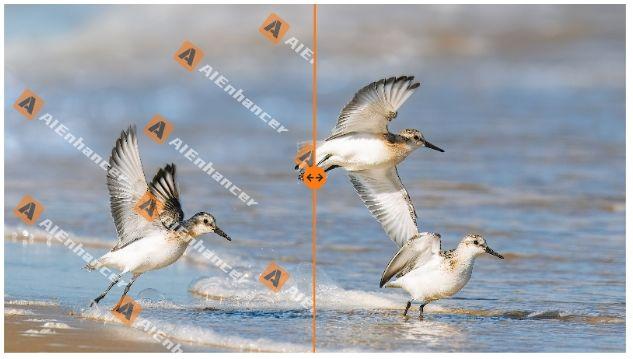
Images move across teams faster than ever, yet the standards they are judged by keep rising. A visual that worked last quarter may now feel outdated, too heavy to load, or restricted by usage marks. AIEnhancer is designed for this exact tension. It is not a single-purpose editor, but a collection of AI-powered image tools that can be used independently or together, depending on what the situation actually requires.
A Platform Built for Real Usage Patterns
Different Users, Different Starting Points
From a management perspective, one of the most common mistakes in image tooling is assuming a fixed workflow. In practice, users arrive with different intentions. Some need to improve clarity and resolution. Others want to clean up assets sourced from partners. Some are focused on restoring old visuals, while others simply need smaller file sizes.
AIEnhancer supports these parallel entry points. Each tool stands on its own, allowing teams to address specific problems without committing to unnecessary steps.
Core Capability Versus Supporting Functions
AI image enhancement sits at the technical heart of AIEnhancer. Improving resolution, sharpening details, and correcting color form the foundation of many use cases. At the same time, supporting tools exist to solve equally common constraints, such as usage limitations or performance issues. This balance keeps the platform adaptable without diluting its focus.
Handling Image Reuse Constraints
When Marks Limit Practical Use
One of the most frequent blockers in reusing images is the presence of visible watermarks. These often appear in stock images, inherited brand assets, or partner-provided materials. Even when the image quality is acceptable, the mark itself can prevent publishing or distribution.
In such cases, a dedicated watermark remover [https://aienhancer.ai/remove-watermark-from-image] offers a direct solution. It allows users to upload an image and remove watermarks without being tied to any other tool on the platform.
Maintaining Visual Integrity After Removal
A watermark remover is only valuable if the image remains credible afterward. AIEnhancer focuses on preserving background continuity and texture so that the removal does not attract attention. For managers approving assets, this reduces review cycles and avoids repeated revisions.
The watermark remover can be used alone or alongside enhancement, depending entirely on the condition of the image.
AI Image Enhancement as a Long-Term Requirement
Meeting Modern Display Expectations
Image standards evolve quietly. Higher-resolution screens, new layout formats, and tighter brand guidelines make subtle quality issues more visible. AIEnhancer's enhancement tools address this by lifting resolution and clarity in a controlled way, avoiding the artificial look that overprocessing can introduce.
Many users rely on enhancement as their primary tool, without touching watermark remover or restoration features at all.
Consistency Across Teams and Campaigns
For organizations managing large image libraries, consistency often matters more than dramatic improvement. AIEnhancer applies enhancement models that behave predictably across batches, helping teams maintain a unified visual baseline across campaigns, regions, or time periods.
Addressing Aging and Damaged Images
Restoring Value From Old Assets
Not all image problems are modern. Old photos and archived visuals often include fading, scratches, or noise that simple enhancement cannot solve. AIEnhancer's restoration capabilities focus on repairing these issues while respecting the original character of the image.
If an older image also includes an embedded mark, the watermark remover can be applied independently. There is no required sequence, and no assumption that restoration must precede or follow enhancement.
Reducing Replacement Costs
From a management standpoint, restoring existing images is often more cost-effective than recreating them. AIEnhancer supports this approach by offering targeted tools that extend the usable life of assets already owned.
Optimizing Images for Performance
File Size as an Operational Concern
High-quality images tend to produce large files, which affects website speed, storage costs, and distribution efficiency. AIEnhancer includes intelligent compression to reduce file size while preserving visual clarity.
Users can compress enhanced images, restored photos, or outputs from the watermark remover, depending on their delivery requirements.
Supporting Faster Distribution
Smaller files load faster and move more easily across systems. While compression is rarely the most visible feature, it plays a significant role in keeping image workflows efficient, especially at scale.
Controlled Editing for Changing Requirements
When Context Changes, Not Quality
Sometimes an image is clean, clear, and restored, yet no longer fits its intended placement. Aspect ratios change, layouts evolve, or platforms impose new specifications. These situations call for controlled editing rather than full redesign.
AIEnhancer supports this type of adjustment without pushing users toward creative experimentation they may not need.
Guided Adaptation With AI Assistance
The built-in AI image editor [https://aienhancer.ai/ai-image-editor] allows users to select models, define output ratios, and guide changes through prompts. It is designed for intentional adaptation, helping teams adjust images to new contexts while maintaining consistency.
Used independently or alongside tools like the watermark remover, it adds flexibility without complexity.
Managing Multiple Image Needs in One Place
Avoiding Tool Sprawl
Each additional image tool introduces training costs, integration issues, and process overhead. AIEnhancer consolidates common image tasks into a single platform, allowing teams to address enhancement, cleanup, restoration, compression, and editing without switching environments.
From a management lens, this reduces friction and simplifies decision-making.
A Platform That Adapts to Demand
AIEnhancer does not assume how its tools should be used. Some users will rely heavily on AI image enhancement. Others will primarily use the watermark remover. Many will combine features as needs evolve. This flexibility reflects how image problems actually appear: independently, unpredictably, and often under time pressure.
By keeping each capability accessible and optional, AIEnhancer supports rational, efficient image management. The platform grows with user needs, offering clear solutions without forcing a single way of working.
Media Contact
Company Name: Aienhancer
Contact Person: Andrew Jackson
Email:Send Email [https://www.abnewswire.com/email_contact_us.php?pr=aienhancer-watermark-remover-managing-image-quality-with-flexible-ai-tools]
City: New York
Country: United States
Website: https://aienhancer.ai/
Legal Disclaimer: Information contained on this page is provided by an independent third-party content provider. ABNewswire makes no warranties or responsibility or liability for the accuracy, content, images, videos, licenses, completeness, legality, or reliability of the information contained in this article. If you are affiliated with this article or have any complaints or copyright issues related to this article and would like it to be removed, please contact retract@swscontact.com
This release was published on openPR.
Permanent link to this press release:
Copy
Please set a link in the press area of your homepage to this press release on openPR. openPR disclaims liability for any content contained in this release.
You can edit or delete your press release AIEnhancer watermark remover: Managing Image Quality With Flexible AI Tools here
News-ID: 4330033 • Views: …
More Releases from ABNewswire

Delicate Software Solutions Launches Integrated Mobile Attendance and WPS Payrol …
Image: https://www.abnewswire.com/upload/2026/05/f3b64242a299bb3561ef0466eda58eda.jpg
DUBAI, UAE - Delicate Software Solutions, a premier provider of enterprise automation tools in the Middle East, today announced the official launch of its next-generation Integrated Mobile App Attendance System. This innovative solution is designed to work in seamless tandem with their comprehensive HR and Payroll Software [https://www.delicatesoft.com/hr-payroll-software.html], specifically engineered to simplify Wages Protection System (WPS) compliance and workforce management for small and medium-sized enterprises across the United Arab…

New Report Highlights How Ready Logistics Infrastructure Reduces Operational Del …
In logistics, speed is no longer a competitive advantage - it's an expectation. Businesses expanding into new markets or scaling operations often face the same bottleneck: infrastructure. Construction, approvals, and setting up of facilities can sometimes get in the way of your best laid plans. The growing pressure on organisations to deliver faster has created a new game-changer in logistics and industrial property - the ready-to-use logistics park.
Immediate operational readiness
Ready-to-use…

How Excedify Quietly Redefined GD&T Training and Took the Market with It
Excedify, a relatively new entrant in the GD&T training market, has rapidly gained industry attention by shifting the focus from theoretical instruction to practical application. By introducing a structured 4-level learning pathway and integrating tools like a GD&T symbol generator and a browser-based 2D drawing environment, the company has addressed long-standing gaps in traditional training
For decades, the market for GD&T (Geometric Dimensioning and Tolerancing [https://www.excedify.com/bundles/gdt-certification-pathway]) training followed a predictable pattern.…
Excedify Partners with Michael A. Anleitner to Launch Advanced FMEA Online Train …
Excedify has partnered with Michael A. Anleitner, author of The Power of Deduction: Failure Modes & Effects Analysis for Design (2nd Edition), to develop a modern FMEA online training course. The program is based on the AIAG-VDA 7-step method and focuses on practical application, replacing outdated RPN-only approaches with structured Action Priority (AP) analysis.
Germany - May 4, 2026 - Excedify has announced a strategic partnership with Michael A. Anleitner, author…
More Releases for AIEnhancer
AIEnhancer Watermark Remover and Beyond: Managing Image Quality With Fewer Trade …
Image work rarely fails because of a lack of tools. It fails because too many decisions are forced at the wrong moment. A file arrives with a watermark, low clarity, uneven color, or an oversized file size, and everything gets mixed. AIEnhancer approaches this differently. It separates concerns, starting with clean removal and extending into enhancement, editing, compression, and restoration only when those steps actually add value.
A Broader View of…
How To Use AI Photo Enhancer for Social Media Images
Image quality has established itself as the foundation of modern digital communication. It is vital to have sharp and clean imagery, whether in social media, online retailing, or personal catalogs, to create interest and show business. The reason is that it can be described as an AI photo enhancer that enables people to instantly convert their dull, blurry, or low-quality pictures into crisp and vivid pictures, which makes it one…
Remove Watermarks and Enhance Photo Quality Instantly with AIEnhancer
In the fast-paced digital world, images are an essential part of communication, marketing, and online engagement. High-quality visuals can captivate audiences, boost credibility, and make content more shareable. Unfortunately, not all images come in perfect form. Many are blurred, low in resolution, or marked with distracting watermarks. Fortunately, AlEnhancer provides a smart solution for both enhancing photo quality and removing unwanted watermarks in a matter of seconds.
Whether you're a professional…

